



The Hidden Revenue Opportunity in Your Shopify Store
Summary
- Shopify's native abandoned checkout recovery is located in Marketing > Automations and sends automated emails to customers who provide an email but do not complete a purchase.
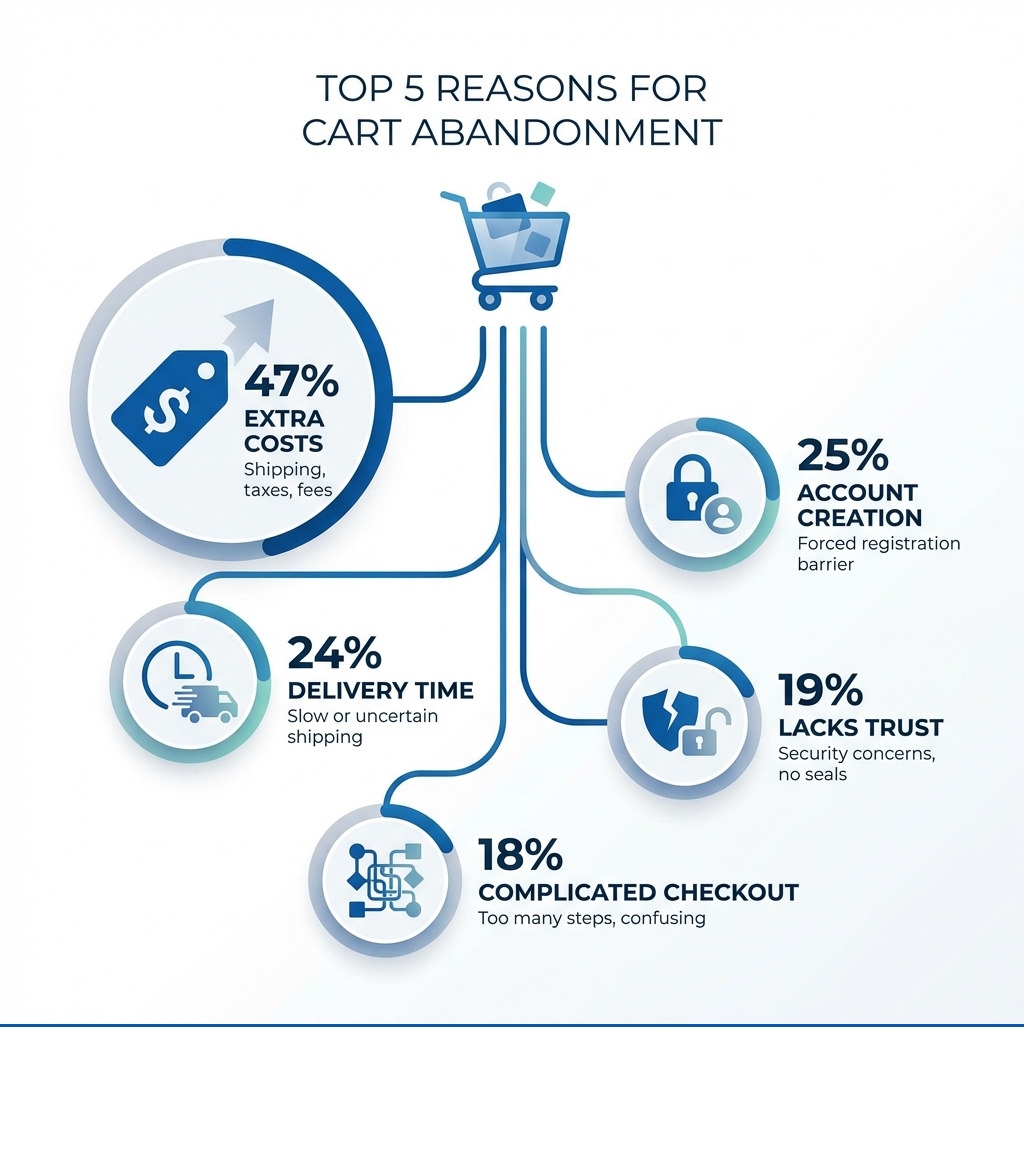
- The most common reasons for cart abandonment are unexpected costs like shipping and taxes (47%), required account creation (25%), and slow delivery times (24%).
- An effective recovery email sequence involves sending messages one hour, 24 hours, and three days after abandonment.
- Prevention methods include offering guest checkout, displaying all costs upfront, and using accelerated checkouts like Shop Pay.
Abandoned cart Shopify recovery is a significant source of revenue for online merchants. When customers add items to their cart but leave without purchasing, you're losing sales. On average, more than 70% of ecommerce carts are abandoned by shoppers, meaning seven out of ten potential customers browse your store without completing their purchase.
The financial impact is substantial. Ecommerce stores collectively lose $260 billion in recoverable sales revenue each year due to cart abandonment. Businesses using cart recovery emails earn back 3.33% of lost sales on average, with some high-performing stores recovering 10% or more.
Why customers abandon their carts:
- 47% cite unexpected costs like shipping and taxes
- 25% leave because they're forced to create an account
- 24% find delivery times too long
- 18% encounter a complicated checkout process
- 19% don't trust the site with their payment information
I'm Steve Pogson, and over two decades of helping Shopify merchants grow their businesses, I've seen how a well-executed abandoned cart Shopify plan can significantly increase revenue. Here at First Pier, we've implemented these systems for brands like Wyman's Blueberries and Hyperlite Mountain Gear, recovering sales that would otherwise be lost.
Quick look at abandoned cart shopify:
Understanding Cart and Checkout Abandonment
When we talk about lost sales in ecommerce, the terms "abandoned cart" and "abandoned checkout" often come up. While many platforms use them interchangeably, there's a crucial difference, especially when you operate on Shopify. Understanding this distinction is key to an effective abandoned cart Shopify recovery plan.
An abandoned cart occurs when a customer adds items to their shopping cart but leaves your site before initiating the checkout process. They've shown interest in your products, but for some reason, they didn't get to the point of entering their contact information.
An abandoned checkout, on the other hand, happens when a customer has started the checkout process—meaning they've typically entered their email address (and often shipping details)—but then they do not complete the purchase. This is where Shopify's native recovery tools primarily focus their efforts. The key difference lies in whether you've captured the customer's email. Without an email, sending a recovery message is much harder.
For merchants, this distinction matters because it impacts your recovery tactics. You can explore more about these dynamics and other recovery approaches in Shopify's insights on stats and strategies for recovering lost sales.
The financial impact of abandonment is a significant challenge for merchants. Studies show that ecommerce stores lose an estimated $260 billion in recoverable sales each year due to shoppers leaving before completing their purchase. This isn't just a small leak; it's a significant drain on potential revenue.
Why Shoppers Abandon Carts
Knowing what an abandoned cart or checkout is just the beginning. To fix the problem, we need to understand why shoppers leave. My experience, supported by industry research, points to several common factors.
One of the most frequent culprits is unexpected costs. If a customer reaches the checkout page only to find additional shipping fees, taxes, or other charges that were not clearly displayed earlier, they are very likely to leave. Research confirms that cost is the main reason for abandonment. This includes not just the product price, but also delivery costs, insurance, and duties.
Another significant barrier is being forced to create an account. Many shoppers prefer a quick guest checkout, especially for a first-time purchase. If your site requires them to sign up, remember a password, and fill out extra fields, you risk losing them. Studies indicate that a quarter of all checkout abandonments occur because a site requires account creation. Given that 13% of people use the same password for every online account, asking them to create a new one can be a real hassle.
A complicated checkout process also drives customers away. If your checkout has too many steps, requires too much information, or is poorly designed, shoppers will get frustrated. The average checkout flow contains almost 12 form elements by default. While this data can be useful, collecting too much information can cause customers to exit. Here at First Pier, we frequently help clients improve their checkout experience by reducing the number of required steps and form fields.
Payment security concerns can also cause hesitation. If your site doesn't look trustworthy, or if security badges are absent, customers might worry about providing their credit card information. This lack of trust accounts for a notable percentage of abandonments.
Finally, slow delivery times are a major turn-off. Customers expect quick shipping. If your estimated delivery window is too long, or not clearly stated, almost a quarter of shoppers will abandon their cart. Conversely, 45% of shoppers head online specifically because they expect free delivery, so any delays or unexpected shipping costs can quickly negate that initial appeal.
Using Shopify's Native Recovery Tools
Shopify provides built-in tools to help merchants recover abandoned checkouts. As an expert, I always advise clients to start here, as these features are integrated directly into the Shopify admin.
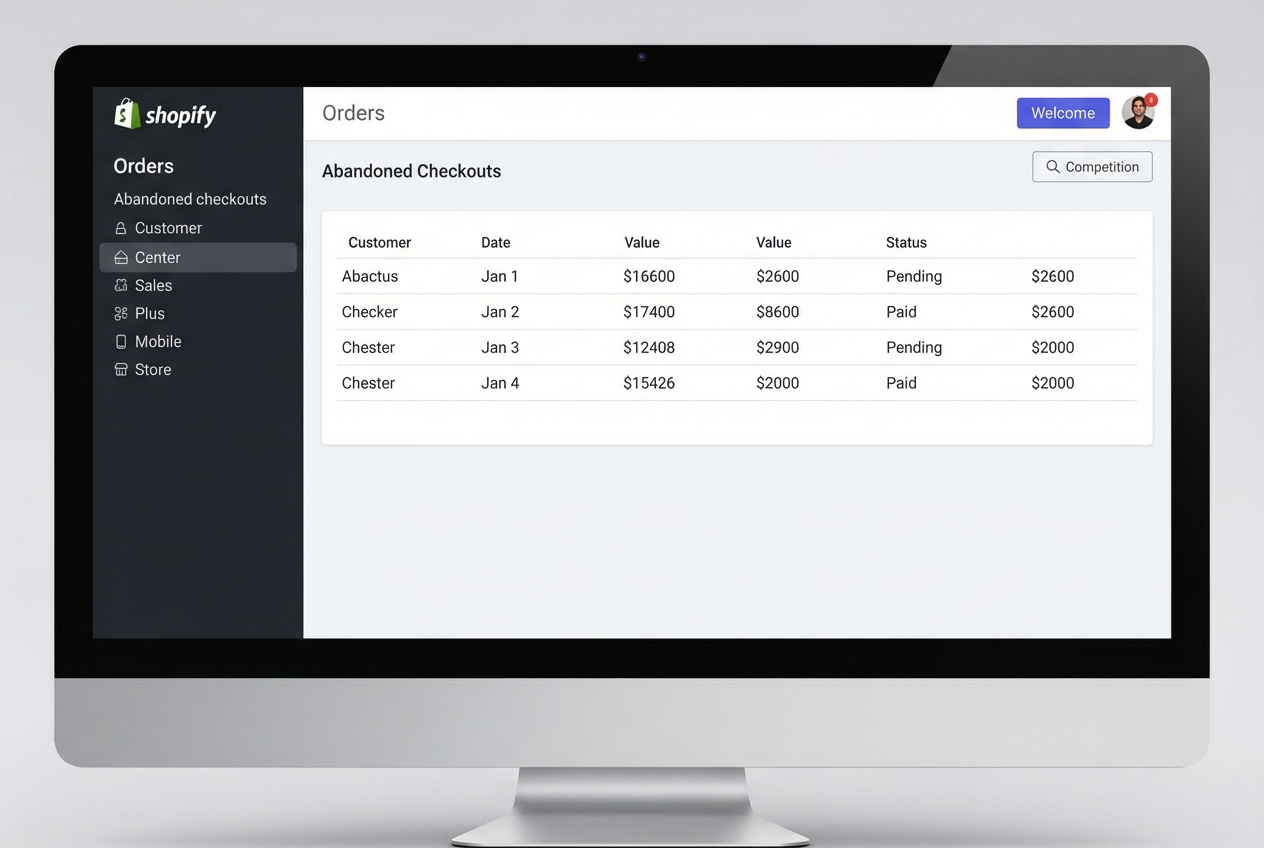
To review and manage abandoned checkouts, you'll start in your Shopify admin. Go to the Orders section, and then select Abandoned checkouts. This view gives you a comprehensive list of all checkouts that were not completed.
Within each abandoned checkout entry, you can review its payment events history. This is useful for troubleshooting failed payments. If a customer reaches out to you about an issue with their payment, reviewing the event details in the timeline can help you identify exactly where the process broke down. You can see error messages from payment gateways, which provides valuable information to assist your customer directly.
It's important to understand how third-party payment gateways can affect this process. If a customer uses a third-party gateway and the payment is captured but the confirmation doesn't properly communicate back to Shopify, it might appear as an abandoned checkout. In such cases, you might need to manually create a draft order within Shopify to finalize the sale and ensure your records are accurate. Shopify's system is primarily designed for its native checkout flow, so third-party integrations sometimes require a little extra attention.
Setting Up Automated Abandoned Checkout Emails
An important built-in feature Shopify offers is its automated abandoned checkout email system. This allows you to automatically send reminders to customers who left items behind, nudging them to complete their purchase.
Shopify has recently improved this feature, transitioning the settings to Shopify Marketing Automations. I strongly recommend opting into the new automation as soon as possible. The older system, found under Settings > Checkout, will eventually be phased out.
The benefits of the new system compared to the older version are clear: it provides more design flexibility and control over when your abandoned checkouts are sent and to whom. You can access these new settings by going to Marketing > Automations in your Shopify admin. If you need assistance setting up these more complex workflows, here at First Pier, we provide dedicated Shopify automation services to ensure you are using these tools effectively.
You can customize the workflow, including setting wait times for when emails are sent after abandonment. For example, you might set the first email to go out one hour after the checkout is abandoned. The new system also allows for greater control over customizing email templates. You can easily add your logo, change the color scheme to match your brand, and edit the text to create on-brand messages that speak directly to your customers.
That there are specific conditions under which Shopify will not send an abandoned checkout email:
- If the customer completes their purchase before the email is scheduled to send.
- If a payment processing error occurred that prevents completion.
- If your shop does not support shipping to the customer's address.
- If the customer provided a phone number instead of an email address at checkout (as these automations are email-based).
- If none of the products in the cart are available, or if all items are free and the shipping page wasn't visited (or shipping is also free).
- If the checkout was abandoned from the Shop app.
Analyzing Your Abandoned Cart Shopify Recovery Efforts
Sending recovery emails is only the first step. To improve performance, you need to measure how effective they are. Shopify provides a dedicated report for this, which shows the results of your recovery campaigns.
The Abandoned Checkouts email report is found in the Marketing section of your Shopify admin. This report provides key data for understanding the impact of your automated emails. It will tell you how many sessions and completed orders have resulted directly from your reminder emails.
Key metrics you'll find in this report include:
- Conversion rate: The percentage of abandoned checkouts that were recovered.
- Total sales recovered: The actual revenue brought back by these emails.
- Average order value: The average value of the recovered orders.
- Average number of products sold: How many items are typically in a recovered order.
- Information on how many of these customers were first-time purchasers.
Beyond the overall report, you can also track the status of individual emails. By navigating to Orders > Abandoned checkouts, you can review the Email status column for each entry, which tells you if a recovery email was sent, opened, or clicked. The Recovery status column indicates whether the abandoned checkout was ultimately converted into a sale.
This data helps you identify what's working and what might need adjustment in your abandoned cart Shopify recovery automations. For more detailed analysis of your store's performance, including abandoned cart metrics, here at First Pier, we offer specialized ecommerce analytics support.
Advanced Recovery and Prevention Strategies
While Shopify's built-in tools are a good place to start, a complete abandoned cart Shopify plan often involves more advanced methods for both recovery and prevention.
One of the most critical aspects of recovery is email timing best practices. Research consistently shows that the sooner you send a reminder, the better your chances of success. The best approach involves a sequence of emails:
- First email: One hour after abandonment. This is a soft, friendly reminder, often the most effective. Studies indicate that a significant portion of conversions from recovery emails happen within this first hour.
- Second email: One day after abandonment. If the first email didn't work, this follow-up can offer more value, perhaps highlighting product benefits or customer reviews.
- Third email: Three days after abandonment. This final email in the sequence can introduce a sense of urgency or offer a small incentive, like free shipping or a discount, to encourage the purchase.

Beyond emails, using multi-channel recovery can greatly improve your efforts. Customers interact with brands across various platforms, so meeting them where they are is smart.
- SMS marketing offers a direct and immediate channel. Texts have high open rates and can be very effective, especially for time-sensitive offers. Many Shopify apps specialize in SMS recovery, sending quick reminders with direct links back to the cart.
- Push notifications, for those customers who have opted in, can also be highly effective. They appear directly on the customer's device, often leading to very high click-through and purchase rates.
Here at First Pier, we frequently help our clients build integrated email and SMS marketing services that work together to increase recovery rates.
How to Prevent Abandoned Carts Before They Happen
The best plan for abandoned carts isn't just about recovery; it's also about prevention. By fixing common problems in your checkout process, you can reduce the number of abandoned carts in the first place.
One of the most effective prevention tools is Shop Pay Installments. Since cost is a primary reason for abandonment, offering flexible payment options can be very effective. Shop Pay Installments allows customers to pay over time with no additional fees, potentially reducing cart abandonment rates by up to 28%. This feature helps to reduce "sticker shock," especially for higher-ticket items.
Implementing one-click checkout with Shop Pay is another effective method. Shop Pay speeds up the checkout process significantly, increasing checkout speed by four times and leading to a much higher conversion rate compared to standard checkouts. The fewer steps a customer has to take, the more likely they are to complete their purchase.
Other important prevention methods include:
- Offering a guest checkout option: Don't force customers to create an account. Provide a clear path for them to purchase as a guest.
- Transparent pricing: Show all costs—product price, shipping, taxes—upfront. No hidden fees at the last step.
- Shipping cost clarity: Be clear about shipping costs and estimated delivery times early in the shopping journey. Improving your Shopify shipping options can directly affect abandonment rates.
- Trust badges and security indicators: Display SSL certificates, payment provider logos, and trust badges prominently to reassure customers about the security of their transaction.
- Clear return policy display: Make your return policy easily accessible and understandable. Knowing they can return an item if it doesn't work out can reduce purchase anxiety.
Understanding Triggers for Abandoned Cart Shopify Automations
The distinction between an abandoned cart and an abandoned checkout becomes particularly relevant when discussing automation triggers. Shopify's native abandoned checkout automation is primarily triggered when a customer starts the checkout process and enters their email address. This means Shopify's system only kicks in once the customer is well into the purchase funnel.
However, platforms like Klaviyo offer more advanced triggers, specifically an 'Added to Cart' event. This allows you to start recovery flows much earlier—as soon as a customer adds an item to their cart, even if they haven't proceeded to checkout or entered their email. While how 'Added to Cart' events work for third-party platforms often requires manual setup for Shopify integrations, it provides much more flexibility.
The effect on recovery timing is significant. This earlier contact can be important for capturing interest when it's highest.
Compared to Shopify's native features, third-party platforms often provide:
- Conditional logic: Allowing you to send different messages based on cart value, product type, or customer segment.
- Advanced design capabilities: More freedom to create visually engaging and branded emails.
- Integrated SMS: Combining email and text messages into a single, cohesive flow.
- Better reporting: More granular data on flow performance and customer behavior.
For merchants looking to set up these more complex integrations and workflows, specialized custom Shopify development can connect Shopify's main features with the advanced options of marketing automation platforms.
Choosing Third-Party Abandoned Cart Apps
While Shopify's built-in tools are a good starting point, many merchants find that third-party apps from the Shopify App Store offer more advanced features, greater customization, and multi-channel options for their abandoned cart Shopify plan. However, choosing the right app requires careful consideration.
When selecting third-party abandoned cart software, I always advise clients to look at several points:
- Integration quality: How well does the app connect with your Shopify store and other tools you use (like your CRM or other marketing platforms)? A good integration means less manual work and more reliable data flow.
- Feature set: Does the app offer everything you need? This might include multi-email sequences, SMS recovery, exit-intent pop-ups, advanced segmentation, or A/B testing options.
- Pricing models: Understand the cost structure—is it subscription-based, usage-based, or a combination? Many apps offer free tiers or trials, which are a great way to test them out before committing.
- Customization options: Can you brand the emails and messages to match your store's look and voice? Generic messages rarely perform as well as personalized, branded ones.
- Reporting capabilities: Does the app provide detailed analytics on open rates, click-through rates, and recovered revenue? Good reporting is necessary for improving your campaigns.
Types of Recovery Apps to Consider
The Shopify App Store offers many types of tools, each with its strengths. Here are some categories of apps that can lift your abandoned cart Shopify plan:
- Advanced Email & SMS Platforms: These are often full-service marketing automation platforms that go beyond simple abandoned cart emails. They allow for complex multi-step email and SMS flows, detailed customer segmentation, and integration with other marketing efforts. Examples often include tools like Omnisend, ActiveCampaign, and Klaviyo, which provide pre-made templates and detailed analytics.
- Exit-Intent Pop-Up Tools: These apps are designed to prevent abandonment before it happens. They detect when a visitor is about to leave your site and trigger a pop-up offering a discount, a free shipping code, or an invitation to sign up for your newsletter. Justuno is a well-known example that uses customer segmentation and exit behavior to show relevant offers.
- AI-Powered Chatbots: Some apps integrate AI to interact with customers who are hesitating or have abandoned their cart. These chatbots can answer questions, offer assistance, or even provide personalized discounts directly within a chat window, often via WhatsApp or site-based chat.
- Wishlist & 'Save for Later' Apps: While not strictly recovery tools, these apps can prevent immediate abandonment by allowing customers to save items they're interested in for future purchase. Apps like Keeper remember items in a customer's cart, making it easy for them to return and complete their purchase later. This can turn a soft abandonment into a future sale.
When exploring these options, always check reviews and consider apps that are "Built for Shopify," as they are typically built for good performance and integration with the platform.
Frequently Asked Questions about Shopify Cart Abandonment
I often get questions from merchants about the nuances of abandoned cart Shopify recovery. Let's address some of the most common ones.
What is the difference between an abandoned cart and an abandoned checkout in Shopify?
This is a fundamental distinction. An abandoned cart refers to a situation where a customer adds products to their cart but leaves your store before even starting the checkout process. They haven't provided any contact information. An abandoned checkout, however, occurs when a customer has proceeded to the checkout page, entered their email address (and sometimes other details), but then leaves before completing the purchase. Shopify's native recovery features are designed specifically for these abandoned checkouts because that's when it captures the customer's email, which allows for automated communication.
When does Shopify not send an abandoned checkout email?
Shopify is smart about when it sends these recovery emails to avoid sending unnecessary or irrelevant messages. Here are the main scenarios where an automated abandoned checkout email will not be sent:
- The customer completes a purchase before the email is scheduled to send.
- A payment error occurred during the checkout process, preventing completion.
- One or more products are out of stock by the time the email is due.
- The customer used a phone number instead of an email address at checkout (as the automation relies on email).
- None of the items in the cart are available, or all items are free and the shipping page wasn't visited (or shipping is also free).
- The checkout was abandoned from the Shop app.
These conditions help ensure that your efforts are focused on recoverable sales.
What is a good abandoned cart recovery rate?
The effectiveness of your abandoned cart Shopify plan can be measured by your recovery rate. While industry benchmarks vary, it's important to have a realistic expectation. On average, businesses using cart recovery emails earn back about 3.33% of lost sales. So, a recovery rate of 3-5% is generally considered a good benchmark.
However, high-performing stores with well-tuned recovery plans can achieve 10% or more. Several factors influence this rate, including:
- Brand loyalty: Stronger brands often see higher recovery rates.
- Offer attractiveness: Whether you include a discount, free shipping, or another incentive.
- Timing and sequence: How quickly and how many emails you send.
- Email content: The quality, personalization, and clarity of your messages.
Testing and adjusting your recovery emails based on your customer base is how you improve your rate over time.
Turn Abandoned Carts into Revenue
Recovering abandoned carts on Shopify is a direct way to increase revenue. By understanding why customers leave, using Shopify's built-in recovery tools, and adding prevention methods like Shop Pay, you can turn potential losses into sales.
We've covered how to use Shopify's native email automation, more advanced methods like SMS recovery, and prevention tactics like offering flexible payments and a simpler checkout. A clear plan is important.
Here at First Pier, we build and improve these systems for Shopify merchants. We know how the platform works and how to connect it with other tools to build a successful ecommerce business. If you want to recover more sales from abandoned carts, contact our team. We can help you put an effective abandoned cart Shopify plan in place for your brand.





.png)
.png)

