



Summary
- Ecommerce analytics is the process of collecting, measuring, and interpreting data from an online store to guide business decisions.
- Key categories include traffic sources, on-site behavior, conversions, customer value, and product performance.
- Analytics supports clearer decisions on marketing spend, product focus, inventory planning, and customer experience.
- The ecommerce analytics market is projected to reach $5.5 billion by 2025.
- Effective use depends on sound tracking setup, regular review, and clear follow-through in operations.
Why Ecommerce Analytics is the Backbone of Online Growth
Ecommerce analytics is the process of collecting, measuring, and interpreting data from your online store so you can make clear, informed decisions. Used well, it turns raw numbers into practical next steps: what to sell, where to spend, and which parts of the customer journey to fix first.
Here at First Pier, we treat analytics as part of the daily work of running an online store, not a side project or a one-time setup. The stores that grow steadily are the ones that know their numbers, trust them, and act on them.
Core Metrics:
- Traffic & Acquisition – Where visitors come from and how they find your store.
- Behavior & Engagement – What customers do on your site and which products they view.
- Conversions & Revenue – Sales, average order value, and cart abandonment rates.
- Customer Value – Lifetime value, acquisition costs, and repeat purchase patterns.
Key Uses:
- Move from guesswork to data-based decisions.
- See which products and customer segments bring in the most profit.
- Cut wasted marketing spend by focusing on channels that create orders.
- Spot issues like stockouts or poor shipping performance before they show up in reviews.
- Plan inventory and staffing based on real demand patterns.
Nearly 90% of users begin their shopping experience with an online search, and 53% of online shoppers are more likely to buy from businesses that tailor their experience based on data.
As Steve Pogson, founder of First Pier and a certified Shopify Expert with over two decades of ecommerce work, I have helped brands like Wyman's Blueberries and Hyperlite Mountain Gear use ecommerce analytics to scale operations and improve conversions.
Here is what ecommerce analytics usually covers in our client work:
- Traffic and search behavior that tells us how people first meet the brand.
- On-site behavior that shows what they care about and where they hesitate.
- Checkout and post-purchase data that shows what it takes to complete an order.
- Long-term patterns that show which customers keep buying and why.
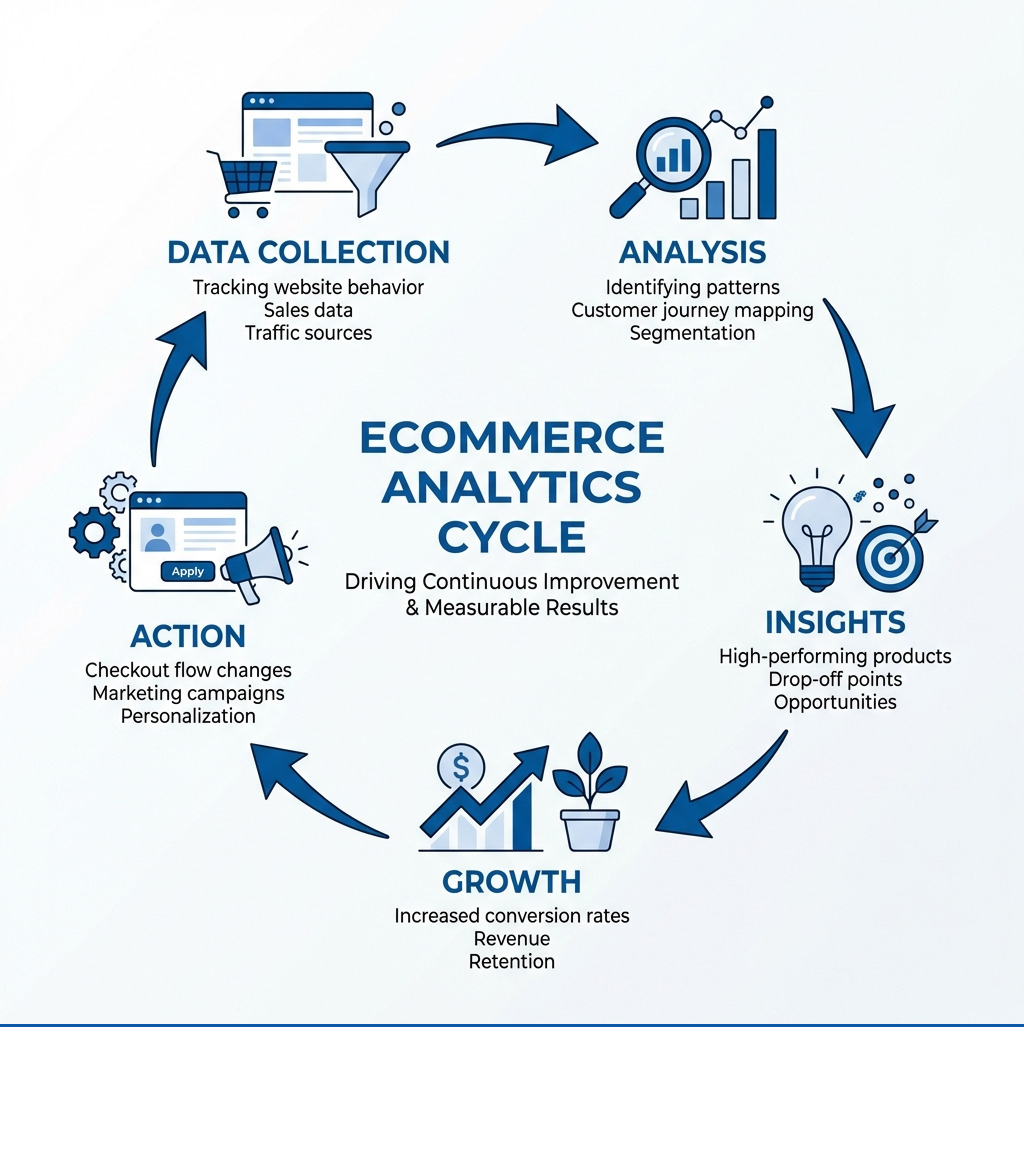
If you treat that system as a loop—data, analysis, action, review—you get a clear story of what is happening in your store and what to fix next.
Related topics in ecommerce analytics:
What is Ecommerce Analytics and Why is it Essential?
Ecommerce analytics is about understanding the story your data tells. It is the process of collecting, analyzing, and interpreting data from your online store so you can see what is working, what is not, and what to do next. For us here at First Pier, that means going past "what happened" into "why it happened" and "what action we should take this week."
The global ecommerce analytics market is projected to reach $5.5 billion by 2025. That growth reflects something we see every day: data is now basic infrastructure for online retail, not a nice-to-have extra. Running an online store without analytics is like driving through fog with the headlights off.
The Main Benefits for Online Businesses
Putting ecommerce analytics to work brings practical benefits that show up in your P&L and in how your team spends time.
Increased SalesAnalytics helps you see which products drive revenue and profit, how different customer groups buy, and where people drop out. For example, a client found that 22% of their homepage revenue came from just 2% of their products. We moved those items higher on the page and pushed them harder in email. Revenue per session went up.
Better Customer ExperienceBy looking at how customers move through your site, you can remove friction and make it easier to buy. This often means basic fixes: clearer size guides, more stock status messaging, or shorter checkout forms.
More Efficient Marketing SpendAnalytics lets you see which campaigns and channels lead to orders and profit, not just clicks. We often see paid search that looks strong on traffic but weak once you match order data and returns. When you tie this together, you can shift budget into campaigns that hold their margin.
Smoother OperationsAnalytics helps track how fast inventory moves, how quickly orders ship, and where refunds spike. We often set up dashboards that flag when an item is selling faster than forecast or when a warehouse is slipping on ship times.
Improved ForecastingPredictive views built on your own history let you plan inventory, staffing, and cash flow. Looking at two or three years of data around key events gives you a solid base to plan stock and ad spend.
Fraud ReductionBy watching patterns in order size, payment method, and past behavior, you can flag orders that carry higher risk. For some clients, we have tied order data, payment flags, and chargeback logs into a single view so the support team can act quickly.
Key Categories of Ecommerce Data
To get a clear picture of store performance, we break ecommerce analytics into main data groups:
Customer and Audience DataDemographics, location, device, and shopping patterns. This helps you see who is actually buying. Salt n Soap saw that 78% of their orders shipped to home addresses and 76% were placed by homemakers. That pointed us toward specific time slots and messaging.
Behavioral DataClick paths, scroll depth, product page engagement, and common exit pages. This is where we look when we want to understand why people stall or leave.
Transactional DataRevenue, average order value, discount use, and acquisition costs. When we segment this by source, we can say with confidence which traffic is worth paying for.
Marketing DataChannel- and campaign-level performance across paid search, social, email, and SEO. We pay close attention to the difference between channel-level performance and specific creative or audience groups.
Product DataViews, add-to-cart rate, purchase rate, returns, and margin by product. Fabuwood used this to see that buyers of certain cabinets often added specific hardware. That led to clearer product bundles.
Customer Support DataContact reason, resolution time, and the link between service tickets and later orders. When we join this with order data, we can see which support touchpoints tend to lead to higher lifetime value.
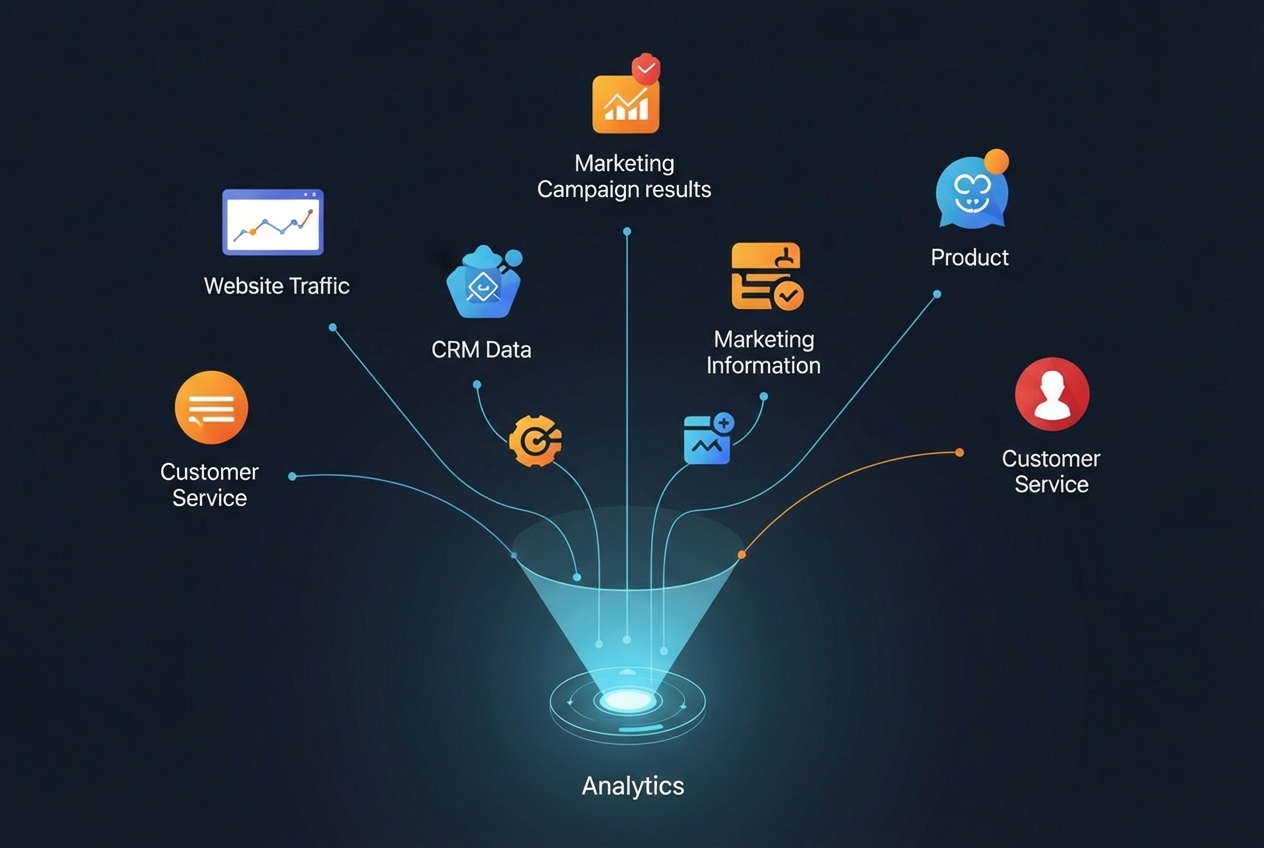
All of these data sets matter, but they do not all matter equally all the time. The real work is picking the few that line up with your current goals and focusing there first.
Key Metrics and KPIs to Track for Growth
Data is only useful if you know what to measure. This section explains the specific numbers that show the health of your online store.
Acquisition and Traffic Metrics
These metrics tell you how people find your store:
- Sessions: Total visits to your website.
- Users: Number of unique individuals who visited.
- Pageviews: Total pages viewed.
- Traffic Sources: Where visitors come from (organic search, social media, paid ads, direct). This helps you decide where to allocate marketing budget.
- Bounce Rate: Percentage of visitors who leave after viewing only one page. High bounce rate can signal issues with content relevance.
- New vs. Returning Users: Helps you understand customer acquisition versus retention.
- Channel Groupings: I look at how conversion rates vary based on different channels. While Google Analytics has default channel groupings, I prefer the Source/Medium breakdown for a more granular view.
On-Site Behavior and Engagement Metrics
Once visitors are on your site, these metrics describe what they do:
- Average Session Duration: How long users spend on your site.
- Pages Per Session: Average number of pages viewed during a single session.
- Product Detail Views: How many times specific product pages are viewed.
- Add to Cart Rate: Percentage of product views that result in an add-to-cart.
- On-Site Search Queries: What customers search for on your site.
- Heatmaps: Visual representations of where users click and scroll.
Conversion and Revenue Metrics
These numbers directly relate to sales and profitability:
- Conversion Rate: Percentage of visits that result in a purchase.
- Average Order Value (AOV): Average amount spent per order.
- Cart Abandonment Rate: Percentage of customers who add items but do not complete purchase. Mixpanel's Cart Analytics helps pinpoint where buyers drop off.
- Revenue Per Visitor (RPV): Total revenue divided by total visitors.
- Checkout Funnel Completion: Tracking progression through each checkout step. The Google Analytics Checkout Behavior Analysis report shows where users drop off.

Customer Loyalty and Value Metrics
These metrics look at long-term customer relationships:
- Customer Lifetime Value (CLV): Total revenue expected from a customer over their entire relationship with your business. CLV helps inform how much you can spend to acquire a new customer.
- Customer Acquisition Cost (CAC): Total cost of acquiring a new customer, including all marketing and sales expenses.
- Repeat Purchase Rate: Percentage of customers who have made more than one purchase.
- Churn Rate: Rate at which customers stop doing business with you.
Applying Analytics to Your Business Strategy
Data is only truly useful when you apply it. This section covers how to use analytics to make real improvements across your business.
Improving Customer Acquisition and Retention
My goal is always to help businesses not just attract customers, but keep them coming back.
- Customer Segmentation: Dividing your customer base into groups based on shared characteristics (demographics, behavior, purchase history). This allows for highly targeted marketing and personalized experiences. Northmill, for example, implemented customer segmentation strategies that led to a 30% boost in conversion rates. Tata CLiQ Luxury used RFM analysis (Recency, Frequency, Monetary value) to segment users into 10 categories, resulting in a 159% revenue boost.
- Personalization: Tailoring the shopping experience based on individual customer preferences and past behavior. 53% of online shoppers are more likely to purchase from businesses that personalize their experiences.
- Cohort Analysis: Grouping customers by a common characteristic (often their acquisition date) and tracking their behavior over time. This helps you understand repeat purchase patterns. Tula found through cohort analysis when their customers naturally make repeat purchases, allowing them to time replenishment emails with extra incentives.
- Retention Strategies: Using analytics to identify why customers leave and what keeps them coming back. This could involve loyalty programs, personalized follow-ups, or addressing common pain points found through data.
Optimizing Marketing Strategies and ROI
Marketing is often a significant investment, and ecommerce analytics ensures that investment pays off.
- Attribution Modeling: Understanding which touchpoints in the customer journey contribute to a conversion. This helps you allocate budget effectively across different channels. Mixpanel’s Multi-touch Attribution feature can help here.
- Campaign Performance Analysis: Measuring the effectiveness of specific marketing campaigns. This includes tracking click-through rates, conversion rates, and the cost of acquiring a customer through each campaign.
- A/B Testing Marketing Copy: Using analytics to test different versions of ad copy, landing pages, or product descriptions to see which performs better.
- Channel Optimization: Identifying your most effective marketing channels and refining your strategy for each. For example, comparing the conversion rates of traffic from social media versus email marketing.
- Creating a Marketing Plan that Grows with Your Business: Start by defining clear goals, tracking relevant metrics, and regularly reviewing performance to make data-driven adjustments.
Improving User Experience and Website Performance
A smooth and enjoyable user experience directly impacts conversions and customer satisfaction.
- Funnel Analysis: Examining user paths through your website, especially the checkout process, to identify drop-off points. My team uses tools like Google Analytics' Funnel reports to visualize these journeys and pinpoint areas for improvement.
- Mobile Optimization: Ensuring your site performs well and is easy to use on mobile devices. Mainline Menswear achieved a 55% higher conversion rate and 243% higher revenue per session after optimizing their mobile experience based on analytics.
- Page Speed Analysis: Monitoring how quickly your pages load. Slow load times are a major cause of abandonment.
- Checkout Process Improvements: Streamlining each step of the checkout process to reduce friction. This can involve reducing the number of fields, offering guest checkout, or providing clear progress indicators.
- Using Analytics to Improve UX Design: Analytics gives us the data to identify UX problems, and good UX design provides the solutions. It's a continuous feedback loop.
Streamlining Operations with Ecommerce Analytics
Beyond marketing and sales, analytics also plays a crucial role in the operational efficiency of your business.
- Inventory Management: Using sales data and demand forecasting to optimize stock levels, minimize stockouts, and reduce overstocking. This ensures you have the right products available at the right time.
- Demand Forecasting: Predicting future customer demand based on historical sales, seasonality, and market trends. This is vital for efficient inventory and supply chain management.
- Product Bundling and Cross-selling Opportunities: Analyzing purchasing patterns to identify products frequently bought together. This information can be used to create compelling bundles or suggest related items.
- Fraud Detection: Monitoring transaction data for suspicious patterns to prevent fraudulent orders. This is a critical aspect of protecting your business and customers.
- The Role of Analytics in Credit Protection: By analyzing transaction data and identifying patterns indicative of fraudulent activity, businesses can effectively implement fraud detection measures such as credit protection services to protect against chargebacks and losses.
Tools, Challenges, and Best Practices
Setting up and running your analytics program requires the right tools, an understanding of potential problems, and a commitment to best practices.
Choosing Your Toolkit: An Overview of Ecommerce Analytics Platforms
The market offers a range of tools, each with its strengths.
- Web Analytics Platforms: Tools like Google Analytics are fundamental. Google Analytics 4 (GA4) offers an improved, privacy-safe measurement solution that helps you get a deeper understanding of user behavior across devices and platforms. It’s free and covers most basic needs.
- Product Analytics Platforms: Tools like Mixpanel and Heap focus on user interactions with your products. Mixpanel, for example, offers Cart Analytics and Funnels to understand visitor decisions and reduce cart abandonment.
- Behavior Analytics Tools: Hotjar provides heatmaps and session recordings to visualize user behavior, helping you see where users click, scroll, and experience friction.
- Business Intelligence (BI) Tools: For larger operations, BI tools integrate data from multiple sources (ecommerce platform, CRM, marketing) into custom dashboards for comprehensive analysis. Glew is an example of a platform that offers deep analysis for LTV and CAC.
- Key Features to Look For: When choosing a tool, consider its ability to track conversion rates, average order value, customer lifetime value, customer acquisition cost, and revenue per visitor. Also, look for features like customer segmentation, funnel analysis, and real-time reporting.
- How to Get Started with a Free Analytics Account: For many businesses, starting with a free tool like Google Analytics is the best first step. You can create a free Analytics account and add the Google tag to your website to begin collecting data.
Common Implementation Challenges
Even with the best tools, implementing ecommerce analytics can present problems.
- Data Quality and Accuracy: Incorrect tracking setup can lead to flawed data, rendering your insights unreliable. I always stress that a proper tracking setup is essential.
- Data Silos: Information often exists in separate systems (ecommerce platform, CRM, email marketing tool), making a unified view difficult. This is why connecting platforms with CRM tools is crucial.
- Lack of Skills: Interpreting complex data requires analytical skills. Businesses might need to invest in training or work with experts.
- Privacy and Compliance: With increasing data privacy regulations, ensuring your data collection practices are compliant is paramount. Matomo, for example, is a privacy-focused web analytics platform.
- Managing Large Data Volumes: As your business grows, the sheer volume of data can become overwhelming without the right infrastructure.
- How to Address Accessibility and Data Compliance in Ecommerce: This involves implementing consent management, anonymizing data where appropriate, and understanding regional regulations.
Best Practices for Effective Analysis
To truly benefit from ecommerce analytics, I recommend these practices:
- Start with Clear Goals: Before you start analyzing data, know what questions you want to answer. Are you trying to reduce cart abandonment? Improve marketing ROI?
- Track the Right Metrics: Focus on the KPIs that directly impact your goals, rather than getting lost in a sea of numbers.
- Ensure Proper Tracking Setup: This is non-negotiable. If your data is inaccurate, your decisions will be too. You can enable debug mode in Google Analytics to see events in real-time and troubleshoot issues.
- Analyze Data Regularly: Set up daily, weekly, and monthly reports to monitor performance and spot trends. Use comparison periods (e.g., year-over-year) to understand seasonality.
- Test and Iterate: Analytics provides insights, but action is what drives results. Use data to inform A/B tests and iteratively improve your website and strategies.
- How to Add the Google Tag to Your Website: This is the first step for many. Google provides clear instructions on how to set up ecommerce events to collect information about user shopping behavior.
Frequently Asked Questions about Ecommerce Analytics
When should a business start using ecommerce analytics?
From day one. Even if you start with basic tracking using free tools like Google Analytics, having data from the beginning is invaluable. You can grow the complexity of your analytics over time, but you cannot retroactively collect data. Getting started early means you build a historical record of your performance, which is essential for future analysis and forecasting.
How is ecommerce analytics different from general web analytics?
While there's overlap, ecommerce analytics focuses specifically on commercial actions and outcomes. General web analytics often looks at traffic, page views, and user engagement. Ecommerce analytics goes further by:
- Tracking Revenue and Transactions: Directly measuring sales, average order value, and profit.
- Including Product-Level Data: Analyzing individual product performance (views, add-to-carts, purchases, returns).
- Connecting to Inventory and Customer Value: Linking sales data to stock levels and understanding customer lifetime value.
- Analyzing Conversion Funnels: Specifically focusing on paths to purchase, from product finding to checkout completion.
Can I do ecommerce analytics without expensive tools?
Absolutely. For many small and medium-sized businesses, starting with free or built-in tools is perfectly sufficient.
- Free Tools: Google Analytics is a powerful, free platform that covers a wide range of ecommerce needs.
- Platform-Native Analytics: Most ecommerce platforms like Shopify offer their own analytics dashboards that provide essential sales and customer data.
- Scale as You Grow: As your business grows and your needs become more complex, you can then consider investing in more specialized tools. The key is to start somewhere and build your analytical capabilities iteratively.
Putting Your Data to Work
To sum up, ecommerce analytics is not just about collecting numbers; it is about turning those numbers into a clear path for growth. It is an ongoing process, a continuous cycle of data collection, analysis, insight generation, and action. The businesses that thrive online are those that consistently use data to understand their customers, refine their strategies, and improve their operations.
Here at First Pier, we help businesses like yours turn data into a clear path for growth. We understand the challenges of the online marketplace and work to provide insights you can act on. If you are ready to stop guessing and start growing with data-backed decisions, I encourage you to learn more about our ecommerce data analytics solutions and how we can help you improve customer retention and loyalty.





.png)
.png)

