



Summary
Summary
- Facebook ads give Shopify stores access to a large audience on Facebook and Instagram with detailed targeting options.
- A reliable setup requires the Facebook and Instagram app, the Meta Pixel with Conversions API, and a synced product catalog.
- Campaigns work best when split into separate prospecting and retargeting efforts with clear objectives.
- Effective ads use clear images or video, direct calls-to-action, and ongoing A/B testing of copy and creative.
- Performance is usually reviewed with metrics such as ROAS, CPA, CTR, and conversion rate, then budgets are adjusted based on results.
Why Facebook Ads Are a Vital Sales Channel for Shopify Stores
For facebook ads for shopify store owners, Facebook ads are a primary tool for reaching new customers and driving consistent revenue growth. With over three billion active users across Meta's platforms, Facebook and Instagram provide direct access to your target audience through precise targeting based on demographics, interests, and behaviors.
Quick Answer: Getting Started with Facebook Ads for Your Shopify Store
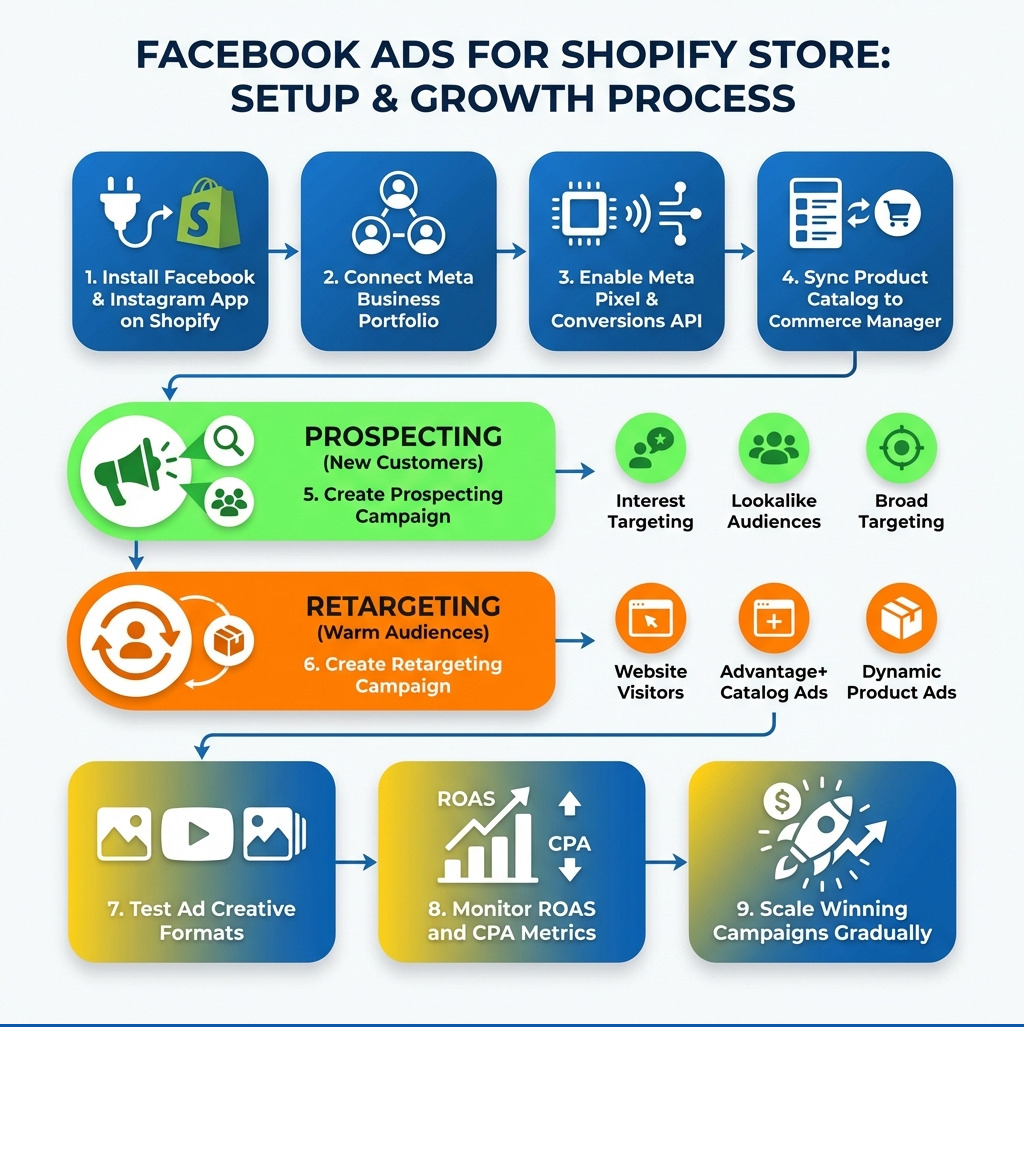
- Install the Facebook and Instagram by Meta app from the Shopify App Store to connect your store
- Set up the Meta Pixel on your store to track conversions and enable retargeting
- Sync your product catalog to Commerce Manager for dynamic ads
- Create two campaign types: Prospecting campaigns to find new customers and retargeting campaigns to convert interested visitors
- Start with a modest daily budget (10-30% of revenue is a common recommendation) and scale based on performance
- Test different ad formats including single image, video, carousel, and collection ads
- Monitor key metrics like ROAS (Return on Ad Spend), CPA (Cost Per Acquisition), and conversion rate
The challenge isn't whether Facebook ads work for e-commerce—it's building a strategic, data-driven approach that turns ad spend into profitable growth. Many store owners struggle with the complexity of Meta's advertising platform, unclear targeting, poor creative performance, or campaigns that burn through budget without delivering results.
I'm Steve Pogson, founder of First Pier, and I've spent over two decades helping Shopify stores build profitable advertising strategies, including comprehensive facebook ads for shopify store campaigns that drive measurable growth. Here at First Pier, we've seen how the right approach to Facebook advertising can significantly change a store's performance when paired with proper technical setup and ongoing optimization.
The Foundation: Integrating Shopify with Meta
Before I can even think about launching a single ad, I need to lay a solid foundation by connecting my Shopify store to Meta's ecosystem. This integration is crucial because it allows me to sync my products, track customer behavior, and manage my advertising efforts efficiently. The first step involves installing the official Facebook and Instagram by Meta app from the Shopify App Store. This app is the bridge that links my Shopify product catalog to Facebook, enabling me to create marketing activities directly for my products.
To get started, my Shopify store needs to be on a paid plan (Basic Shopify or higher) and not password protected. I also need a Facebook Page for my business and a Meta business portfolio that owns that Facebook Page, along with admin permissions for the business portfolio. Once these prerequisites are met, I install the app, click "Add sales channel," and follow the prompts to log in with Facebook and accept the terms. This process allows me to sync my products to a catalog in Commerce Manager, which is Meta's hub for managing product feeds and sales. This product catalog is essential for running dynamic ads, which I'll discuss later.
The Meta Pixel: Your Data Powerhouse
The Meta pixel is, without a doubt, one of the most critical components of any successful facebook ads for shopify store strategy. I think of it as my store's digital Sherlock Holmes, constantly observing and reporting back on what visitors are doing on my website. It's an analytics tool that helps me measure how effective my Facebook ad campaigns are by monitoring the actions people take on my website.
Once installed, the Meta Pixel tracks standard events like ViewContent (when someone views a product page), AddToCart (when they add an item to their cart), and Purchase (when a sale is completed). This data is invaluable for several reasons:
- Conversion Tracking: It tells me exactly which ads are leading to sales, allowing me to attribute revenue directly to my advertising efforts.
- Optimization: Facebook's algorithm uses pixel data to find more people who are likely to convert, making my campaigns more efficient over time.
- Retargeting: This is a key benefit of the pixel. It allows me to show ads specifically to people who have already interacted with my Shopify store, such as visitors who viewed a product but didn't buy, or those who abandoned their cart.
In addition to the Meta Pixel, the Conversions API works in conjunction to provide more reliable data sharing, especially in a privacy-focused landscape. To ensure I'm getting the most accurate data, I always make sure my data sharing settings on Shopify are set to "Improved" or "Maximum." This robust data flow is essential for the pixel to do its job effectively.
Structuring Your Campaigns: Prospecting vs. Retargeting
Once the technical setup is complete, my next step is to structure my campaigns within Meta's Ads Manager. This is the central control panel for all my Facebook advertising efforts. A common mistake I see is merchants treating all their ads the same way. However, a strategic approach involves creating campaigns with distinct objectives. My best practice is to always have two primary campaign types running: one for prospecting and one for retargeting.
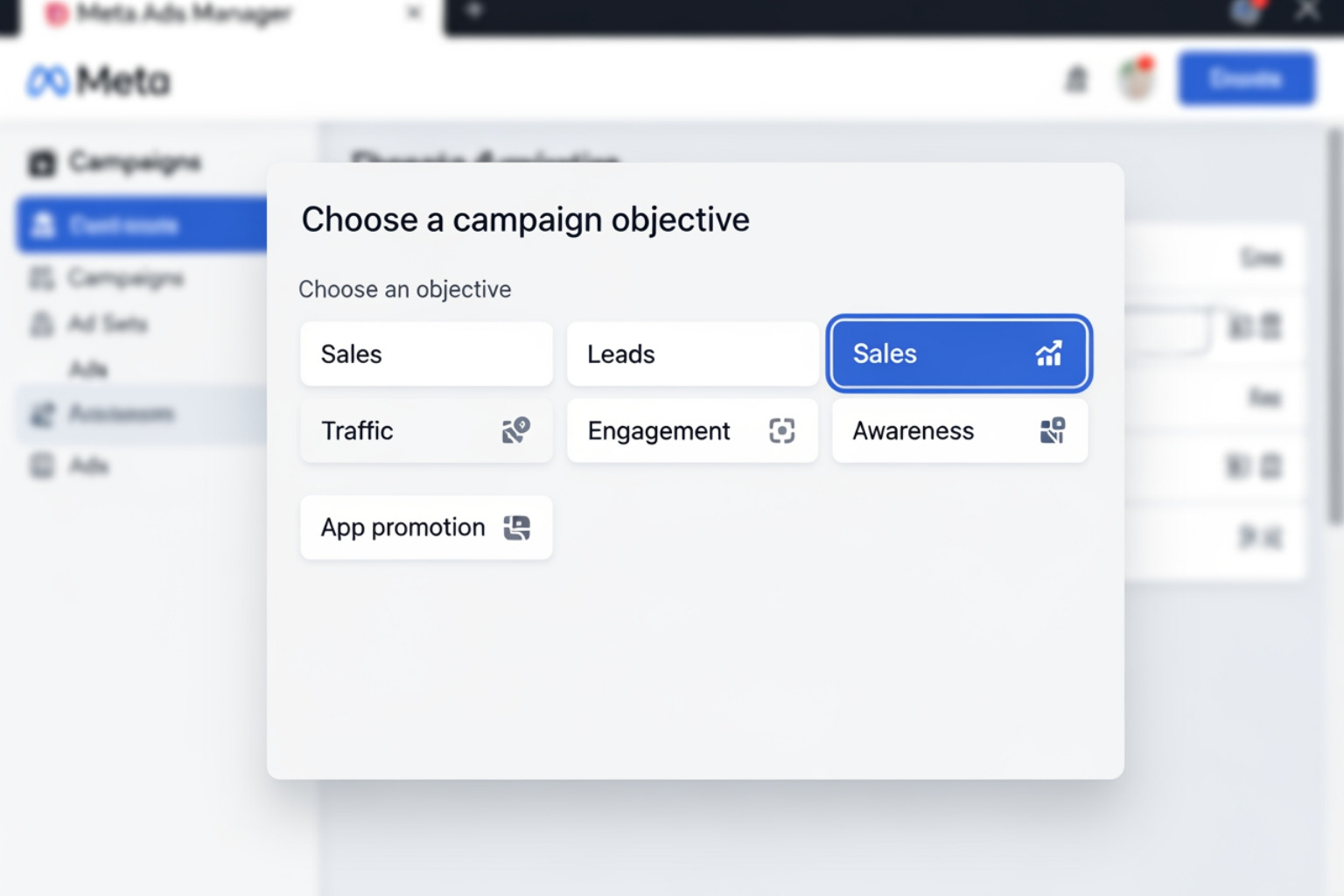
When I create a new campaign, the first thing I do is choose a campaign objective. Meta offers several options, such as Sales, Leads, Engagement, App promotion, Traffic, and Awareness. My choice here tells Facebook what my primary goal is, and its algorithm will then work to achieve that.
Prospecting Campaigns: Finding New Customers
The goal of my prospecting campaigns is simple: find new potential customers who have never interacted with my Shopify store before. I'm essentially casting a wide net to introduce my brand and products to a cold audience.
To effectively target these cold audiences, I use several methods:
- Interest Targeting: This involves targeting users based on their expressed interests on Facebook. For example, if I sell pet supplies, I might target users interested in "dogs," "cats," "pet care," or specific pet breeds. Facebook's detailed user data allows me to get quite granular here.
- Behavior Targeting: I can also target users based on their online behaviors, such as "engaged shoppers" or those who have shown an interest in certain types of products or activities.
- Lookalike Audiences: This is an effective tool. I create a lookalike audience by uploading a list of my existing customers or website visitors (a custom audience, which I'll explain next). Facebook then finds new users who share similar characteristics with those high-value individuals. A 1% lookalike audience is typically the most similar to my source audience and is often highly effective for prospecting.
When I create prospecting campaigns for my Shopify store, I focus on objectives like "Traffic" (to get more eyes on my products) or "Sales" (if my product has a broad appeal and a clear value proposition). The ad creatives I use here are often introductory, highlighting my brand's unique selling points and showcasing popular products.
Retargeting Campaigns: Re-engaging Warm Audiences
My retargeting campaigns have a different, but equally important, goal: convert people who have already shown interest in my Shopify store but haven't yet purchased. These are my "warm audiences"—individuals who have visited my website, added items to their cart, or even previously purchased from me. They know my brand, so my message to them can be more direct and conversion-focused.
I segment my retargeting audiences based on their engagement level:
- Website Visitors: Anyone who has visited my Shopify store within a specific timeframe (e.g., the last 30, 60, or 90 days).
- Cart Abandoners: Crucially, people who added products to their cart but didn't complete the purchase. This is a high-intent audience.
- Past Purchasers: I can target these customers with ads for complementary products or special offers to encourage repeat business.
For retargeting, I heavily rely on Advantage+ Catalog ads, also known as Dynamic Product Ads. These ads automatically show users the exact products they viewed on my Shopify store, or similar items, complete with pricing and direct links. It's a highly personalized and effective way to remind them about what they left behind. I often include a small discount or free shipping offer for cart abandoners to give them that final nudge.
The key difference between prospecting and retargeting campaigns for my Shopify store is the audience temperature and the campaign objective. Prospecting targets cold audiences with the aim of initial engagement or first purchase, while retargeting targets warm audiences with the aim of completing a purchase, often by reminding them of specific products they've viewed.
Reaching the Right People: Audience and Ad Creative
Effective advertising is a two-pronged approach: identifying the right audience and presenting them with compelling ad creative. Even the most perfectly targeted ad will fall flat with poor visuals or confusing copy. This is where my experience in e-commerce data analytics solutions comes into play, helping me understand who my customers are and what messages resonate with them.
Effective Audience Targeting for facebook ads for shopify store
Beyond the basics of interests and behaviors, I use a variety of advanced targeting options to ensure my facebook ads for shopify store reach the most relevant people:
- Core Audiences: These are defined by demographics (age, gender, location), interests (hobbies, pages liked), and behaviors (purchase history, device usage). I start here for broad prospecting.
- Custom audiences: These are built from my own data sources. I can create custom audiences from:
- Website Traffic: People who visited specific pages, spent a certain amount of time on my site, or performed specific actions (like viewing a product or adding to cart).
- Customer lists: I can upload my email lists or phone numbers of existing customers. Facebook matches this data to its users, allowing me to target my existing customer base or exclude them from prospecting campaigns.
- Engagement: People who have engaged with my Facebook Page, Instagram profile, or video content.
- Advantage+ Audience: This uses Meta's AI to find new audiences based on parameters I provide and past interactions. It's a great way to let Meta's algorithms find potential customers that I might have overlooked.
My goal is to constantly refine my audiences. I often start broad and then narrow down as I gather data on what works. This iterative process allows me to effectively target audiences for my Shopify products, ensuring my ad spend is as efficient as possible.
Best Practices for facebook ads for shopify store Creatives
Ad creatives are where my brand's personality is expressed. Compelling visuals and persuasive copy are crucial for stopping the scroll and encouraging action. Here are some best practices I follow:
- High-Quality Visuals: Whether it's an image or a video, clarity and professional presentation are non-negotiable. Images should be at least 1080 x 1080 pixels and videos should be engaging from the first few seconds. I make sure to adhere to Facebook’s required dimensions for each ad format.
- User-Generated Content (UGC): Authentic content from real customers often outperforms polished studio shots. It builds trust and social proof.
- Strong Call-to-Action (CTA): Every ad needs a clear instruction. Buttons like "Shop Now," "Learn More," or "Get Offer" guide the user to the next step.
- A/B Testing: I never assume I know what will work best. I regularly test different headlines, ad copy, images, videos, and CTAs to see which combinations resonate most with my target audience. Facebook's ad platform offers A/B testing directly on its dashboard, making it easy to compare variables.
- Ad Copy: My copy is concise, highlights benefits over features, and addresses potential customer pain points. I often test different opening hooks and emotional appeals.
- Show Products in Use: Images or videos of people enjoying my products help potential customers visualize themselves using them. This makes the product more relatable and desirable.
Meta offers several ad formats, and I experiment with these to see what performs best for different products and audiences:
- Image Ads: Simple, direct, and effective for showcasing a single product or message.
- Video Ads: Excellent for storytelling, showing product features, or creating emotional connections. Video ads can capture attention quickly.
- Carousel Ads: These allow me to display up to 10 images or videos in a single ad, each with its own link. I use them to showcase multiple products, different angles of one product, or a step-by-step process.
- Collection Ads: This format includes a cover image or video with multiple products displayed beneath it, making it easier for people to browse and buy directly from the ad.
When I'm stuck for creative ideas, I turn to the Meta Ad Library. It's a comprehensive collection of ads currently running on Facebook, Instagram, and Messenger. I can search by brand name to see what my competitors are doing, or by keywords to find inspiration.
Budget, Measurement, and a Profitable facebook ads for shopify store Strategy
Running facebook ads for shopify store isn't just about setting up campaigns; it's about smart budgeting, diligent measurement, and continuous optimization. Without a clear strategy for these, even the best creatives and targeting can lead to wasted ad spend.
How to Budget and Manage Ad Spend
Budgeting for Facebook ads requires a thoughtful approach. I advise clients to consider their business finances, product cost, and campaign objectives.
- Daily vs. Lifetime Budgets: I typically start with daily budgets, as they offer more flexibility and control. Lifetime budgets are useful for campaigns with fixed end dates, like seasonal promotions.
- Starting Budget Recommendations: Experts like Ezra Firestone, founder of Smart Marketer, recommend investing between 10% and 30% of a store's revenue back into Facebook advertising. This means if my store generates $1,000, I might allocate $100-$300 to ads. Facebook allows for budgets as low as one dollar, but I ensure I allocate enough to give my ads a fair shot.
- Meta Advantage campaign budget: This feature allows Meta to automatically manage and distribute my campaign budget across my ad sets, directing funds to those with the best opportunities. It's a good option for those starting out or looking to simplify budget management.
- The Learning Phase: When I launch new ads or make significant changes, Facebook's algorithm enters a "Learning Phase." This is a period when it explores the best way to deliver my ads. It's crucial to give the algorithm enough time and budget during this phase (ideally waiting until an ad gets at least 1,000 impressions) before making major decisions. Patience here pays off.
- Scaling Budgets: I scale budgets gradually. Sudden, large increases can push campaigns out of the learning phase and disrupt performance. Small, consistent increases allow the algorithm to adapt.
Measuring Campaign Performance
Measuring success is non-negotiable. I constantly monitor my campaigns using Ads Manager reports to understand what's working and what's not. Here are the key metrics I focus on:
- Return on Ad Spend (ROAS): This tells me how much revenue I generate for every dollar spent on ads. For example, a ROAS of 3 means I earn $3 for every $1 spent. My goal is always to achieve a positive and profitable ROAS.
- Cost Per Acquisition (CPA): This is the cost to acquire one customer. I compare this to my average customer lifetime value to ensure profitability.
- Click-Through Rate (CTR): The percentage of people who see my ad and click on it. A higher CTR often indicates a more engaging ad creative or a highly relevant audience.
- Conversion Rate: The percentage of website visitors who complete a desired action, like a purchase.
Ads Manager provides detailed reporting, allowing me to break down data by day, time, action, or delivery format. I also use A/B testing on copy, art, or audiences to pinpoint what drives the best results.
Here's a quick comparison of key metrics I look at for prospecting versus retargeting campaigns:
| Metric | Prospecting Campaigns | Retargeting Campaigns |
|---|---|---|
| Primary Goal | Reach new audiences, generate brand awareness, drive initial traffic | Convert interested visitors, recover abandoned carts, drive repeat purchases |
| Expected ROAS | Often lower initially, as it's about acquiring new customers (may break even or be slightly negative in the short term for long-term customer value) | Generally higher, as these audiences are already familiar and have shown intent |
| Expected CPA | Higher, as I'm paying to introduce my brand to a cold audience | Lower, as these audiences are closer to purchasing |
| Target CTR | Moderate (aim for engagement from new eyes) | Higher (ads are highly relevant to previous actions) |
| Conversion Rate | Lower (cold audience needs more convincing) | Higher (warm audience is ready to buy) |
Frequently Asked Questions about Facebook Ads for Shopify
What is a good starting budget for Facebook ads for a Shopify store?
I recommend starting with a budget that allows for meaningful testing and for Facebook's Learning Phase to complete. While Facebook allows very low daily budgets, a more realistic starting point might be around $10-$20 per day per ad set, especially for smaller stores. As mentioned earlier, a common recommendation from experts is to invest between 10% and 30% of your store's revenue into Facebook advertising. This provides a good benchmark for scaling. The most important thing is consistent spending over time to allow the algorithm to optimize.
How long does it take to see results from Facebook ads?
It's tempting to expect instant results, but I always advise patience. While some campaigns might show immediate promise, Facebook's algorithm needs time to learn and optimize. I typically recommend running ads for at least two weeks before making significant changes, allowing the Learning Phase to complete and for the algorithm to gather enough data (ideally at least 1,000 impressions per ad). Initial results might be slower, but performance often improves as the system gathers more data.
Should I use the "Boost Post" button or create campaigns in Ads Manager?
For serious facebook ads for shopify store efforts, I strongly advocate for using Meta's Ads Manager. While the "Boost Post" button can be tempting for its simplicity, it offers limited targeting and optimization options. Ads Manager provides granular control over objectives, audience targeting (including custom and lookalike audiences), ad formats, placements, and bidding strategies. This level of control is essential for driving measurable sales and optimizing your ad spend effectively. I use "Boost Post" only for very specific, simple objectives like increasing engagement on a particular organic post, but never for direct sales campaigns.
What are common mistakes to avoid when running Facebook ads for Shopify?
In my experience, here are some common pitfalls I see merchants encounter:
- Skipping the Meta Pixel Setup: Not having the pixel properly installed or configured means I'm flying blind, unable to track conversions or effectively retarget.
- Lack of Clear Objectives: Launching campaigns without a specific goal (e.g., "Sales," "Traffic") leads to unfocused efforts and wasted budget.
- Poor Audience Targeting: Not segmenting audiences correctly (e.g., showing prospecting ads to warm audiences or vice versa) results in irrelevant ads and low conversion rates.
- Bad Ad Creatives: Low-quality images, unclear messaging, or a missing call-to-action will cause ads to perform poorly, regardless of targeting.
- Not A/B Testing: Assuming what works is a recipe for mediocrity. I always test different elements of my ads to find winning combinations.
- Impatience with the Learning Phase: Making frequent, drastic changes to campaigns too early prevents Facebook's algorithm from optimizing, leading to inconsistent results.
- Ignoring Ad Fatigue: Showing the same ad to the same audience too many times can lead to declining performance and negative feedback. I revisit ad visuals and copy after launch to prevent audience burnout.
- No Retargeting Strategy: Neglecting to re-engage visitors who showed interest but didn't purchase leaves significant money on the table.
How can I use Facebook ads to drive traffic and sales to my Shopify store?
I use facebook ads for shopify store to drive traffic and sales by creating a comprehensive ad funnel:
- Awareness/Traffic (Prospecting): I use broad interest-based, behavior-based, and lookalike audiences with ads that introduce my brand and products, focusing on driving traffic to my Shopify store. My objective here is to get new eyes on my offerings.
- Consideration (Prospecting/Retargeting): For those who engage with my ads or visit my site but don't buy, I run campaigns focused on nurturing interest. This might involve video ads showcasing product benefits, or carousel ads highlighting different product features, using engagement custom audiences.
- Conversion (Retargeting): This is where I push for the sale. I target cart abandoners, recent website visitors, and past purchasers with specific product ads, often using Advantage+ Catalog ads. I might offer a small incentive to overcome any last-minute hesitation.
This funnel approach ensures I'm addressing customers at different stages of their buying journey, from initial finding to final purchase.
Conclusion
Mastering facebook ads for shopify store requires continuous learning and adaptation. From the initial technical integration of your Shopify store with Meta's platforms, to the strategic setup of prospecting and retargeting campaigns and the careful creation of ad creatives, every step is important. My approach is always to be data-driven, constantly testing, measuring, and refining to ensure every dollar spent works as hard as possible for my clients.
Here at First Pier, we believe that successful e-commerce is built on strong foundations and smart, iterative marketing. If you're looking to improve your facebook ads for shopify store strategy or need expert guidance to manage the complexities of paid social, I invite you to explore more info about our paid social services. We're here in Portland, Maine, ready to help your brand build a high-performance online business.





.png)
.png)

