




Why Moving to Shopify Could Be Your Best Business Decision
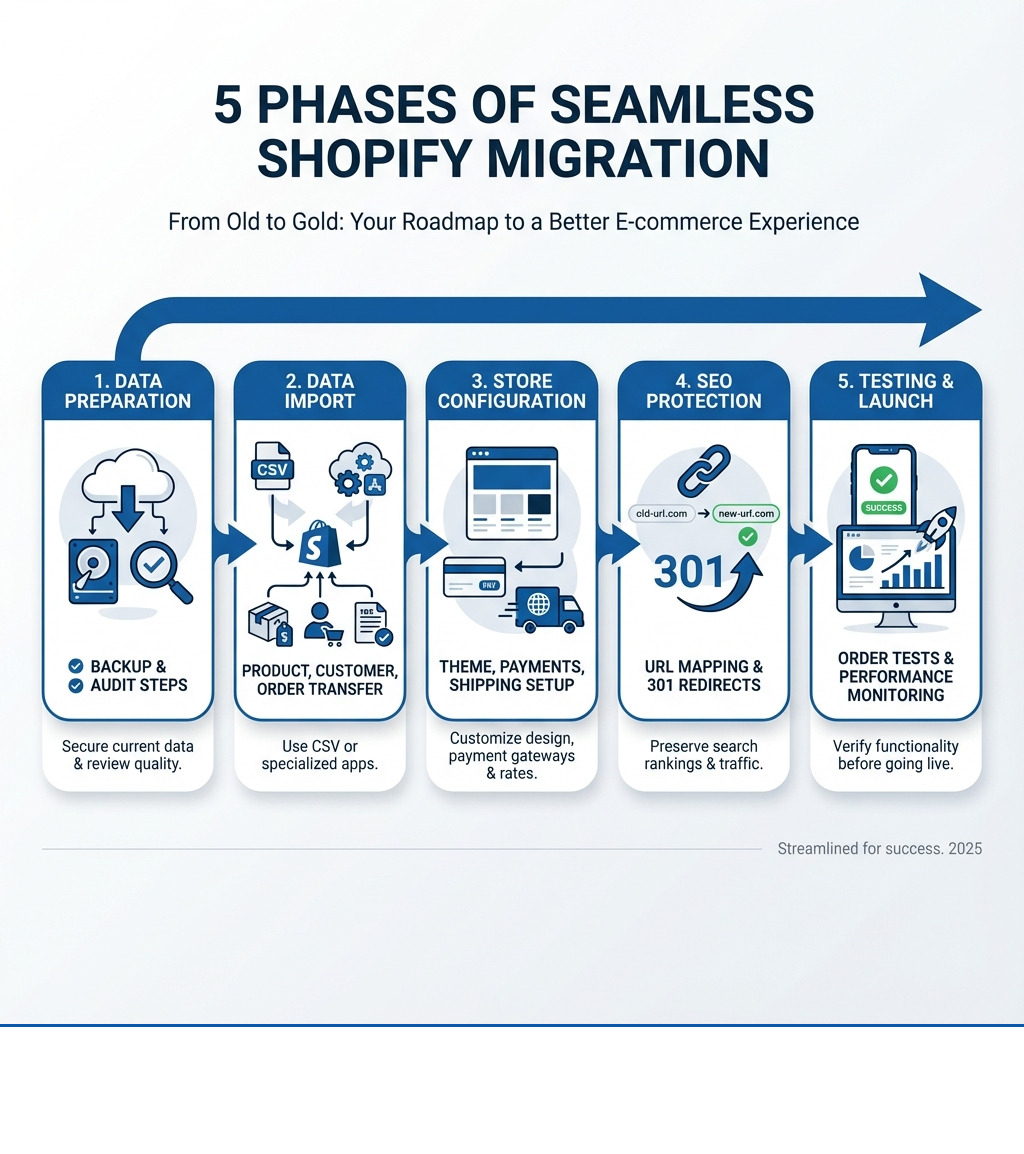
How to migrate from another platform to shopify involves three core phases: preparing your data, importing it to Shopify, and testing before launch. Here's the process at a glance:
- Prepare Your Data - Back up your current store, audit your product catalog, and clean up customer data
- Import to Shopify - Use CSV files, migration apps, or hire an expert to transfer products, customers, and orders
- Configure Your Store - Set up themes, payment providers, shipping rates, and taxes
- Protect Your SEO - Map old URLs to new ones and create 301 redirects for all important pages
- Test and Launch - Place test orders, check all functionality, and monitor performance after going live
A successful migration takes anywhere from a few hours for small stores to several weeks for complex businesses with thousands of products and deep integrations. The key is planning carefully to avoid data loss, broken URLs, and traffic drops.
Many businesses are making the switch. A recent survey found that 76% of B2B sellers and 27% of retailers plan to change platforms within the year. The reasons are clear: outdated systems that crash during traffic spikes, expensive maintenance costs, and the need for modern features like AI tools and mobile-first design.
But here's the truth: 43% of companies experience disruptions or data loss during migration. That's why having a clear roadmap matters. When done right, businesses see dramatic improvements. One fashion brand increased sales by 40% and organic traffic by 22% after migrating to Shopify.
In this guide, I'll walk you through everything you need to know to make your migration smooth and profitable.
Why Businesses are Moving to Shopify
E-commerce is booming, with sales projected to grow from $5.8 trillion in 2023 to $8 trillion by 2027. This rapid growth means businesses need platforms that can keep up. Many brands find their existing platforms can't handle the pace, leading them to look for more robust solutions. Shopify has become a top choice for these businesses, and for good reason.
Better Performance and Scalability
Imagine your store crashing during a busy holiday sale. That's a nightmare scenario that outdated platforms can make a reality. Many older systems struggle when stores grow to thousands of products or experience high traffic spikes. This leads to frustrating customer experiences and lost sales. A Google study found that an impressive 53% of mobile visits are abandoned if a page takes longer than three seconds to load. Shopify's robust infrastructure is built to handle growth and high traffic, offering 99.98% uptime. This means your store stays online and performs well, even during peak shopping times, giving your customers the smooth experience they expect.
Lower Total Cost of Ownership (TCO)
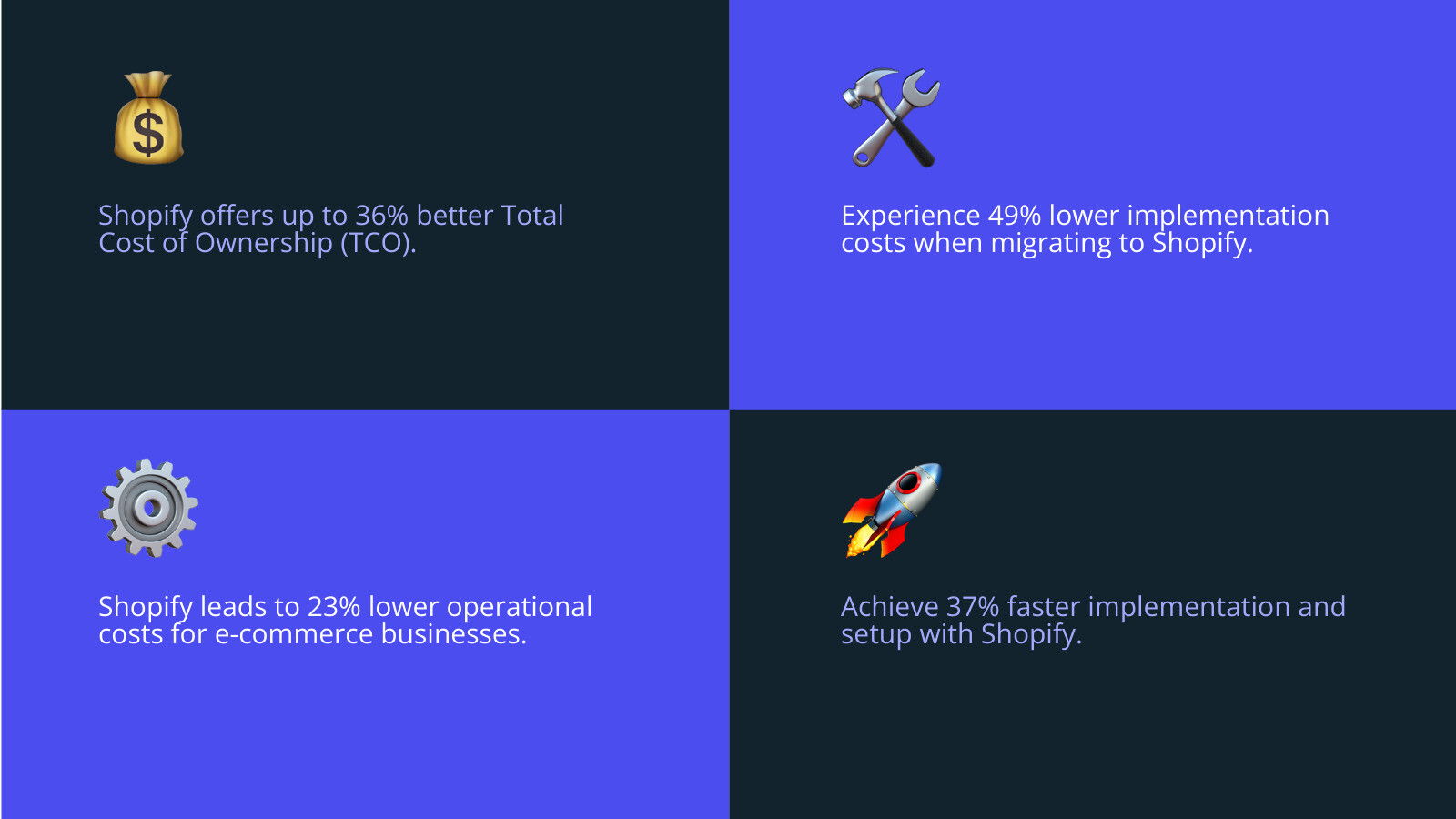
The cost of running an e-commerce store goes beyond just platform fees. It includes implementation, operational costs, and ongoing support. Research shows that Shopify has the best total cost of ownership (TCO) compared to other major platforms in North America. Competitors' implementation and setup costs are, on average, 49% higher than Shopify's. Their operational and support costs are about 23% higher, and platform costs can be 30% more expensive. What's more, getting a new storefront up and running is often 37% faster with Shopify. This means not only do you save money in the long run, but you also get to market faster. If you're looking to save on these aspects, you can find more information about my Shopify setup services.
Access to a Modern App Ecosystem
The digital landscape changes quickly, with new technologies like AI constantly emerging. A modern platform needs to support these innovations. Shopify offers a vast App Store with thousands of applications that can extend your store's functionality without requiring complex development. From AI tools like Shopify Magic and Sidekick for advanced text and image generation to marketing automation and customer service apps, this ecosystem allows you to build a best-in-class tech stack. This is especially important as 43% of private companies now say that increasing AI use is a top business priority. Shopify's constant innovation, with over 150 new features announced across AI, B2B, and international selling, ensures you always have access to cutting-edge tools.
Planning Your Shopify Migration: A 4-Step Prep Guide
Migrating your online store can feel like moving to a new house—a big undertaking, but incredibly rewarding when done right. Just like you wouldn't move without a plan, a successful Shopify migration requires careful preparation.

Step 1: Decide What Data to Move
Before you even think about packing, you need to know what you're taking with you. This is a chance to declutter and only bring over what's essential and valuable. Here’s a list of data types you can migrate to Shopify:
- Products: This includes names, descriptions, images, prices, variants, SKUs, and stock levels.
- Customers: Names, contact details, addresses, and order history.
- Historical Orders: Important for customer history and analytics.
- Gift Cards, Certificates, and Store Credits: Crucial for customer retention.
- Blog Posts: Your valuable content that drives traffic and engagement.
- Pages: Essential static content like your "About Us," "Contact," or "Shipping Policy" pages.
- Product Reviews: This social proof is incredibly valuable. Studies show that a product with just five reviews is 270% more likely to be purchased than one with none.
- Loyalty Data: Your customers' hard-earned points balances and VIP tiers. Losing this is a betrayal of trust and can significantly impact retention.
Step 2: Prepare Your Data for the Move
This is where you clean house. Before migrating, audit your existing data. I recommend creating a complete inventory of what needs to be moved. Why? Because 43% of companies experience disruptions or data loss during migration, and I don't want that to be you.
This preparation involves:
- Data Cleanup: Remove old, irrelevant, or duplicate information.
- Product Catalog Review: Standardize product data, naming conventions, and retire outdated SKUs. Ensure all product descriptions, variants, and images are accurate and consistent.
- Customer Data Audit: Clean your customer data by removing old or invalid emails, merging duplicates, and fixing inconsistent formatting. This will improve segmentation and email deliverability on your new store.
- Organizing Product Variants: If your current platform has complex variant structures, start thinking about how they'll map to Shopify's system. Shopify now supports up to 2,048 variants per product with its Combined Listings system, but understanding how your data translates is key.
This meticulous preparation creates a clean data layer, which leads to a faster and more predictable migration. For deeper insights into managing your data, explore my ecommerce data analytics services.
Step 3: Choose Your Migration Method
Now that your data is sparkling clean, it's time to choose how you'll transport it. Shopify offers several flexible options for how to migrate from another platform to shopify:
- Manual CSV Import: For smaller businesses, you can export your product and customer data into CSV files and import them directly into Shopify. This is a cost-effective method but can be time-consuming for larger catalogs. Customer passwords cannot be migrated this way due to security encryption.
- Migration Apps: The Shopify App Store offers numerous free and paid migration apps designed to automate much of this process. Apps like Store Migration can transfer essential store data, including products, orders, customers, and reviews, often keeping your store's SEO and integrity intact.
- Custom API Solution: For large businesses with complex product logic, deep integrations, or custom features, a custom solution using the Shopify API might be necessary. This offers the most flexibility and control but requires technical expertise.
- Hiring an Expert: If your store has a large catalog, complex product logic, custom features, or deep integrations, partnering with a Shopify agency like First Pier is often the best route. We handle the heavy lifting, ensuring a seamless transition. You can contact us to discuss your specific needs.
Step 4: Understand the Timeline and Costs
The timeline and costs for your Shopify migration will vary based on your store's complexity and the chosen migration method.
- Shopify Plan Fees: These are ongoing costs based on your chosen Shopify plan.
- App Subscriptions: Many helpful apps in the Shopify App Store come with monthly fees.
- Expert Service Fees: If you hire a Shopify Partner, their fees will depend on the scope and complexity of your project.
- Domain Costs: If you're buying a new domain or transferring an existing one, there might be associated costs.
A typical Shopify migration can take anywhere from a few hours to a few weeks for smaller businesses doing it themselves. For complex enterprise-level migrations with professional help, it can take anywhere from a few weeks to 3-6 months. While this might seem like a significant investment, brands can save an impressive 80% over legacy implementation costs by migrating to Shopify Plus. For a detailed discussion on the financial aspects and process, dig into my platform migrations services.
The Core Migration Process: How to Move Your Store to Shopify
Once your planning is complete, it's time to roll up your sleeves and begin the actual migration. This is where your new Shopify store starts to take shape!
Step 1: Set Up Your New Shopify Store
The first step in how to migrate from another platform to shopify is creating your new home. This involves some basic setup:
- Sign up for Shopify: You can begin with a free trial to explore the platform.
- Initial Store Settings: Name your store, enter your business address, and add your billing information. Since I'm based in Portland, ME, I always ensure these details are correctly configured for local businesses.
- Default Currency and Weight: Set your store's default currency and weight unit.
Step 2: Import Your Store Data
This is the big move! Following your data preparation, you'll bring your cleaned-up information into Shopify.
I recommend importing your data in a specific order to ensure everything connects correctly:
- Import Products First: This creates the foundation of your store.
- Then Customers: Once products are in, you can link customer data.
- Finally, Historical Orders: These often reference specific products and customers, so they should be imported last.
For complex data, especially historical orders, using a migration app from the Shopify App Store can greatly simplify the process. Customer passwords cannot be migrated due to encryption, so you'll need a plan to invite customers to reactivate their accounts later.
Step 3: Organize and Design Your Store
With your data in place, it's time to make your store look amazing and function intuitively.
- Choose a Theme: Shopify provides a default theme when you open an account, but you can explore the extensive Shopify Theme Store for free and paid options. You can even try a paid theme with your products before purchasing it.
- Customize Your Theme: Adjust colors, fonts, layouts, and sections to match your brand's aesthetic.
- Create Product Collections: Group your products into logical collections (e.g., "Men's T-shirts," "Summer Sale") to improve navigation for your customers. You can use manual or automated collections based on rules.
- Set Up Navigation Menus: Design your main menu, footer menu, and any other menus to guide visitors through your store effortlessly.
A well-designed store significantly improves user experience and conversion rates. To ensure your store looks and feels great, dig into my ecommerce UX design services.
Step 4: Configure Your Store's Essential Functions
Before you open your doors, you need to make sure the practical aspects of running your business are set up.
- Set Up Payment Providers: This is how you get paid! You can use Shopify Payments, which is available in many countries and integrates seamlessly, or select from various supported third-party payment providers.
- Configure Shipping Rates and Zones: Define your shipping zones, set up rates (flat rate, calculated, free shipping), and consider options like local pickup or delivery if you're serving customers in Portland, ME. Accurate shipping rates are crucial to avoid over or undercharging.
- Set Up Taxes: Shopify can automatically calculate taxes based on customer location, but you'll need to configure your tax settings and understand any specific rules that apply to your products or region.
After configuring these, place some test orders to ensure everything is working perfectly from a customer's perspective. For help with efficient delivery, explore my Shopify shipping optimization services.
Going Live: Testing, SEO, and Post-Migration Checks
This is the exciting part! You've built your new store, and now it's almost time to share it with the world. But first, some crucial checks to ensure a smooth launch and protect your hard-earned search engine rankings.
Step 1: Thoroughly Test Your New Store
Before going live, rigorous testing is non-negotiable. This helps catch any glitches and ensures a seamless customer experience.
- Place Test Orders: Go through the entire checkout process as a customer. Test successful orders, failed transactions, and different payment methods.
- Check Refund and Fulfillment Process: Practice refunding an order and marking an order as fulfilled to see how it works in your new system.
- Review Customer Email Notifications: Make sure all automated emails (order confirmation, shipping updates, etc.) are sending correctly and look professional.
- Test all links and forms: Click every link, fill out every form, and ensure everything functions as expected.
Shopify's detailed migration checklist can help guide you through this critical testing phase.
Step 2: Protect Your SEO with URL Redirects
One of the biggest risks during migration is losing your search engine rankings and organic traffic. This is where URL redirects become your best friend.
- Why Redirects are Crucial: When you move to a new platform, your page URLs will likely change. If an old URL no longer points to a valid page, visitors (and search engines) will hit a 404 "page not found" error. This is bad for user experience and can severely damage your SEO.
- Mapping Old URLs to New Ones: Before launch, create a spreadsheet that maps every old URL to its corresponding new Shopify URL. Focus on your most important pages first.
- Setting Up 301 Redirects: Implement 301 redirects (permanent redirects) from your old URLs to your new ones. This tells search engines that the page has permanently moved and transfers its SEO value to the new page. Avoid 302 redirects, as these are temporary and don't pass on SEO value effectively.
- Using Shopify's Built-in URL Redirect Tool: Shopify has a straightforward URL redirect tool in your admin to set up these redirects. For complex migrations, you might need to import them in bulk.
Protecting your SEO is paramount. I always say, "If you treat SEO as an afterthought, you'll feel the pain later." For more on this, dig into my SEO services.
Step 3: Final SEO and Go-Live Steps
You're almost there! A few final steps to ensure a smooth transition and tell search engines about your new store.
- Submit Your New Sitemap to Google: Shopify automatically generates a
sitemap.xmlfile for your store. Once your site is ready, submit this to Google Search Console. - Use Google's Change of Address Tool (if applicable): If you've changed your primary domain name during the migration, use Google Search Console's Change of Address tool to inform Google of the move.
- Remove Storefront Password: Once you're confident everything is perfect, remove the password protection from your Shopify storefront to make it publicly accessible.
- Announce Your New Store: Share the exciting news with your customers through email, social media, and other marketing channels.
Step 4: Monitor and Optimize Post-Launch
The launch isn't the finish line; it's the starting block for your next phase of growth. Continuous monitoring is key to catching any issues early and optimizing for better performance.
- Track Site Speed: Use tools like Google PageSpeed Insights to monitor your new store's loading speed. A 1-second delay can drop conversions by 7%, so speed matters!
- Monitor for 404 Errors: Regularly check Google Search Console for any new 404 errors that might indicate broken links or missed redirects.
- Check Organic Traffic and Rankings: Keep a close eye on your organic traffic and keyword rankings using tools like SEMrush or Ahrefs. Expect small fluctuations initially, but if you see a significant drop (more than 20%), investigate immediately.
- Gather Customer Feedback: Listen to your customers. Their feedback can highlight any usability issues or areas for improvement.
This ongoing optimization ensures your store performs at its best. To help you with this, explore my Shopify Plus optimization services.
Common Questions About Shopify Migration
What are the main challenges during a migration?
Even with the best planning, migrations can present challenges. Here are some common ones I've encountered and how to address them:
- Data Loss or Corruption: This is a big one. It often happens due to incomplete backups or errors during import. Solution: Meticulous data auditing and multiple backups are crucial. Always verify imported data thoroughly.
- Broken URLs Affecting SEO: If redirects aren't set up correctly, you'll lose organic traffic. Solution: Create a complete URL map and implement 301 redirects for every important page. Test these redirects before launch.
- Inaccurate Data Mapping for Products or Customers: Product details might be missing, or customer records could be incomplete. Solution: Review and organize your products and customer data after import. Use Shopify's tools to fill in missing information or correct errors.
- Downtime During the Switch: While unavoidable for a brief period, prolonged downtime can hurt sales. Solution: Schedule your go-live during off-peak hours and use a staging site for testing to minimize surprises.
Should I consider advanced Shopify plans for my migration?
If you're a high-volume business, considering advanced Shopify plans like Shopify Plus can be a game-changer.
- For High-Volume Businesses: Shopify Plus is designed for scale, handling massive traffic and sales volumes effortlessly.
- Advanced Features: Shopify Plus offers powerful features like Shopify Flow for automation, advanced discounts, and robust B2B functionalities.
- Lower Transaction Fees: Plus merchants often benefit from significantly lower transaction fees, which can lead to substantial savings for large businesses.
- Greater Customization Options: While Shopify is a SaaS platform, Plus provides greater access to the checkout and other areas for deeper customization.
Brands save an impressive 80% over their legacy implementation costs by moving to Shopify Plus, and many launch within 90 days. If you're a growing business looking for enterprise-grade solutions, explore my Shopify Plus optimization services.
How do I handle customer accounts and passwords?
This is a frequently asked question, and it's an important one for customer experience and security.
- Customer Records Can Be Migrated: You can transfer customer names, contact details, addresses, and order histories to Shopify.
- Passwords Are Encrypted and Cannot Be Moved: For security reasons, customer passwords are encrypted on your old platform and cannot be directly migrated to Shopify. This is a standard security practice across platforms.
- You Must Invite Customers to Create New Accounts on Your Shopify Store: This means customers will need to reset their passwords or create new accounts on your new Shopify site.
- This Improves Security for Everyone: While it might seem like an extra step for your customers, it ensures their account security is maintained on the new platform.
To reduce friction, I recommend sending an email to your customers, explaining the migration and providing clear instructions on how to reactivate their accounts. Offering a small discount or incentive can also help smooth the transition.
To Sum Up: Your Next Steps for a Successful Shopify Store
Migrating your online store is a significant undertaking, but it's also an incredible opportunity to refresh your brand, improve performance, and set the stage for future growth. By carefully planning, preparing your data, choosing the right migration method, and thoroughly testing your new store, you can achieve a seamless transition.
A successful migration isn't just about moving data; it's about making a strategic move that benefits your business and your customers. With Shopify's robust platform and a well-executed plan, you can transform your online store into a gold standard for e-commerce.
At First Pier, my team and I specialize in platform migrations, helping businesses like yours in Portland, ME, and beyond. We understand the nuances of how to migrate from another platform to shopify and are here to guide you every step of the way. If you're ready to make the move, explore my platform migration services to start building a high-performing Shopify store.





.png)
.png)

