



Summary
- Shopify includes built-in SEO features such as sitemaps and canonical tags, but manual work is needed for strong search rankings.
- Common SEO issues on Shopify include duplicate content, slow site speed from heavy themes or apps, and unclear site structure.
- Effective SEO on Shopify requires technical improvements, on-page keyword work, content creation, and building backlinks.
- Improving user experience with clear navigation, mobile design, and fast load times can help SEO by keeping visitors on the site.
- Adding structured data (schema markup) helps products show extra details in search results and can be set up with custom code or supported apps.
Getting the Foundation Right: Site Structure and Technical Health
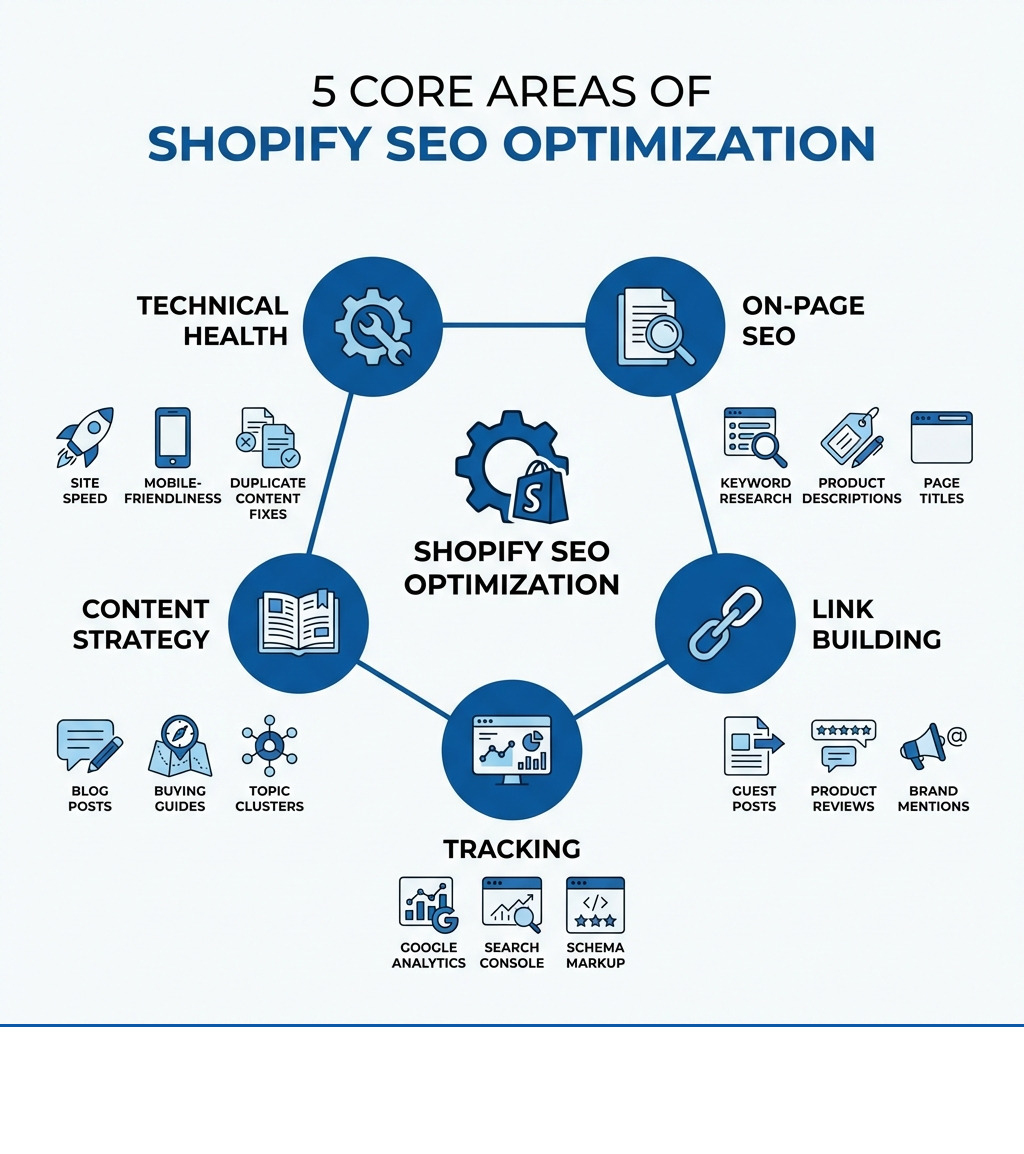
SEO optimization on Shopify is not automatic. While the platform includes helpful features like sitemaps and canonical tags, these alone won't deliver strong rankings. Store owners must also address duplicate content, improve site speed, build clear navigation, research keywords, write unique product descriptions, create content, and earn backlinks.
Quick Overview: What SEO on Shopify Requires
- Technical Setup: Fix duplicate content from product variants and collections, improve Core Web Vitals, and ensure mobile-friendliness
- On-Page Work: Research buyer-intent keywords, write unique product descriptions, and optimize page titles and meta descriptions
- Content & Authority: Publish helpful blog content and earn backlinks from trusted sites
- Tracking: Connect Google Analytics, Google Search Console, and Google Merchant Center to measure results
- Structured Data: Add schema markup so products can appear with rich details in search results
Many store owners think that because Shopify is "SEO-friendly," their job is done. But the truth is different. Google processes over 16.4 billion searches per day, and search contributes around 68% of all trackable website traffic. The first result on Google gets 27.6% of all clicks. If your store isn't ranking, you're missing out on customers who are already looking for what you sell.
The biggest mistake is assuming your theme or a single app will handle everything. Shopify gives you the foundation, but you still need to do the work. That means fixing common problems like duplicate URLs from product variants, speeding up your site by managing apps and compressing images, and writing product descriptions that match what your customers actually search for.
You also need to think beyond your product pages. A blog that answers real questions can bring in new visitors and build trust. Backlinks from other sites tell Google your store is worth recommending. And if you're not tracking your performance with tools like Google Search Console, you're flying blind.
I'm Steve Pogson, founder of First Pier, and I've spent over two decades helping Shopify stores grow through proven *SEO optimization on Shopify strategies.* Here at First Pier, we've worked with brands like Wyman's Blueberries and Hyperlite Mountain Gear to build sustainable organic traffic by fixing technical issues, creating content, and earning authority.
Relevant articles related to seo optimization on shopify:
A strong site structure is the base for good search rankings. Many store owners assume their theme handles technical details, but this is rarely enough. This section covers how to set up your store so search engines and users can move through it easily.
When I work with clients, I always emphasize that a well-organized Shopify store with clear navigation, logical categories, and a simple URL structure improves both user experience and search engine crawlability. This means making sure important pages are easily found, not buried deep within the site.
Fixing Common Shopify Structure Problems
One of the most common issues I see with Shopify stores is duplicate content. Shopify’s "collections" feature, while helpful for organizing products, can create multiple URLs for the same product. For example, a product might be accessible via /collections/category/product-name and /products/product_name. This can confuse search engines, leading to a lack of link equity and making it hard for them to combine link metrics. Google does not penalize innocent duplication, but it can cause issues.
To fix this, Shopify has added canonical URLs. A canonical tag tells search engines which version of a page is the "master" version they should index and rank. Shopify often handles this automatically for simple cases, but for specific product variants or subcollections, you might need to ensure these tags are correctly applied. If you cannot avoid duplicate content on dynamic pages, use canonical URLs to tell Google which page to prioritize. Also, use noindex and nofollow tags to tell Google not to index specific pages.
Another area I often check is the robots.txt.liquid file. This file tells search engine bots which parts of your site they can or cannot crawl. While Shopify automatically generates a robots.txt file, they now allow merchants to edit it. This gives us more control to guide search engine crawlers, ensuring they focus on your most important pages and avoid wasting crawl budget on less important ones. For instance, I might use it to stop bots from crawling certain filtered collection pages that add little SEO value.
Optimizing for Site Speed and Core Web Vitals
A slow website kills conversions. Shopify recommends pages load in under 3 seconds. Google also considers page speed a major ranking factor, especially with its Core Web Vitals (CWV) metrics. CWV includes Largest Contentful Paint (LCP), Interaction to Next Paint (INP), and Cumulative Layout Shift (CLS). LCP should happen within 2.5 seconds, INP should be 200 milliseconds or less, and CLS should be less than 0.1. Pages that meet these thresholds offer a better user experience, and Google is more likely to recommend them.
I've found that the biggest culprits for slow Shopify sites are:
- Your Shopify theme: Some themes are heavier than others. Choosing a highly optimized theme or updating to a 2.0 theme can make a big difference.
- Installed apps: Every app you install adds code to your store. I always advise clients to only install the Shopify apps they need and regularly review them. Remove non-essential apps that can slow down the store.
- Images: Large, unoptimized images can drastically slow down your page. I always ensure images are compressed without losing visible quality and use formats like JPG for product/lifestyle images and PNG for transparent assets. Tools like Tiny SEO can help with image optimization.
- Extra third-party code: Sometimes, custom code or integrations can add bloat.
You can run your site through Google's PageSpeed Insights tool to get Google’s recommended performance improvements. This gives you a clear report on what needs fixing.
Creating a User-Friendly Navigation
A website's navigation holds the most important links in your online store. These links tell visitors which pages are important, giving them an easy way to get to specific sections such as the blog, product pages, or landing pages. Good navigation also tells search engines what your site is about and helps them crawl it effectively.
I always recommend a simple, clear navigation structure: Home Page > Category Page > Product Page. This makes it easy for users to find what they need and for search engines to understand your site hierarchy. For example, a good navigation looks like clear menus, drop-down options to narrow choices, and breadcrumbs to show a user's path.
An effective internal linking strategy is also key. Add internal links to promote the most important pages of your online shop. Google uses links to rank content in search results – the more links a page has, the more it indicates its importance. I make sure every important page on a client's site is accessible from the homepage or within a few clicks. If a page isn't linked, it becomes "orphaned," meaning it's not accessible to users or search crawlers.
For us here at First Pier, designing an intuitive site structure and user experience is a core part of our e-commerce UX design services.
On-Page SEO Optimization on Shopify
On-page SEO means matching your product pages to the words your customers use. This is not a set-and-forget job. If you skip this step, your best buyers may never find you.
This is where you directly tell search engines what your pages are about. It involves using keywords in your content, titles, and descriptions so that when someone searches for a product you sell, your store shows up.
Finding the Right Keywords for Your Products
Keyword research is the first step in any effective SEO optimization on Shopify strategy. It's about understanding what words your potential customers type into search engines when looking for products like yours. I advise clients to focus on buyer intent – are they looking to buy, or just researching?
I use keyword research tools from Moz, Ahrefs, or Semrush to identify keywords. These tools present a list of keywords based on your seed keyword. For example, if you sell unique gifts, your seed keyword might be "best gifts for moms." I also look at Google Trends and Bing Webmaster Tools for current trends.
Long-tail keywords are especially important for e-commerce. These are longer, more specific phrases (e.g., "handmade ceramic coffee mugs with elephant design" instead of just "mugs"). They often have lower competition and higher conversion rates because they indicate a very specific search intent. Since it can be hard to rank for a single, competitive product term, a good approach is to create product collections optimized for a lower-difficulty keyword.
I also look at competitor keywords using tools like Ahrefs. Entering a competitor's domain into a keyword research tool can show you which organic keywords they rank for, giving you ideas for your own strategy.
Best Practices for Product Listing SEO Optimization on Shopify
Once you have your keywords, the next step is to use them effectively in your product listings. This goes beyond just stuffing keywords; it's about creating compelling, informative, and visually appealing listings.
- Unique Product Descriptions: Avoid using generic manufacturer descriptions. Write unique, comprehensive descriptions that focus on benefits, not just features. Use bullet points and clear, conversational language. I recommend using AI tools like Shopify Magic, Jasper, or ChatGPT for first drafts, but always refine them with a human touch to match your brand voice and add unique value.
- High-Quality Product Images: Use several high-resolution images that showcase your product from different angles. Optimize these images for web by compressing them and adding descriptive alt text. Alt text helps search engines understand what the image is about and improves accessibility. For example, instead of
image.jpg, useblue-ceramic-elephant-coffee-mug.jpgwith alt text "Handmade blue ceramic coffee mug with elephant design." - User-Generated Content (UGC): Reviews and ratings are effective. Apps like Judge.me or Yotpo can help collect customer reviews and display an aggregate rating, which not only builds trust but also provides fresh, keyword-rich content for search engines. Studies show that 91% of 18-34 year olds trust reviews as much as recommendations.
How Page Titles and Meta Descriptions Affect SEO Optimization on Shopify
Page titles and meta descriptions are your store's storefront in search results. They are often the first thing a potential customer sees, so they need to be compelling and accurate.
- Page Titles: The title tag is a strong ranking signal for search engines. I advise clients to write compelling page titles for humans that clearly describe the content, include important keywords, and are interesting enough to click. Keep your title tag less than 60 characters. Backlinko found title tags with 40 to 60 characters have the highest click-through rate. Shopify page titles are automatically generated, but you can edit them in the Shopify admin to include your main keyword towards the beginning.
- Meta Descriptions: While not a direct ranking factor, meta descriptions influence click-through rates. I craft meta descriptions that are concise, include the primary keyword, describe the page's content, and often include a subtle call to action. Research from Moz indicates many meta descriptions are cut off around the 155 to 160 character mark, so I aim for that length.
Building Authority with Content and Backlinks
Search engines look for authority. You build it by publishing useful content and earning links from other trusted sites. Many Shopify stores skip this step, but it is key for long-term growth.
This section focuses on content marketing and off-page SEO, which are crucial for establishing your store as a trusted resource in your niche.
Using a Blog to Drive Relevant Traffic
A blog is an excellent way to attract visitors who aren't ready to buy yet but are researching or looking for information. As Jake Munday, co-founder of Custom Neon, says, "Relevant, interesting, useful, or even fun content on your site actively encourages visitors to hang around longer, ultimately helping to improve search engine rankings."
I help clients create content that answers customer questions, offers buying guides, or provides how-to articles related to their products. For instance, if you sell artisanal coffee, a blog post like "A Guide to Brewing Pour-Over Coffee" can attract coffee enthusiasts. This informational content can then link to your relevant product pages (e.g., specific coffee beans, pour-over equipment).
I often use a "topic cluster" model. This means creating a central "pillar page" on a broad topic (e.g., "Coffee Brewing Methods") and then linking to several supporting "cluster content" articles that cover specific subtopics (e.g., "How to Make French Press Coffee," "Espresso Machine Maintenance"). This structure tells Google you're an authority on the broader subject.
Shopify's blog function is robust. I ensure clients use keyword-rich titles, descriptions, and URLs for their blog posts, and incorporate images and videos to make the content engaging.
Strategies for Acquiring High-Quality Backlinks
Backlinks are links from other websites to yours. They have a large impact on search ranking, as search engines use backlinks to determine how the wider audience values your Shopify site. They establish brand credibility and trustworthiness. However, I always warn clients against buying links, as this can lead to penalties.
Here are strategies I use to acquire high-quality backlinks:
- Guest Posting: I encourage clients to write guest posts for relevant, high-authority websites in their industry. This positions them as experts and earns valuable links back to their store.
- Product Reviews from Bloggers/Influencers: Sending free product samples to relevant bloggers or influencers in exchange for an honest review can result in natural backlinks and exposure.
- Unlinked Brand Mentions: Sometimes, your brand might be mentioned online without a direct link to your site. I use tools like mention.com or Ahrefs' Content Explorer to find these unlinked mentions. Then, I reach out to the website owner and politely ask them to convert the mention into a link. This is a low-effort, high-reward strategy.
- Digital PR: This involves activities like entering awards, distributing press releases, promoting a social cause, or responding to journalist requests through platforms like Qwoted or Help a B2B Writer. If a journalist covers your story, they often link back to your site.
The Role of User Experience and Accessibility
User experience (UX) is crucial for SEO optimization on Shopify. Google's goal is to provide the best possible results, and that includes a good experience for the user. If your site is hard to use, slow, or inaccessible, users will leave quickly, increasing your bounce rate and signaling to Google that your site might not be as valuable.
I focus on making sure Shopify stores are:
- Mobile-friendly: Every theme on the Shopify Theme Store is mobile-friendly, but I always do a sense-check by testing on various devices.
- Easy to steer: As discussed before, clear menus, breadcrumbs, and a prominent search bar improve UX.
- Accessible: Over 50 percent of consumers with a disability face challenges accessing content and products online. While accessibility isn't a direct ranking factor, ADA compliance can improve SEO by improving user experience and giving context to search engines (e.g., alt text for images). Here at First Pier, we offer Shopify accessibility and data compliance services to help clients meet these standards.
A good UX keeps users on your site longer (improving dwell time) and reduces bounce rate, which are positive signals for search engines.
Measuring Success with Analytics and Advanced Tools
You need to track your results to know what is working. Setting up analytics and using structured data are both needed to measure progress and help your products stand out in search.
Without proper tracking, you're guessing. I ensure clients have the right tools in place to measure their SEO efforts and identify areas for improvement.
Setting Up Essential Tracking and Reporting
I consider these the absolute must-haves for any Shopify store serious about SEO:
- Google Analytics 4 (GA4): This free tool tracks and reports website traffic, giving you insight to understand customers, optimize your store, and improve marketing ROI. I help clients connect Google Analytics to Shopify Analytics for comprehensive data.
- Google Search Console (GSC): This is Google's direct communication channel with your site. I use it to monitor indexing status, see crawl errors, check search queries, and submit sitemaps. Head to the welcome page to create your account and verify your domain. Learn how to verify your Shopify domain to use Google services.
- Sitemap Submission: All Shopify stores automatically generate a sitemap file, which lists your website’s individual pages (usually found at
www.yourstore.com/sitemap.xml). I submit this sitemap to Google through GSC to help them find and index all your important pages. Indexing can take a week or more. - Google Merchant Center: The Google Merchant Center lets you upload your product data so items can appear in Google Shopping results, free listings, and other Google channels. Shopify users can install the Google & YouTube app to easily keep their product catalog synced. This is vital for e-commerce visibility.
I also recommend setting up Bing Webmaster Tools for similar reasons, as Bing still accounts for a significant portion of searches.
Implementing Schema Markup for Rich Results
Structured data, also known as schema markup, is code that tells search engines more about your content. For e-commerce, this means product schema, review schema, and FAQ schema. When correctly implemented, schema can enable "rich results" in search, like star ratings, price, and availability directly under your search listing. This makes your listing stand out and can increase click-through rates.
Shopify assists by automatically generating product schema for merchants. To go the extra mile, I use apps like Shopify Schema app plugins or other schema generators to add more detailed markup. For example, to display customer reviews and ratings, apps like Judge.me can collect customer reviews and display an aggregate rating, which can then appear in rich snippets. Google recently updated its structured data guidelines, recommending product structured data in the initial HTML for best results.
Choosing the Right SEO Apps for Your Store
While Shopify offers built-in SEO features, I often find that apps can add features and automate tasks, especially for larger stores. The Shopify App Store has 478 apps in the SEO category.
Here are some functions I look for in SEO optimization on Shopify apps:
- Image Optimizers: Apps like Tiny SEO or Avada SEO & Image Optimizer can compress images and add alt text automatically.
- Broken Link Checkers/Redirects: Tools that find broken links and help set up 301 redirects are essential for maintaining site health.
- Schema Generators: Apps like Schema Plus for SEO or Sherpas: Smart SEO can help implement various types of schema markup without manual coding.
- SEO Audits/Monitoring: Apps like SEO Manager by Venntov or Plug In SEO offer comprehensive SEO checks and recommendations.
- AI Content Generation: Some apps, like SEOAnt, offer AI features for writing meta and alt text, or even blog posts.
I always advise clients to choose apps carefully. Most beginners add too many apps early on, which can slow page speed and create more problems than it solves. Use an app when it saves significant time or offers a feature Shopify doesn't support natively. For example, if you have under 50 products, you might not need an SEO app, but if you're managing hundreds of products, bulk editing features from an app become very useful.
To Sum Up
Working on SEO for your Shopify store is not about finding a single tool or shortcut. It means fixing common mistakes and following a steady, ongoing process. By building a strong technical base, focusing on clear on-page and content work, and growing your store’s authority, you can bring in more qualified customers. If you want help putting these steps in place, the team here at First Pier is ready to help.More info about our award-winning Shopify agency





.png)
.png)
