



Why Flexible Payment Options Matter for Your Shopify Store
Summary
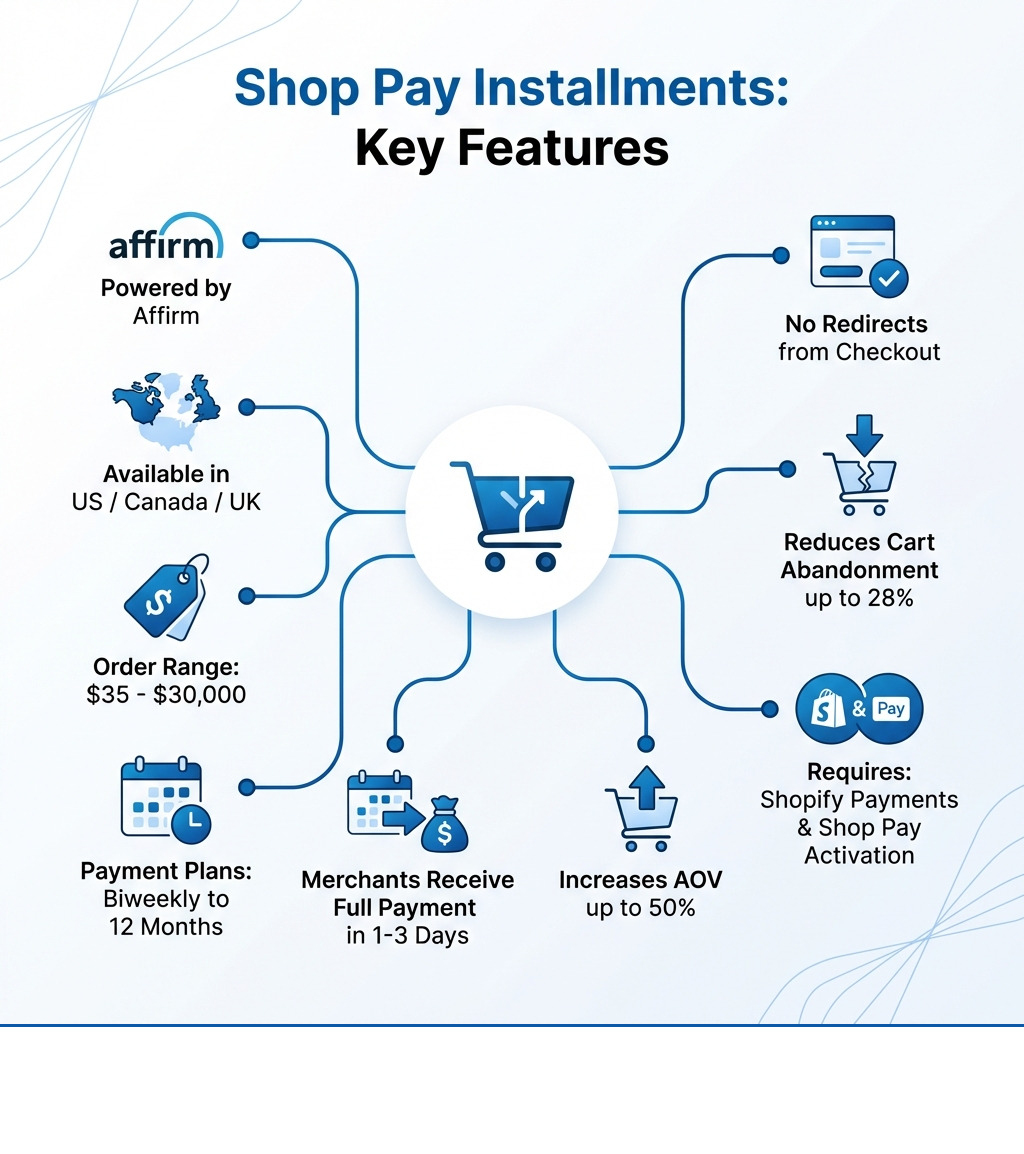
- Shop Pay Installments is a buy now, pay later option in Shopify checkout, powered by Affirm, for orders between $35 and $30,000.
- It is available to merchants using Shopify Payments and Shop Pay in the US, Canada, and UK, and pays merchants in full within 1–3 business days.
- Customers can choose between short biweekly installment plans with no interest and longer monthly plans that may include interest.
- Merchants pay no setup or monthly fees beyond standard transaction fees, and do not manage collection of installments.
- Offering Shop Pay Installments is associated with higher average order value and lower cart abandonment for many Shopify stores.
Shop Pay Installments is Shopify's native buy now, pay later (BNPL) option that lets customers split eligible purchases into smaller payments over time. From a merchant perspective, it behaves a lot like a standard card transaction: you get paid upfront, and a third party takes on the risk and collection work.
Here are the basics:
- What it is: An installment payment option run by Affirm and built directly into Shopify checkout.
- Merchant eligibility: Stores in the US, Canada, and UK that use Shopify Payments and have Shop Pay turned on.
- Order limits: $35–$30,000 USD/CAD or £50–£30,000 GBP, including taxes, discounts, and shipping.
- Customer plans: Short-term biweekly plans with no interest, or monthly plans up to 12 months where interest may apply.
- Merchant payout: Full order amount, less fees, usually paid out within 1–3 business days.
- Merchant cost: No setup or monthly fee; you pay per-transaction fees similar to other payment methods.
Many online shoppers now expect a pay-over-time option at checkout. The question for most Shopify stores is how to add that flexibility without adding an external system or sending buyers through a separate checkout flow.
Shop Pay Installments is currently the only BNPL option that lives inside native Shopify checkout. Customers never leave your storefront, orders post like any other Shopify order, and inventory and reporting stay consistent.
I'm Steve Pogson, founder of First Pier, a Shopify Expert Agency that has set up and tuned payment stacks for a wide range of stores. Here at First Pier, we use Shop Pay Installments where it makes sense to support higher-ticket orders, reduce checkout friction, and keep finance operations straightforward.
Terms related to shop pay installments shopify:
What is Shop Pay Installments and How Does It Work?
Shop Pay Installments is Shopify's native "buy now, pay later" (BNPL) option. It lets customers pay for a purchase over time instead of in a single charge. For Shopify merchants, the main advantage is that it is built into the existing checkout, so there is no handoff to an outside site during payment.
The credit and repayment piece is handled by Affirm. When a buyer chooses Shop Pay Installments, they submit a short application. If Affirm approves the order, Affirm pays you in full, then collects the payments from the customer over time. From your side, it settles like any other payout from Shopify Payments.
If you want the exact product rules and legal language, Affirm's help center has a current overview in About Shop Pay Installments.
Differentiating Shop Pay, Shop Pay Installments, and the Shop App
Shopify uses three related pieces here: Shop Pay, Shop Pay Installments, and the Shop app. We see a lot of confusion between these when we work with new clients, so it is worth being clear about the roles.
Shop Pay is the accelerated checkout. Customers save their email, shipping, and payment details once, then re-use them across any store that supports Shop Pay. This reduces how much they have to type and usually shortens checkout to a few clicks.
Shop Pay Installments sits on top of Shop Pay. It adds the option for eligible customers to split a purchase into several payments rather than paying the full amount at once. Shop Pay handles speed; Shop Pay Installments handles payment timing.
The Shop app is the customer-facing mobile app and web experience. It lets buyers:
- track shipments across stores,
- see recommended products and stores,
- manage Shop Pay and Shop Pay Installments plans,
- view schedules, make early payments, and check past orders.
In our work here at First Pier, we see the app matter most for repeat buyers and brands with strong direct-to-consumer followings.
Here is a quick comparison:
| Feature | Shop Pay | Shop Pay Installments | Shop App |
|---|---|---|---|
| Main function | Faster checkout | Pay-over-time option | Shopping and order hub for customers |
| Payment handling | Stores payment and shipping info | Splits one purchase into multiple payments (Affirm) | Manages Shop Pay details and installment plans |
| Customer cost | No extra charge | Some plans have interest (0–36% APR) | No extra charge |
| Where it runs | Inside Shopify checkout | Inside Shop Pay checkout | iOS/Android app and browser |
| Merchant benefit | Shorter checkout, fewer drop-offs | Higher order values and better conversion | Better retention and repeat orders |
The Customer Experience: Payment Plans, Costs, and Credit Impact
From the buyer side, Shop Pay Installments is a way to spread out an order while keeping the checkout experience short and familiar.
The current order ranges are:
- United States: $35–$30,000 USD
- Canada: $35–$30,000 CAD
- United Kingdom: £50–£30,000 GBP
The total includes tax, shipping, and discounts. If an order falls outside that band, the buyer will not see Shop Pay Installments as an option.
Plan types depend on order size and the shopper's profile:
- For smaller orders (often in the $50–$1,000 range), buyers are commonly offered 4 equal, interest-free payments billed every two weeks.
- For larger orders, buyers may see monthly plans up to 12 months. These can carry interest. The APR is set by Affirm on a per-customer, per-order basis and can range from 0% to 36%.
There are a few details we call out when we explain this to merchants:
- There are no late fees charged by Affirm, even if a buyer misses a payment.
- Some loans will cost more than the original cart total if interest applies; others will not.
- Affordability checks and reporting can affect the buyer's credit history. Making on-time payments can help; missed payments can hurt.
Buyers can manage plans and make early payments in the Shop app or at shop.app. Early payoff can reduce interest charges on interest-bearing loans.
Setting Up and Managing Shop Pay Installments Shopify
Implementing Shop Pay Installments is straightforward if you are already on Shopify Payments, but there are a few requirements and edge cases that matter day to day.
Merchant Eligibility and Activation
To offer shop pay installments shopify on your store, you need to meet three main conditions:
- Shopify Payments is active: Shop Pay Installments only runs on top of Shopify Payments. If you are using a third-party gateway as your primary processor, you will need to move at least some volume to Shopify Payments.
- Shop Pay is turned on: Because Installments is part of Shop Pay, you must have Shop Pay enabled in your payment settings.
- Supported country and currency: Your business location and store currency must match one of the supported pairs (US/USD, Canada/CAD, UK/GBP).
Once those are in place, activation is done in the Shopify admin. You can log in and check eligibility directly. Here at First Pier, we usually do this during a broader payments review so we can check card rates, fraud rules, and existing BNPL tools at the same time.

Managing Orders, Payouts, and Disputes
From an accounting and operations standpoint, Shop Pay Installments behaves more like a card transaction than a layaway plan:
- Payout timing: Once an order is captured, Shopify Payments pays out the full order value minus fees, usually within 1–3 business days, regardless of the customer's future payments.
- Installment collection: Affirm collects each installment from the customer. You do not chase payments or adjust schedules.
- Fees and refunds: The Shop Pay Installments processing fee is not returned to you if you refund the order, even if you refund it in full. We account for this when we model effective margin.
If a customer disputes an order paid with Shop Pay Installments (for example, claiming they did not place it):
- Affirm will email you for evidence such as tracking, invoices, or communication.
- You normally have 15 days to respond.
- Affirm will review and decide the case, often within another 15 days, while holding the disputed funds.
You can track these orders and payouts in two places:
- Orders list: Filter by payment method "Shop Pay Installments".
- Payout reports: Go to Settings > Payments > Shopify Payments > View payouts > Transactions and filter to "Shop Pay Installments".
For more edge cases, Shopify keeps a current Shop Pay Installments FAQ.
Product Exclusions and In-Store Use with Shopify POS
There are a few product and order rules that come up often in real stores:
- Gift cards and subscriptions: Customers cannot pay for gift cards or recurring subscription products with Shop Pay Installments. One-time physical goods are the main fit.
- All-or-nothing availability: You cannot choose specific products to allow or block for Installments. If the order is within the allowed range and meets policy rules, the option shows.
- Order editing: You cannot change an existing order that was paid with Shop Pay Installments in a way that changes the financed amount. If you need to change items or pricing, the clean path is to refund the order and have the customer place a new one.
- Adding items later: If you add a line item to one of these orders, Shopify will create a separate invoice for the extra amount, which the customer must pay in full using a different payment method. It will not extend the existing installment plan.
For retailers using Shopify POS in the United States, Shop Pay Installments can also be offered for in-person orders. The eligibility ranges and pricing are similar to online orders. When we roll this out here at First Pier, we make sure staff know how to explain the option briefly at checkout and understand which orders qualify.
The Business Case: Why Offer Shop Pay Installments?
Adding shop pay installments shopify is not about chasing a trend. It is about matching how customers actually pay for higher-ticket and multi-item orders, while keeping your internal process simple.
When customers can spread payments out, they are more willing to complete larger carts. In practice, this often shows up as:
- Higher average order value (AOV): Shoppers add upgrades or extra items because the per-payment amount stays manageable.
- Better conversion on borderline carts: People who would otherwise back out at the final total are more likely to finish checkout if they can see a smaller installment amount.
Flexible payment options also help with customer acquisition. Many shoppers now expect a pay-over-time option and will look for familiar logos or wording on product pages and in the cart. If they do not see one, they may search elsewhere.
Over time, we see a link between a smooth payment experience and repeat purchases. Buyers remember which stores made it straightforward to buy a bigger item without friction around financing or account creation.
Key Merchant Benefits and Supporting Data
Across Shopify merchants, data around Shop Pay Installments is consistent:
- Average order value increase: Stores that add BNPL options like Shop Pay Installments often see AOV increase, in some cases by as much as 50%.
- Lower cart abandonment: Keeping the customer in the same checkout and showing clear installment options has been tied to cart abandonment reductions approaching 28%.
- More repeat orders: A share of first-time buyers who use Shop Pay or Shop Pay Installments come back, with repeat purchase rates increasing by up to 23% in some studies.
- Provider maturity: Since the 2021 launch, Shop Pay Installments has grown into a leading installment option for US Shopify merchants.
- Customer interest: Surveys report that over three-quarters of shoppers consider using BNPL at some point during the buying process.
- Shop app behavior: Customers who use the Shop app, where Installments is visible and manageable, tend to spend more per buyer than those who do not.
From our work here at First Pier, the practical benefits we pay attention to are:
- Attracting price-sensitive buyers without discounting the product itself.
- Pushing up order size on items where shoppers would otherwise wait or buy piecemeal.
- Keeping cash flow stable because you are paid in full quickly, without adding internal collections work.
- Avoiding extra integration overhead since this lives inside the existing Shopify Payments stack.
How to Promote Shop Pay Installments Shopify to Your Customers
Turning on Shop Pay Installments in the admin is only half the work. Customers need to see and understand it early enough in their journey for it to affect what they put in the cart.
Add installment banners to product pages
Show a short, factual message on product pages near the price (for example, "Or 4 payments of $X with Shop Pay"). This gives shoppers a clear monthly or per-payment number to weigh against the full price. Shopify documents how to add the product page banner.Use in-cart banners
Repeat the message in the cart so customers do not forget the option right before checkout. Based on Shopify's data, stores that do this can see installments order volume rise significantly compared to stores that rely only on the checkout view.Send email announcements
Let your list know that they can now pay over time, especially if you sell higher-priced products. Shopify provides a pre-built email template you can adapt. Here at First Pier, we usually add a short FAQ section and a couple of example payment breakdowns.Include it in broader marketing
For paid campaigns and social posts around big-ticket items or bundles, add a line about pay-over-time availability. This works well on landing pages where the main objection is total price rather than product fit.Update FAQs and support scripts
Make sure your help center and support team can explain who qualifies, what products are eligible, and what happens if someone returns an item bought with installments. Clear answers here prevent confusion and reduce the chance of cancelled orders.
Done well, this does not need to feel like a hard sell. It is simply one more piece of factual pricing information you give shoppers so they can decide how and when to buy.
To Sum Up: Integrating Flexible Payments Into Your Store
Customer payment habits have shifted toward pay-over-time options for larger or higher-margin orders. Shop pay installments shopify is Shopify's built-in answer to that shift, and it fits cleanly into the existing checkout and payout systems you already use.
We have covered how it works technically, how it differs from Shop Pay and the Shop app, what your customers see, and what it means operationally for orders, refunds, and disputes. We have also looked at why it often raises average order value and conversion and how to surface it clearly throughout your store.
Because Shop Pay Installments sits inside Shopify Payments, you avoid managing a separate integration or sending buyers away to complete financing. That keeps the experience simple for both your team and your customers.
Here at First Pier, we build this into a broader view of your store: product price points, merchandising, shipping, and cash flow. If you want help deciding whether Shop Pay Installments fits your model, or you need support rolling it out across web and POS, our team can work with you to set it up, test it, and measure how it affects key metrics.
You can get help from an award-winning Shopify agency to make sure your payment setup supports the way your customers actually buy.





.png)
.png)

