




Why Core Web Vitals Are Crucial for Your Shopify Store
Summary
- Shopify Core Web Vitals are three metrics that show how fast a store loads, how quickly it responds, and how stable it looks while loading.
- Google uses these metrics as part of its ranking system, so weak scores can reduce search visibility and organic traffic.
- Stores that meet Core Web Vitals targets are less likely to lose visitors before they interact or buy.
- Merchants can check their scores with PageSpeed Insights, Google Search Console, and Shopify’s web performance dashboard.
- Improving these metrics usually involves better image handling, less JavaScript, faster themes, and regular app reviews.
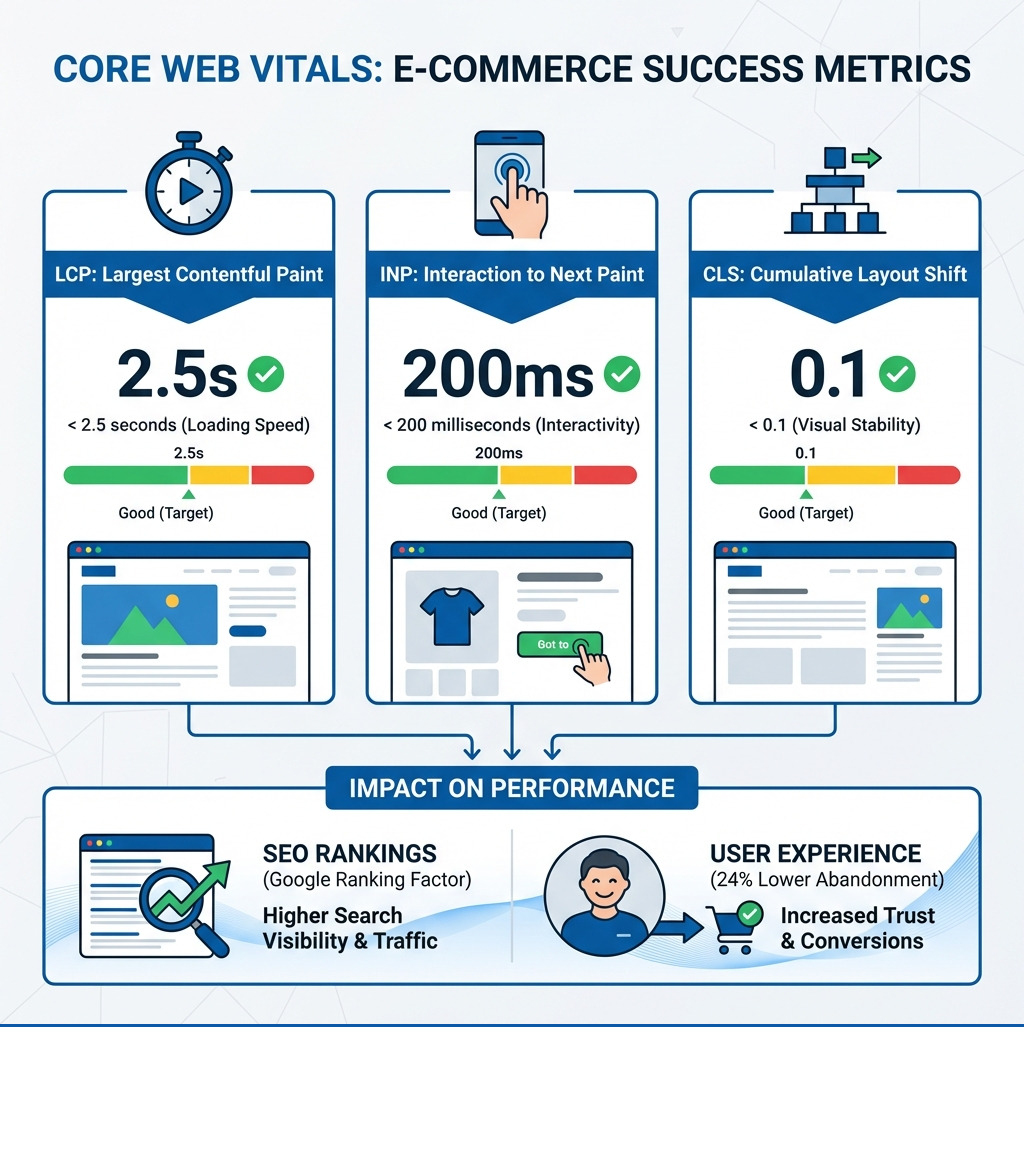
Shopify core web vitals directly impact whether potential customers find your store in search results and whether they stay long enough to make a purchase. These three metrics—Largest Contentful Paint (LCP), Interaction to Next Paint (INP), and Cumulative Layout Shift (CLS)—measure how quickly your pages load, how responsive they are to user interactions, and how stable they appear while loading.
Google started using Core Web Vitals as a ranking factor in 2021. This means your store's performance on these metrics affects where you appear in search results. But the impact goes beyond SEO. Research shows that visitors are 24% less likely to abandon websites that meet Core Web Vitals thresholds. When your product pages load slowly, buttons don't respond quickly, or images shift around unexpectedly, customers leave. They don't trust your store, and they certainly don't complete their purchase.
The good news is that you don't need to be a developer to understand or improve these metrics. Shopify provides built-in tools to measure your performance, and there are clear, proven ways to address each metric.
As Steve Pogson, founder of First Pier, I've spent over two decades helping Shopify merchants improve their store performance. My work often involves detailed technical fixes, including for shopify core web vitals, for leading brands. Here at First Pier, I've seen how improving these metrics can significantly lift both search rankings and conversion rates.
For any e-commerce business, a quick and predictable online experience is a necessity. This is especially true for Shopify stores, where every millisecond can influence a customer's decision to buy or bounce. Shopify core web vitals are Google's attempt to quantify this user experience.
Understanding the SEO Impact
Google's search algorithm values websites that offer a strong user experience, and technical performance is a key part of that experience. Since mid-June 2021, Core Web Vitals have been a direct ranking factor in Google Search. This means that a store with good Core Web Vitals scores has an advantage in search engine results pages (SERPs) over a comparable store with poor scores.
Think of it this way: Google wants to deliver the best possible results to its users. If your store provides a slow, clunky experience, Google is less likely to show it prominently, even if your products are relevant. This directly affects how easily customers find you. In a competitive online market, even small improvements in your shopify core web vitals can make a difference. A study from April 2021, around the time these metrics became a ranking factor, revealed that only four percent of all studied websites were prepared for the Core Web Vitals update and had good rankings in all three metrics. This means stores that focus on performance can gain an advantage.
While Core Web Vitals are part of a larger set of "page experience signals," they are a key component. They serve as a baseline for Google's evaluation of your site's technical health. Improving these metrics translates directly into a better chance of ranking higher, drawing more organic traffic, and acquiring more customers. You can learn more about the rollout of page experience in ranking systems directly from Google.
Connecting Speed to Sales
Beyond SEO, the direct effect of shopify core web vitals on your revenue is significant. User frustration is a silent killer for e-commerce stores. If a page takes too long to load, if buttons don't respond, or if content jumps around, customers are likely to abandon their carts and leave your site. I've observed this countless times: a slow site translates directly into lost sales.
The statistic that visitors are 24% less likely to abandon websites that meet Core Web Vitals thresholds is a clear indicator of their importance. This is not just about speed; it's about building customer trust. A fast, stable, and responsive site feels professional and reliable. It signals to your customers that you care about their experience. Conversely, a poor experience can make a store seem insecure or unreliable, leading to a higher bounce rate and fewer completed purchases.
Putting resources into shopify core web vitals work is an investment in your customer's experience and, by extension, your revenue. It leads to more people staying on your site, more products added to carts, and more successful checkouts. Understanding how your site's performance affects user behavior is a critical step. Here at First Pier, our ecommerce analytics services can show you this connection.
Breaking Down the Three Core Metrics
Google's shopify core web vitals focus on three key aspects of the user experience: loading, interactivity, and visual stability. Let's look at each one.
Largest Contentful Paint (LCP): Measuring Loading Performance
LCP measures the time it takes for the largest content element visible in the viewport to load. This "largest content element" is often a hero image, a prominent product photo, or a large block of text. Essentially, LCP answers the question: "When does the main content of the page become visible to the user?"
A slow LCP means users are staring at a blank or incomplete screen for too long, leading to frustration. Google's target for a 'Good' LCP score is 2.5 seconds or less. Anything between 2.5 and 4 seconds is 'Moderate', and anything over 4 seconds is considered 'Poor'. These thresholds are based on research showing that users start to lose focus if they have to wait more than 3 seconds. The median percentage of shops passing Largest Contentful Paint (LCP) is 91.8%, but it's important to check your own store's performance, especially if you fall into the 'Moderate' or 'Poor' categories.
You can find more details on LCP and other metrics in Google's official Core Web Vitals documentation.
Interaction to Next Paint (INP): Measuring Responsiveness
Interaction to Next Paint (INP) is the latest metric to join the Core Web Vitals, replacing First Input Delay (FID) as of March 2024. While FID measured the delay before the browser could begin processing a user's first interaction, INP provides a more complete measurement. It measures the latency of all user interactions with a page, from a click or tap to the next visual update. This includes actions like clicking an "Add to Cart" button, navigating a menu, or expanding a product description.
A good INP score means your store feels snappy and responsive. When a user clicks a button, they expect immediate feedback. If there's a noticeable lag, it can feel broken or slow. The target for a 'Good' INP score is 200 milliseconds or less. Between 200ms and 500ms is 'Moderate', and over 500ms is 'Poor'. The median percentage of shops passing Interaction To Next Paint (INP) is 95.7%, which shows that many Shopify stores are doing well in this area, but it's still a crucial metric to monitor.
Cumulative Layout Shift (CLS): Measuring Visual Stability
CLS measures the visual stability of a page. Have you ever been reading an article or trying to click a button, only for the content to suddenly shift, making you click the wrong thing? That's a layout shift, and it's incredibly annoying. CLS quantifies how much unexpected layout shift occurs during the page's lifecycle.
Common causes of high CLS include images loading without reserved space, dynamically injected content (like ads or pop-ups), or web fonts that cause a "flash of unstyled text" (FOUS) before rendering. Google's target for a 'Good' CLS score is 0.1 or less. Between 0.1 and 0.25 is 'Moderate', and anything greater than or equal to 0.25 is 'Poor'. The median percentage of shops passing Cumulative Layout Shift (CLS) is 95.5%, indicating that most Shopify stores maintain good visual stability. However, even small, consistent shifts can erode user trust.
How to Measure and Analyze Your Shopify Core Web Vitals
Understanding your shopify core web vitals is the first step toward improving them. Fortunately, Google and Shopify provide effective tools to help you track your store's performance.

Using Google's Free Tools
I always start with Google's own diagnostic tools. They offer both "lab data" (simulated tests) and "field data" (real user experiences), which are both valuable.
- PageSpeed Insights (PSI): This is my go-to for a quick, in-depth audit of a single page. You simply enter a URL, and PSI provides a score from 0-100, along with detailed diagnostics and prioritized recommendations for improvement. It evaluates more than just Core Web Vitals, covering a range of technical factors. It's excellent for identifying specific issues on a particular product page or your homepage.
- Google Search Console: For a broader view, Search Console is invaluable. It allows you to check Core Web Vitals performance across all pages on your site at once. While its diagnostics aren't as granular as PSI's, it automatically tracks historical performance, giving you a high-level view of how your entire site performs and where problem areas might exist. It's a critical tool for monitoring your site's health over time. You can access Search Console directly.
- CrUX Dashboard: The Chrome User Experience Report (CrUX) Dashboard provides even more specific diagnostics for how websites load on Chrome, which is the browser Google uses for its field data. This tool offers detailed visualizations of your Core Web Vitals performance over time, including comparison tools. It's browser-agnostic, meaning it works on any web browser, but the data specifically comes from Chrome users.
Lab Data vs. Field Data: Which Is More Important?
When you check your shopify core web vitals, you'll often see both "lab data" and "field data." It's important to understand the difference.
| Feature | Lab Data (Synthetic) | Field Data (Real User Monitoring - RUM) |
|---|---|---|
| Environment | Simulated, controlled conditions | Real users, real devices, real network conditions |
| Measurement | Tools like Lighthouse, WebPageTest | Chrome User Experience Report (CrUX), Google Analytics |
| Use Case | Debugging, pre-release testing, identifying specific issues | Understanding actual user experience, historical trends |
| FID/INP | Cannot measure FID directly (use TBT as proxy) | Directly measures FID/INP based on user interaction |
| Relevance | Helps developers pinpoint technical causes | Reflects what real visitors experience |
For Shopify stores, field data is more important. While lab data (like that from Lighthouse) helps me identify technical bottlenecks in a controlled environment, it doesn't account for the variability of real users' devices, network conditions, or geographic locations. A site's performance can vary dramatically based on these factors. Field data, specifically from the Chrome User Experience Report (CrUX), shows actual page performance. It's the data Google primarily uses for search ranking.
For instance, First Input Delay (FID) cannot be measured in a lab environment because it requires actual user interaction. In such cases, Total Blocking Time (TBT) is often used as a proxy in lab tests. However, with INP replacing FID, the focus is even more on real user interactions.
Interpreting Your Shopify Web Performance Dashboard
Shopify understands the importance of performance, so they've integrated web performance reports directly into your admin. This is a very useful feature for merchants.
- Web performance metric summary: You can find a quick summary of your store's 3 Core Web Vitals over time on the
Online Store > Themespage in your Shopify admin. This summary gives you a 'Good', 'Moderate', or 'Poor' ranking for LCP, INP, and CLS, based on real user data from the past 30 days. This ranking reflects the top 75% of user experiences (the P75 metric). - Web performance over time reports: Clicking on LCP P75 (ms), INP P75 (ms), or Cumulative Layout Shift will take you to detailed "Over Time" reports. These charts show your performance trends and can include event annotation tags. These tags are useful because they can highlight when you installed a new app, updated your theme, or made other significant changes. This helps you correlate performance changes with specific actions.
- Web performance by page type reports: Under
Analytics > Reports, you can find reports that break down your Core Web Vitals by page type (e.g., product pages, collection pages, blog posts). This helps me identify if a particular template is causing performance issues across many pages. - Web performance by page URL reports: Even more granular, these reports show Core Web Vitals for individual URLs. If a specific product page is underperforming, this report will pinpoint it.
I always advise my clients to ensure they have the 'Reports' staff permission to view this data and, importantly, to remove online store password protection. This step is necessary for Shopify to collect Real User Metrics (RUM) data for your dashboard. The data in these reports may have a delay of up to 36 hours, so keep that in mind when making and reviewing changes.
You can learn more about viewing and using these reports in Shopify's official documentation on Web performance reports.
How to Improve Your Shopify Core Web Vitals
Now that you know what shopify core web vitals are and how to measure them, let's talk about what you can do to improve your scores. My approach always starts with identifying the biggest bottlenecks and addressing them systematically.
How to Improve Your LCP Score
LCP is often heavily influenced by images and how quickly your server responds. Here's what I recommend:
- Optimize Images: This is a common and effective starting point for most Shopify stores.
- Compress Images: Use tools like TinyPNG or ShortPixel to reduce file size without losing quality. Shopify already has built-in image optimization, but sometimes manual compression can help further.
- Use Modern Image Formats: Convert images to WebP where possible. Shopify often handles this automatically for you.
- Proper Sizing: Ensure images are delivered at the correct dimensions for the user's viewport, not oversized images scaled down by CSS.
- Don't Lazy-load the LCP Element: If your largest contentful paint element (e.g., your hero image) is above the fold, ensure it's not lazy-loaded. It needs to load as quickly as possible.
- Preload Critical Assets: Tell the browser to fetch important resources (like your LCP image or crucial web fonts) early. You can do this by editing your theme code to output a preload tag. Shopify noticed a 50% (1.2 seconds) improvement in time-to-text-paint by preloading Web Fonts.
- Review Server Response Time: While Shopify manages the server infrastructure, factors like a slow Time To First Byte (TTFB) can impact LCP. Shopify already has a built-in CDN that you can enable, which helps deliver content faster globally.
- Eliminate Render-Blocking Resources: Ensure your LCP element is included in the initial HTML response and that critical CSS and JavaScript don't block the rendering of your main content. Inlining critical CSS for above-the-fold content and loading the main stylesheet asynchronously can help.
For more in-depth technical improvements on your store, consider looking into More info about Shopify Development.
How to Improve Your INP Score
INP focuses on interactivity, which is mostly determined by JavaScript execution.
- Reduce JavaScript Execution Time: Excessive JavaScript can block the main thread, making your page unresponsive.
- Audit Third-Party Scripts: Apps, analytics tools, and marketing tags often inject JavaScript. Review these carefully. Is every app still necessary? Can some scripts be deferred or loaded asynchronously?
- Minimize and Compress JS: Ensure your JavaScript files are minified and compressed to reduce download size.
- Code Splitting: Break down large JavaScript bundles into smaller, on-demand chunks.
- Minimize Thread Work: The main thread handles most of the work for rendering and interactivity. When it's busy, your page feels slow.
- Use
asyncordefer: Apply these attributes to<script>tags to prevent JavaScript from blocking the HTML parsing. - Combine Scripts: Tools like Google Tag Manager can help you combine multiple scripts into a single request, which can reduce the browser's workload.
- Use
How to Improve Your CLS Score
CLS issues often stem from content shifting unexpectedly as elements load.
- Add
widthandheightAttributes to Images: This is perhaps the most critical step. By specifying dimensions for your images (and iframes, videos, etc.), the browser can reserve the necessary space before the content loads, preventing jarring shifts. Using CSSaspect-ratioboxes is another effective technique. - Optimize Fonts:
- Preload Fonts: If you use custom web fonts, preload them to ensure they're available early.
- Use
font-displayProperty: Usingfont-display: optionalorswapcan help manage how fonts load, preventing a "flash of unstyled text" (FOUS) that can cause layout shifts.
- Reserve Space for Dynamically Injected Content: If you have ads, banners, or widgets that load dynamically, ensure you reserve sufficient space for them in your layout to prevent content below them from jumping.
The Impact of Themes and Apps on Your Shopify Core Web Vitals
Your theme choice and the apps you install are two of the biggest factors influencing your shopify core web vitals.
- Theme Choice: Some themes are inherently faster and more optimized than others. For example, the 'Baseline' theme has the highest percentage of shops passing all CWVs at 97.8%, while 'Xclusive' has the lowest at 18.0%. Shopify's own data shows that the median percentage of views passing all Core Web Vitals (CWVs) across all themes is 83.5%. This shows that a well-coded, lightweight theme provides a good starting point for performance. I always recommend choosing themes from the Shopify Theme Store that are known for their performance, like Dawn.
- App Installations: While apps add functionality, each one can introduce additional JavaScript, CSS, and HTTP requests, potentially slowing down your store and hurting your Core Web Vitals.
- Auditing Apps: Regularly review your installed apps. Do you still need them all? Are there lighter alternatives? I often see stores burdened by unused or redundant apps.
- AI-Driven Optimization Apps: Some apps, like those designed for "AI Speed + Core Web Vitals," can help. They often use AI to defer non-critical resources, compress images, minimize JavaScript, and enable smart lazy loading. These tools can automate many of the optimization tasks I've discussed. However, it's important to monitor their actual impact on your store's performance.
- Theme Updates: Keeping your theme updated is crucial. Theme developers often release updates that include performance improvements and bug fixes. Running an outdated theme can mean you're missing out on important optimizations.
- Customizations: Any custom code or modifications you add to your theme can also affect performance. Ensure customizations are clean, efficient, and don't introduce new bottlenecks.
Shopify provides useful data on theme performance. You can view Aggregated Core Web Vitals performance by Shopify Theme to see how various themes stack up based on real-user data. This data is aggregated from shops meeting specific criteria (100+ daily events, active, custom domain, using one of the latest 3 theme versions). This data is a useful resource for making an informed decision when choosing a theme.
Frequently Asked Questions about Shopify Core Web Vitals
I often get questions about shopify core web vitals from my clients. Here are some of the most common ones I hear:
Are Core Web Vitals the only SEO factor that matters?
Absolutely not. While Core Web Vitals are a direct ranking factor and a critical part of Google's "page experience signals," they are not the only thing Google considers. Content relevance, high-quality backlinks, mobile-friendliness, secure HTTPS, and a good overall site structure all play significant roles. Think of Core Web Vitals as a prerequisite for good SEO. You need a technically sound, fast website to even compete for top rankings, but you also need excellent content and a strong off-page presence. My team and I provide SEO services that address all aspects of search performance, from technical fundamentals to content and backlinks.
How often should I check my Core Web Vitals?
I recommend regular monitoring, especially after any significant changes to your Shopify store. This includes:
- After major theme updates: Always check your performance after updating your theme to ensure no regressions occurred.
- After installing new apps: New apps are notorious for adding JavaScript and other resources that can impact performance. Check your Core Web Vitals promptly after installation.
- After major content changes: If you're adding many new images, videos, or complex sections to your pages, it's a good idea to re-evaluate.
- Monthly or quarterly: Even without specific changes, a routine check (e.g., monthly or quarterly) using Google Search Console and PageSpeed Insights helps you identify and fix problems early and catch any gradual declines in performance.
Can I get a perfect 100 score on PageSpeed Insights?
While a perfect 100 score on PageSpeed Insights looks impressive, it shouldn't be your sole focus. The goal is to achieve 'Good' scores for all three shopify core web vitals metrics based on field data. PageSpeed Insights' lab score is a diagnostic tool, not the ultimate judge of your site's health. Sometimes, chasing a perfect 100 in the lab can lead to diminishing returns or even compromise functionality.
Instead, I advise focusing on passing the 'Good' thresholds for LCP (<= 2.5s), INP (<= 200ms), and CLS (<= 0.1) in your real-user (field) data. This helps ensure that the majority of your actual customers have a positive experience, which is what matters for both Google and your revenue.
Working with an Expert for Ongoing Performance
Optimizing shopify core web vitals is not a one-time task; it's an ongoing process. Web standards and Google's algorithms change, and your store will grow with new products, apps, and content. Maintaining good performance requires regular attention and technical expertise.
Here at First Pier, my team and I specialize in helping Shopify merchants build and maintain high-performance online businesses. We bring technical knowledge and practical experience to address complex performance challenges. From auditing your theme and apps to implementing code-level optimizations and setting up detailed monitoring, we work to get your store to meet and exceed Google's Core Web Vitals standards.
If you find web performance difficult to manage or you're not seeing the improvements you need, working with an experienced agency like First Pier can make a significant difference. We can help you fix performance bottlenecks to attract more traffic, improve user experience, and increase sales. Find out how we can help your business by checking out our award-winning Shopify ecommerce agency.




