


Why This Shopify Guide Matters for Your Business

Summary
- Explains the core steps to set up, configure, and launch a Shopify store.
- Outlines how to structure products, collections, and pages so customers can find and buy items.
- Describes key operational settings, including payments, shipping, taxes, and order handling.
- Lists common tools and tactics for ongoing marketing, analytics, and store improvements.
- Shares practical lessons from client work here at First Pier building and scaling Shopify stores.
A shopify guide helps you build, launch, and grow an online store in a structured way. Here's what you need to know:
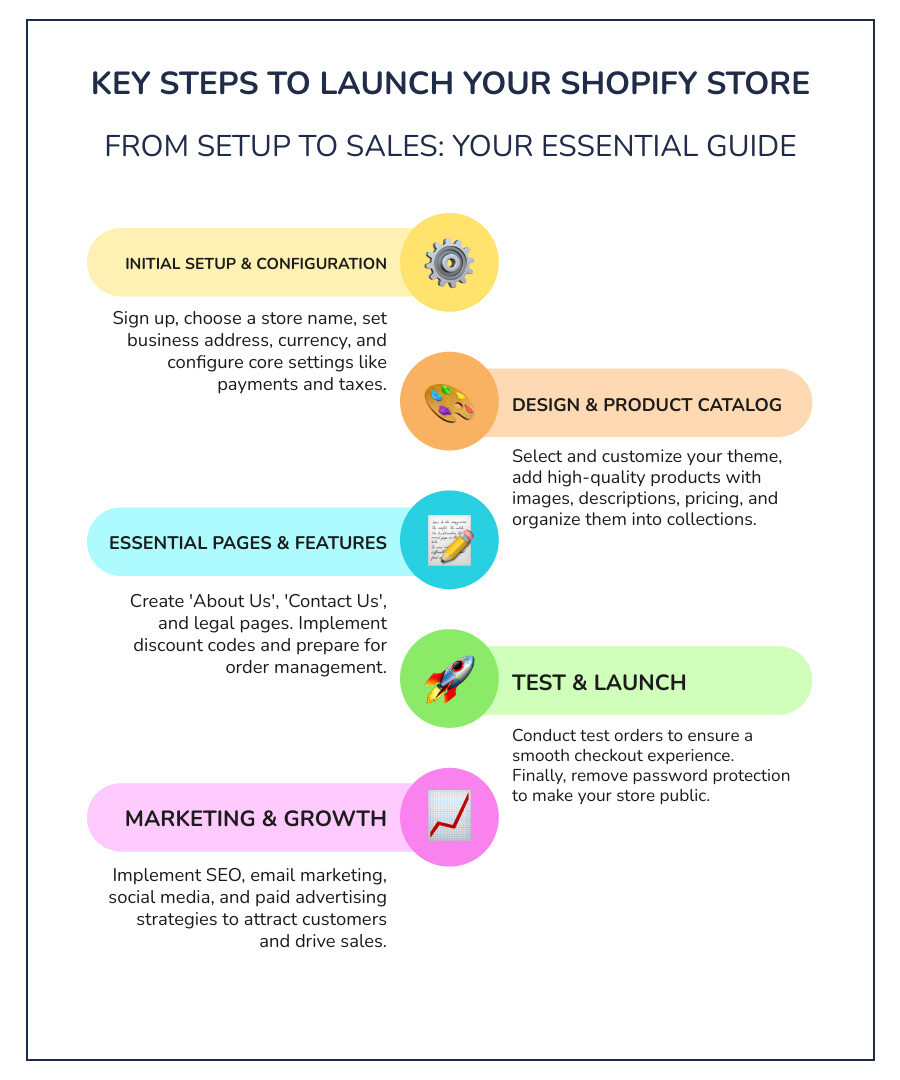
Key Steps to Launch Your Shopify Store:
- Sign up for Shopify and complete initial setup (store name, business address, currency)
- Choose and customize a theme from the Shopify Theme Store
- Configure settings for payments, shipping, and taxes
- Add products with titles, descriptions, images, pricing, and variants
- Create collections to organize products (manual or automated)
- Build essential pages (About, Contact, Policies, FAQ)
- Set up payment providers and customize your checkout
- Test your store with test orders before going live
- Remove password protection to make your store public
- Market your store through SEO, email, and social media
Shopify powers millions of online stores worldwide, from startups to established businesses. The platform handles core needs: website hosting, payments, inventory management, shipping, and basic marketing. With over 8,000 apps available and 24/7 support, you can shape the store your business needs.
Whether you're launching your first store or migrating from another platform, this guide walks through the technical setup, key choices, and growth tactics that lead to steady sales. We focus on the details that matter in day-to-day work: payment processing, shipping configurations, product organization, and conversion tactics that turn browsers into buyers.
I'm Steve Pogson, and I've spent over two decades helping businesses increase revenue from their Shopify stores through practical implementation and careful technical setup. This shopify guide draws from our work with leading brands here at First Pier, where we've handled everything from complex migrations to multi-channel growth plans.
Common shopify guide vocab:
Store Setup and Configuration
Starting an online store can feel overwhelming, but with the right guidance, it becomes a clear, step-by-step process. Shopify is known for its user-friendliness, making it a popular choice for aspiring entrepreneurs and established businesses alike. Here, I'll walk you through the essential setup and configuration steps.
Steps to Set Up Your Store
My journey with Shopify often begins with the initial sign-up process. You can start for free by visiting www.shopify.com/signup and taking advantage of their 14-day free trial. This trial period is a great opportunity to explore the platform without any commitment. After you register, Shopify provides an initial setup guide with step-by-step tutorials for key tasks. I often advise my clients to print the setup checklist to track their progress, ensuring no crucial step is missed.
One of the first decisions you'll make is choosing a store name. I always recommend selecting something short, memorable, and original. It's also wise to consider your future product offerings; a name that's too specific might limit you later. For instance, if you start with "Simply Matcha," but later want to sell other types of tea, the name might feel restrictive.
Once you have your account and a name, you'll enter your business address. For those operating out of Portland, ME, this helps Shopify tailor certain settings. You'll also set your default currency and weight units. These details are important for accurate product listings and transactions. If you need assistance with the foundational setup, my team at First Pier offers Shopify Setup services to get your store off to a strong start.
Configuring Store Settings
After the initial setup, I guide my clients through configuring essential store settings. This is where you lay the groundwork for smooth operations.
Payment Providers: This is crucial for accepting customer payments. Shopify Payments is a popular choice because merchants who use it do not pay transaction fees for payments processed through Shopify Payments, Shop Pay, or PayPal Express. You can activate Shopify Payments directly from the "Settings" menu under "Payments." Depending on your Shopify plan, transaction fees can range from 2.9% to 2.4% plus $0.30 per transaction for other payment gateways.
Shipping Settings: Setting up shipping correctly prevents headaches down the line. Shopify automatically adds domestic and international shipping zones. You'll define your shipping rates, which can vary based on destination, product weight, or order value. For local customers, consider offering local delivery and pickup options, which can be a valuable service. My team provides Shopify Shipping Optimization Support to help ensure your shipping strategy is efficient and cost-effective.
Tax Settings: Handling sales tax can be complex, but Shopify simplifies it. The platform can automatically calculate most common sales taxes. You can visit the Shopify Help Center to learn more about Shopify tax collection or consult a tax professional for specific guidance. For businesses in Portland, ME, understanding local and state tax regulations is key.
Choosing and Customizing a Shopify Theme
Your store's theme is its storefront, and it plays a significant role in customer experience. The Shopify Theme Store offers hundreds of free and paid themes.
Shopify itself provides free themes, with "Dawn" being a popular and versatile option. The Dawn theme is designed for speed and flexibility, making it a great starting point for many businesses. When selecting a theme, I always emphasize ease of use and design options. You want a theme that is straightforward to edit and looks great with minimal effort.
Once you've chosen a theme, you can customize it using the theme editor. This tool allows you to adjust colors, fonts, layouts, and content blocks to match your brand's identity. Around 59% of web sales come from mobile devices, so ensuring your theme is mobile-responsive is not just a preference, it's a necessity. If your store doesn't work well on smartphones, you could lose sales. For businesses seeking a unique and highly optimized design, First Pier offers eCommerce UX Design services to craft a compelling user experience.
Building Your Product Catalog
The heart of any online store is its products. Effectively showcasing your offerings is crucial for attracting and converting customers.
Adding Products to Your Shopify Store
Adding products is a core task in your shopify guide. From your Shopify admin, you steer to "Products" and click "Add product." This is where you'll input all the details that inform and entice your customers.
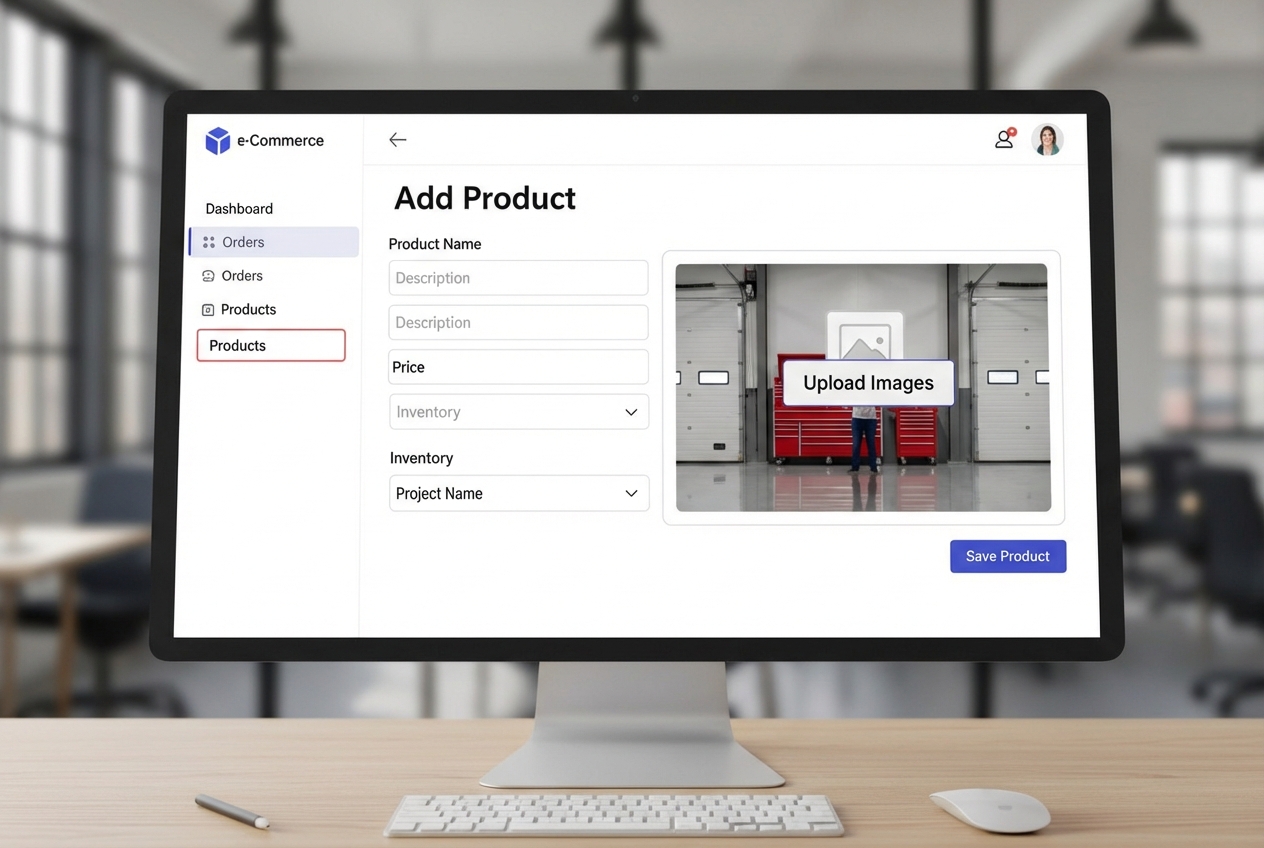
Product Titles and Descriptions: Your product title should be clear and concise. For descriptions, I advise focusing on benefits first, then features. Think about what problems your product solves or how it improves a customer's life. High-quality product descriptions are an opportunity to connect with your audience.
High-Quality Images: Visuals are paramount in e-commerce. Use clear, high-resolution images that showcase your product from multiple angles. Consider using photos on plain backgrounds to highlight details, like ReFramed does, and lifestyle photos to help customers envision the product in their own lives. Shopify even offers AI photo editing tools to help you create professional-looking images.
Pricing and Inventory: Set your product's price, and consider using a "compare-at price" to show potential savings, a common conversion strategy. You'll also track inventory, using Stock Keeping Units (SKUs) for efficient management. If your products come in different sizes or colors, you'll use product variants to manage these options effectively.
Organizing Products with Shopify Collections
Once you have products, organizing them makes browsing easier for your customers. This is where Shopify collection pages come in. A collection is a group of similar products, allowing customers to find what they're looking for quickly. For example, a fashion store might have collections for "Womens," "Mens," or "Accessories."
Integrating collections into your store's menu navigation is essential for good user experience. This also helps with SEO, as well-structured categories can improve your store's visibility in search results.
Manual vs. Automated Collections
Shopify offers two ways to create collections:
- Manual Collections: These are static groups of products where you manually add or remove items. This works well for curated collections or small product catalogs that don't change frequently.
- Automated Collections: These are dynamic, using condition-based rules to automatically include products that meet specific criteria. For example, you can set a rule to include all products with a certain product tag (e.g., "summer sale"), product type, vendor, or even price range. This saves time and keeps your collections updated as you add new products.
Essential Pages and Store Features
Beyond your product catalog, certain pages and features are vital for building trust, providing information, and driving sales.
Creating Key Store Pages
Every Shopify store needs a set of essential pages. These pages provide important information to your customers and can help build credibility.
- About Us Page: This is your chance to tell your brand's story, share your mission, and connect with customers on a personal level.
- Contact Us Page: Make it easy for customers to reach you. Include contact details, a form, and consider options like live chat. I recommend setting up a dedicated support email address, such as
support@yourwebsite.com. - Legal Pages: These are non-negotiable. You'll need a Refund Policy, a Privacy Policy, and Terms of Service. Shopify offers templates to help you generate these. A clear Shipping Policy template is also important, especially if you have specific delivery timelines or international shipping considerations.
Once created, ensure these pages are easily accessible through your main menu navigation or footer navigation.
Using Discount Codes
Discount codes are a powerful tool for driving sales and attracting new customers. Shopify makes it simple to create various types of discounts:
- Percentage-based: Offer a percentage off an order (e.g., 10% off).
- Fixed amount: Provide a specific dollar amount off (e.g., $10 off).
- Free shipping: A highly effective incentive. Research suggests offering free shipping on orders over a certain threshold (e.g., $50) can increase average order value.
You can also set up automatic discounts that apply at checkout, define usage limits (e.g., one per customer), and specify active dates for promotions.
Managing Orders and Fulfillment
Once sales start rolling in, efficient order management and fulfillment become paramount.
The Orders page in your Shopify admin provides an overview of all customer purchases. Here, you can monitor the order status, process payments, and manage fulfillment.
Fulfilling Orders: Fulfillment is the process of preparing and delivering a customer’s order. You can choose between manual or automatic fulfillment based on your business model. For example, if you're dropshipping, fulfillment might be automated. For physical products you store, you'll manually mark items as fulfilled after shipping. You can also handle partial fulfillment if an order has multiple items shipping separately. It's often helpful to print packing slips directly from the order page.
Testing Orders: Before launching your store to the public, I always emphasize the importance of placing a test order. This allows you to experience the checkout process from a customer's perspective, ensuring everything works smoothly. You can use Shopify's Bogus Gateway for simulated transactions or place a real order and then refund it.
Here at First Pier, our Shopify Shipping Optimization Support helps businesses refine their fulfillment processes to be as efficient and cost-effective as possible.
Growing Your Store: Apps, Marketing, and Education
A successful Shopify store doesn't just run itself; it grows through strategic improvements and continuous learning.
Recommended Shopify Apps
The Shopify App Store is a treasure trove of tools that extend your store's functionality, with thousands of apps available to help manage your store, fulfill orders, and drive traffic. I often recommend a few key types of apps for new stores:
- Product Reviews: Apps like YotPo help you collect and display customer reviews, which are crucial for building trust and social proof. YotPo is free for up to 50 orders per month.
- Email Marketing: Tools like Sumo can help you capture email subscribers, reduce abandoned carts, and grow your email list, which is vital for long-term customer engagement.
- Image Compression: Apps like Crush.pics automatically compress your product images without sacrificing quality, significantly improving your site's loading speed.
- Dropshipping: If you're exploring a dropshipping model, apps like Oberlo integrate directly with AliExpress, automating product sourcing and order placement.
Marketing Your Shopify Store
Getting your store noticed requires a solid marketing strategy.
SEO Basics: Search Engine Optimization (SEO) helps your store appear higher in search results. Start by optimizing your product titles and descriptions with relevant keywords. Pay attention to your meta titles and descriptions, keeping them concise (max 60 characters for titles, 160 for descriptions) and compelling. For in-depth SEO strategies, First Pier offers specialized SEO services.
Email Marketing: Email is widely recognized as one of the most effective ways to generate sales. Build your email list from day one and use it to send welcome series, abandoned cart reminders, and promotional campaigns. My team provides Email & SMS Marketing services to help businesses craft engaging and converting campaigns.
Social Media Marketing: Identify where your target audience spends time online and establish a presence there. Create valuable content that resonates with your followers. For example, MADE Everyday uses YouTube videos to attract customers interested in their product line.
Paid Advertising: Consider platforms like Google Shopping and Facebook Marketing to run targeted ad campaigns. Paid advertising can quickly drive traffic to your store. First Pier's Paid Search & SEM services can help you create efficient and effective paid campaigns.
Using Shopify's Educational Resources
Shopify provides a wealth of educational resources to help merchants succeed:
- Shopify Academy: Offers free courses and learning paths covering everything from store setup to advanced marketing.
- Shopify Help Center: A comprehensive knowledge base for troubleshooting and learning specific features.
- Shopify Community: A forum where you can connect with other merchants, ask questions, and share insights.
- Shopify Blog: Features articles on e-commerce trends, business strategies, and product ideas.
These resources are invaluable for continuous learning and problem-solving as your business grows.
Frequently Asked Questions about Shopify
I often encounter similar questions from new Shopify merchants. Here are some of the most common ones I address:
How do I choose the right Shopify plan?
Shopify offers several plans to suit different business needs. The primary differences often lie in transaction fees and access to advanced features.
- Basic Shopify plan: This is the ideal starting point for most new stores. It costs $39/month and is generally recommended unless you anticipate over $20,000 per month in sales.
- Shopify plan: Offers lower transaction fees and additional features compared to the Basic plan.
- Advanced Shopify plan: Designed for larger businesses with even lower transaction fees and advanced reporting capabilities.
The main difference between plans is your cost per sale. For example, the Basic Shopify plan has a 2.9% + $0.30 transaction fee, while higher plans offer progressively lower rates. I always advise starting with the Basic plan and upgrading as your sales volume justifies the cost. For businesses with significant scale, our Shopify Plus Optimization services can help tailor the platform to enterprise-level requirements.
How much does it cost to start a Shopify store?
The cost to start a Shopify store can vary widely depending on your approach. Here’s a breakdown of potential expenses:
- Monthly Plan: The Basic Shopify plan costs $39/month. Shopify often offers introductory promotions, such as a 3-day free trial followed by $1 for the first 30 days.
- Transaction Fees: As mentioned, these vary by plan and payment gateway.
- Domain Name: A custom domain name typically costs $10-$20 per year.
- Theme Costs: Shopify offers many free themes, but premium themes can cost $180 or more (one-time purchase).
- App Costs: While many essential apps have free tiers, premium apps can range from $0-$250+ per month depending on their functionality.
- Product Photography: You can DIY with a smartphone and AI editing, or invest in professional photoshoots.
- Inventory: This can range from $0 for dropshipping to thousands of dollars for holding your own stock.
Many entrepreneurs start with minimal investment, using free themes and focusing on organic marketing, then reinvesting early profits to fund growth.
Do I need a business license to sell on Shopify?
This is a common and important question. The requirement for a business license varies significantly by your location and the type of products you sell.
- Local Regulations: Many small online sellers start as sole proprietors without formal registration. However, as your business grows, you may need to obtain a business license or permit.
- Business Structure: Depending on your business structure (e.g., sole proprietorship, LLC, corporation), you might have different registration requirements. For example, if your store name differs from your legal business name, you might need to file a "Doing Business As" (DBA).
- Tax ID Numbers: You may also need a tax ID number for paying federal and state taxes.
I always recommend consulting with local experts, such as a business attorney or accountant, in Portland, ME, to understand the specific legal and tax requirements for your online store. The Small Business Administration provides resources on registering your business.
Conclusion: Your Next Steps
Launching and growing a Shopify store is an exciting venture that requires dedication and continuous effort. This shopify guide has covered the essential steps, from initial setup and product catalog creation to marketing and order management.
Building a profitable online store takes time. As community discussions often highlight, expecting immediate results is a common mistake. Instead, focus on consistent improvement over months and years. Regularly review your analytics, gather customer feedback, and adapt your strategies.
Here at First Pier, we've helped countless brands and boutiques build high-performance online businesses on Shopify. Our expertise in Shopify development and optimization ensures our clients have a stable and feature-rich platform. Whether you need assistance with complex migrations, UX design, or advanced marketing, my team is ready to provide expert assistance. We pride ourselves on being an award-winning Shopify eCommerce Agency, dedicated to helping businesses like yours thrive online.





.png)
.png)

