


Why Understanding Shopify Paid Search Attribution Matters for Your Bottom Line
Shopify Paid Search refers to paid advertising campaigns that drive traffic to your Shopify store through platforms like Google Ads, Facebook, Instagram, and other channels. Here's what you need to know:
- Search Engine Marketing (SEM): Paid ads on Google and Bing that appear when customers search for products
- Pay-Per-Click (PPC): You only pay when someone clicks your ad
- Social Media Ads: Paid campaigns on Facebook, Instagram, Pinterest, and TikTok
- Retargeting: Ads shown to people who previously visited your store
- Cost: Google Ads CPC ranges from $1 to $50+ per click in competitive niches; Facebook Ads typically cost $0.50 to $5 per click
You've invested in paid ads, but your dashboard shows sales coming from "Direct" traffic. The problem is, that's not where those customers actually found you. Your Facebook ad or Google Shopping ad did the work, but Shopify's default attribution gives credit to the last click before a purchase. This mix-up costs you real money because you're making budget decisions on incomplete data.
Advertisers spent a massive $237.86 billion on Google ads in 2023. Yet many Shopify store owners are flying blind, unsure which ads actually drive sales. The result is wasted ad spend on channels that seem effective but aren't, while under-investing in the campaigns that truly work.
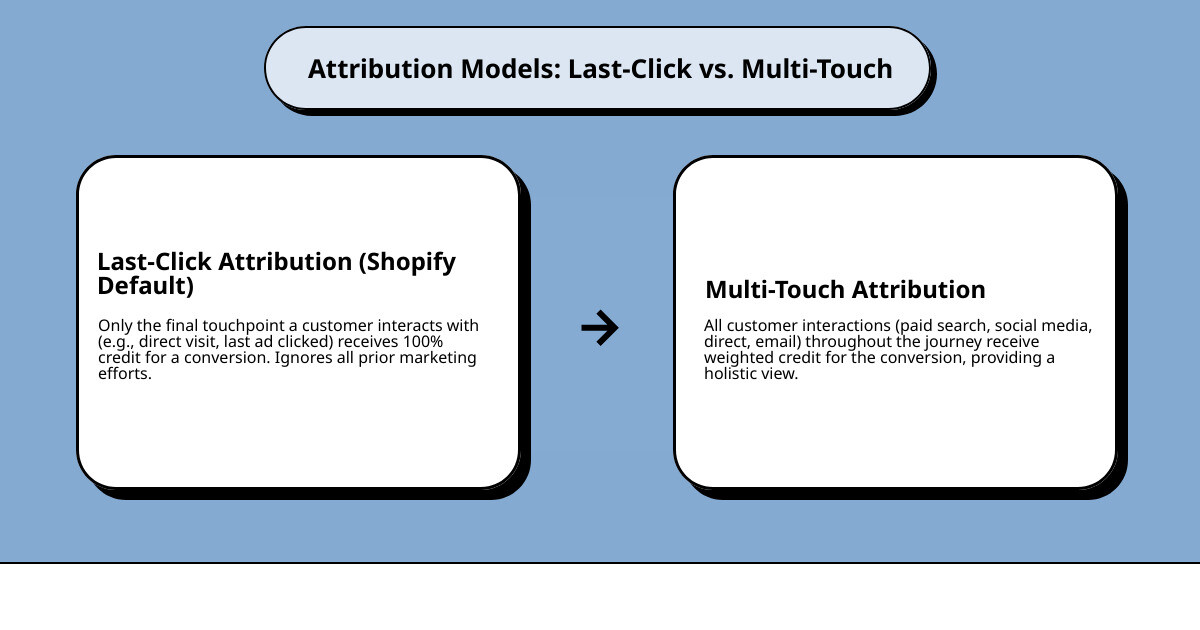
Attribution issues in Shopify happen because the platform uses a last-click model by default. If a customer sees your Facebook ad, researches on Google, and then types your URL directly to buy, Shopify credits the sale to "Direct" traffic. Your campaigns that did the heavy lifting get zero credit.
First Pier has helped brands like Wyman's Blueberries and Hyperlite Mountain Gear solve their Shopify Paid Search attribution challenges and grow their ad campaigns profitably. Over two decades in e-commerce, I've seen how proper attribution tracking turns marketing budgets from guesswork into growth engines.
Understanding Paid Search for Your Shopify Store
When I talk about Shopify Paid Search, I'm referring to a powerful set of strategies that can bring immediate, targeted traffic to your online store. Unlike organic efforts that build momentum over time, paid advertising can put your products in front of motivated buyers almost instantly. It's a fantastic way to quickly gain visibility and drive sales.
Paid advertising is about paying to place your ads on digital platforms. This often takes the form of Pay-Per-Click (PPC), where you're only charged when someone clicks on your ad. This model ensures that you're paying for engaged traffic, making it a highly accountable marketing tactic.
The beauty of paid search for Shopify stores lies in its ability to target specific audiences. You can reach people based on their search queries, demographics, interests, and even their past online behavior. This precision means your ads are shown to those most likely to be interested in what you're selling.
If you're curious to learn more about how I can help your store with paid search, you can find more information about our paid search services here: More info about our paid search services.
Here's a quick look at some of the main platforms and their features for e-commerce:
| Feature | Google Ads | Meta Ads (Facebook & Instagram) | Pinterest Ads |
|---|---|---|---|
| Primary Goal | Captures high-intent searchers | Builds brand awareness, drives discovery | Inspires purchases, visual discovery |
| Ad Types | Search, Shopping, Display, Video | Image, Video, Carousel, Collection, Stories | Standard Pins, Video Pins, Shopping Ads |
| Targeting | Keywords, demographics, location, audience lists | Demographics, interests, behaviors, custom audiences | Keywords, interests, demographics, actalikes |
| Cost Model | CPC (Cost-Per-Click) | CPC, CPM (Cost-Per-Mille), CPA (Cost-Per-Acquisition) | CPC, CPM |
| Strengths | High purchase intent, immediate visibility | Detailed audience targeting, visual engagement | Aspirational purchases, strong for lifestyle brands |
| Considerations | Competitive CPCs, requires strong keyword strategy | Ad fatigue, requires interesting creative | Niche audience, visual-first content is key |
What is Search Engine Marketing (SEM)?
Let's explore Search Engine Marketing (SEM). SEM is a broad term that includes all efforts to gain visibility on search engine results pages (SERPs), including paid strategies (like PPC) and organic ones (SEO). However, today SEM often refers specifically to the paid side.
The primary difference is simple: with SEM, you pay for placement and get instant results. With SEO, you optimize your site to rank naturally, which takes time. Paid search results, marked with "Ad" or "Sponsored," typically appear at the top of a SERP.
My clients in Portland, Maine, often ask about the difference. I explain that SEM offers immediate visibility by allowing you to bid on relevant keywords. This focus on user intent is powerful. If someone searches for "women's running shoes," they're likely ready to buy, and a well-placed SEM ad can capture that interest. It's why advertisers spent an astounding 237.86 billion dollars on Google ads in 2023.
Key Platforms for Shopify Stores
Choosing the right platforms for your paid search efforts is crucial. Each has unique strengths and audiences, helping you guide your budget effectively.
Google Ads: This is the king of intent-driven campaigns, as most online shopping trips begin with a search. It gives you access to a massive pool of users across Google Search, YouTube, and partner networks. Google Shopping Ads are fantastic for e-commerce, displaying product images and prices directly on the SERP.
Meta Ads (Facebook & Instagram): While not traditional "search," Meta's platforms are indispensable. They excel at audience targeting based on demographics, interests, and behaviors. You can reach potential customers who might not even know they need your product yet with visually appealing ads.
Microsoft Advertising (formerly Bing Ads): Don't overlook this platform. It can be a cost-effective alternative to Google Ads, especially if your target audience is older or professional. It allows you to run search ads on Bing, Yahoo, and AOL and can be a great opportunity for B2B e-commerce sites.
Pinterest Ads: This platform is a visual powerhouse, especially for lifestyle, home decor, and fashion brands. It's great for aspirational purchases, as many users buy products they see on the platform. Pinterest Ads blend seamlessly into users' feeds.
TikTok Ads: If your audience is younger (Gen Z and millennials), TikTok is a must-consider. It's ideal for brands using short video ads and influencer marketing. For direct-to-consumer (D2C) businesses, it can be a direct path to sales.
For those looking to expand their reach beyond search engines, I offer specialized services. You can learn more about how I help businesses with their social media advertising here: More info about our paid social services.
How Ad Auctions and Quality Score Work
Understanding ad auctions is key to success in Shopify Paid Search. You enter an auction every time a user's search triggers your keywords. It's not a simple highest-bid-wins scenario.
The auction determines if your ad shows, its position, and how much you pay. With the Cost-Per-Click (CPC) model, you only pay when someone clicks. The actual CPC is influenced by your bid, competition, and your ad's Quality Score.
Google, for instance, considers your bid amount alongside your Quality Score and other factors. A higher bid doesn't guarantee the top spot if your ad isn't relevant.
So, what is Quality Score? It's Google's rating of the quality of your ads, keywords, and landing pages. A higher score typically leads to lower costs and better ad positions. It has three main parts:
- Expected Click-Through Rate (CTR): How likely are users to click your ad?
- Ad Relevance: How well does your ad match the user's search intent?
- Landing Page Experience: Is your landing page relevant, transparent, and easy to use?
If your ad copy is persuasive, your keywords are well-matched, and your landing page offers a great experience, you'll likely get a higher Quality Score. This can give you a discount on your CPC and improve your ad's visibility. For a more detailed explanation, I recommend checking out Google's explanation of Quality Score.
The Attribution Black Box: Why Shopify's Reports Can Be Misleading
Now, let's talk about the elephant in the room: attribution. I've seen countless Shopify store owners in Portland, Maine, scratch their heads over analytics reports that don't add up. They're pouring money into Shopify Paid Search, but their Shopify dashboard tells a different story about where sales are coming from. This is what I call the "attribution black box."

The issue stems from a common problem: last-click attribution. Imagine a customer's trip: they see your Facebook ad, later search for your brand on Google, and finally type your store's URL directly into their browser to buy. If your analytics only credit the last interaction, the initial touchpoints—the Facebook ad and Google search—get no credit. This creates data discrepancies and can lead to wasted ad budget because you aren't truly seeing what drives your sales. It's a real headache for anyone doing cross-channel marketing.
How Shopify's Default Attribution Works
By default, Shopify's reporting often operates on a last-interaction model. This means the credit for a conversion is usually given to the very last marketing channel a customer interacted with. So, if a customer saw your Instagram ad, then clicked a Google Shopping ad, and finally typed your URL directly, "Direct" traffic might get all the credit in Shopify's basic reports.
While Shopify does offer some built-in tracking, its standard reports can over-credit channels that happen to be the final touchpoint, while ignoring the critical role played by earlier interactions. This is frustrating when you know you're running effective social media ads that are generating interest, but the sales attribution doesn't reflect their contribution.
The Problem with a Last-Click Mentality
A last-click mentality in your reporting is like only praising the player who scores the goal, ignoring the team that set up the play. It leads to several critical issues for your Shopify Paid Search efforts:
- Ignoring Top-of-Funnel Efforts: Campaigns designed for brand awareness (often social media or display ads) are consistently undervalued. You might think they're not working and pull the budget from valuable brand-building activities.
- Misinformed Budget Decisions: If you only see "Direct" sales, you might waste money on non-existent "Direct" marketing efforts, while cutting back on the paid campaigns that are actually starting customer trips.
- Undervaluing Brand Awareness: Building a brand takes multiple exposures. If your reports don't show the full customer path, you'll miss how paid ads contribute to future direct sales by making customers aware of your brand in the first place.
I've seen this exact scenario play out for many clients. They come to me in Portland, Maine, wondering why their ad spend isn't translating into clear results, only to find their attribution model is hiding the true heroes of their marketing mix. This is why having a deeper understanding of your e-commerce analytics is so important. I can help you dig into this. You can find more information about our ecommerce analytics services here: More info about our ecommerce analytics services.
Your Step-by-Step Guide to Accurate Shopify Paid Search Tracking
Alright, enough with the problems. Let's talk solutions! Taking control of your Shopify Paid Search tracking means moving beyond Shopify's default reporting and embracing a more complete view of your customer's path. This is where tools like Google Analytics, coupled with smart tracking practices, become your best friends.
My goal for my clients is always to enable data-driven decisions. This means setting up conversion tracking that accurately reflects how each marketing touchpoint contributes to a sale. It’s about getting a clear, multi-channel attribution report that shows you the whole picture. This way, you can truly understand your Return on Ad Spend (ROAS) and optimize your campaigns effectively.
If you need help connecting all these dots, my team and I specialize in Shopify development to ensure your analytics are solid. You can find more information about our Shopify development services here: More info about our Shopify development services.
Step 1: Set Up Google Analytics 4 Correctly
The first and most critical step is to ensure your Google Analytics 4 (GA4) setup is correctly integrated with your Shopify store. GA4 is Google's latest analytics platform, built to handle complex customer paths across multiple devices and channels.
Here's what I ensure for my clients:
- Proper GA4 Setup: This involves creating a GA4 property and connecting it to your Shopify store. Verify that data is flowing correctly.
- Improved Ecommerce Tracking: This is where the magic happens. You need to configure GA4 to track e-commerce events like
view_item,add_to_cart,begin_checkout, andpurchasefor detailed insights. - Understanding Data Streams: GA4 uses data streams for different platforms (web, iOS, Android). Make sure your Shopify store is configured with a web data stream.
- Events vs. Pageviews: GA4 is event-based, meaning almost every user interaction is an event. Understanding and tracking custom events relevant to your business will give you a richer dataset.
As one digital marketer suggests, "Use your GA4 data to find your customer purchase timeline." This data is invaluable for optimizing your remarketing and paid search strategies.
Step 2: Use UTM Parameters for All Campaigns
UTM parameters are tags you add to your URLs that tell Google Analytics where your traffic is coming from. They are crucial for understanding the performance of your Shopify Paid Search campaigns. Without them, clicks from your ads might just show up as "Direct" or "Referral" traffic.
Here are the common UTM parameters I use:
utm_source: Identifies the origin of your traffic (e.g.,google,facebook).utm_medium: Identifies the medium (e.g.,cpcfor paid search,socialfor social media).utm_campaign: Identifies a specific campaign (e.g.,summer_sale_2024).utm_content: Distinguishes between similar content (e.g.,blue_banner,text_ad_A).utm_term: Identifies the keyword for paid search campaigns (e.g.,womens_running_shoes).
You can use URL builder tools to easily create these tagged links. Consistency in naming is key! For example: yourstore.com/product?utm_source=google&utm_medium=cpc&utm_campaign=summer_sale_2024.
These parameters work with website cookies and tracking pixels to give you a full picture of user behavior. If you want to learn more about tracking pixels and cookies, you can read more here: What are tracking pixels and cookies?.
Step 3: Connect Your Ad Platforms Directly
While UTMs are great, many ad platforms offer direct integrations with Shopify for even richer data. I always recommend my clients connect their ad accounts directly to their Shopify store and GA4.
- Google & YouTube Channel: Shopify offers a Google & YouTube sales channel that simplifies connecting your store to Google Merchant Center and Google Ads. This allows for features like automated Google Shopping feeds and improved conversion tracking.
- Meta (Facebook & Instagram) Channel: Similarly, the Facebook & Instagram sales channel in Shopify allows you to install the Meta Pixel easily. This pixel is crucial for tracking events, running dynamic ads, and building custom audiences.
- Pixel Installation & Server-Side Tracking: Beyond basic pixel installation, I help clients set up server-side tracking (like Facebook's Conversions API). This sends data directly from your server to the ad platform, making it more reliable and less affected by browser tracking limits. This direct data sharing significantly improves your ad platform's reporting and optimization.
These direct connections give ad platforms real-time feedback on conversions, allowing their algorithms to optimize your Shopify Paid Search campaigns more effectively.
Beyond Paid Clicks: How SEO and Paid Search Work Together
It's tempting to view SEO and paid search as separate battles, but I see them as two sides of the same coin, especially for my Shopify clients in Portland, Maine. When combined, paid and organic strategies create a powerful combination that drives both immediate results and long-term growth. It's not about choosing one over the other; it's about making them work together.
Think of it this way: paid search gives you immediate traffic, while SEO builds your brand's authority and sustainable traffic over time. This approach leads to better keyword data, more effective retargeting, and increased brand visibility. A blend of organic and paid search campaigns can balance immediate impact with long-term sustainability.
If you're looking to strengthen your organic presence, I also offer specialized SEO services. You can find more information about our SEO services here: More info about our SEO services.
Using Paid Data to Inform Your SEO Strategy
One of the best things about running Shopify Paid Search campaigns is that they generate valuable data you can use to boost your SEO. It's like having a real-time testing lab for your organic efforts.
Here's how I help my clients use paid data for SEO:
- High-Performing Keywords: Your paid campaigns quickly reveal which keywords drive clicks and conversions. These "money keywords" should be prioritized in your SEO strategy for content and product descriptions.
- Ad Copy Testing: Paid ads are perfect for A/B testing headlines and descriptions. The ad copy with the highest click-through rates (CTR) in paid campaigns will likely resonate with your organic audience, too. Use these insights to refine your website's meta descriptions.
- Landing Page Optimization: The landing pages that perform best for your paid ads (those with high conversion rates) are excellent candidates for organic optimization. You already know they convert traffic, so make sure they're also optimized for relevant organic keywords.
- Finding New Content Opportunities: Paid search can uncover long-tail keywords you hadn't considered. If a specific query performs well, it signals a user need you can address with a blog post or guide to capture organic traffic.
Shopify itself offers built-in SEO tools to help with some of these optimizations. You can explore them here: Shopify's built-in SEO tools.
Creating a Complete Marketing Funnel
To make your Shopify Paid Search and SEO efforts work together, you need to think about your entire marketing funnel. This means understanding how customers move from first hearing about your brand to making a purchase.
- Top-of-Funnel (Awareness): This is where you introduce your brand. Paid social media ads (Facebook, Instagram) and display ads are excellent here. Organic content like blog posts also plays a crucial role.
- Middle-of-Funnel (Consideration): At this stage, customers are actively researching. Paid search ads (Google Search, Shopping) are powerful because they capture high-intent users. Organic product pages and reviews also help.
- Bottom-of-Funnel (Conversion): This is where the purchase happens. Highly targeted paid retargeting ads are incredibly effective here, reminding users of products they viewed. Organic efforts ensure your checkout process is smooth and trustworthy.
Crucially, you can use paid ads to retarget organic visitors. If someone landed on your site through an organic search, a well-placed retargeting ad can nudge them towards conversion. This strategy increases conversion rates and helps build brand trust by reinforcing your presence.
Frequently Asked Questions About Shopify Paid Search
I often get asked some great questions about Shopify Paid Search. Here are a few common ones that I address with my clients:
What's the difference between advertising for my Shopify store and advertising on the Shopify App Store?
This is an important difference! When we talk about advertising for your Shopify store, we mean running campaigns on platforms like Google Ads or Meta Ads to attract customers to your products and drive sales on your website. This guide focuses on these campaigns.
Advertising on the Shopify App Store is for app developers. If you've built an app for Shopify merchants, you can buy ads within the App Store to help other merchants find and install your app. These ads operate on a Cost-Per-Click (CPC) model. Only eligible Shopify Partners and apps published in the App Store can purchase them.
How much should I spend on Shopify paid search?
There's no single "right" budget for Shopify Paid Search. It depends on your goals, industry, and target Return on Ad Spend (ROAS).
For new campaigns, I recommend starting with a small, testable budget, such as $20 to $50 per day. This allows you to gather data and see what works without breaking the bank. The key is to focus on your ROAS—are you getting more back than you're putting in? If your campaigns are profitable, you can gradually increase your spend. It's about being flexible and responsive to your data.
Can I run paid search campaigns myself?
Yes, absolutely! Many Shopify store owners start by managing their own Shopify Paid Search campaigns. Platforms like Google Ads and Meta Ads offer user-friendly interfaces and plenty of resources to get started.
However, managing successful campaigns takes significant time to learn the platforms, conduct keyword research, create ad copy, analyze data, and continuously optimize. This can be a steep learning curve. This is why many choose to hire a specialist or an agency like First Pier. We can manage your campaigns, saving you time and often improving results through our expertise.
To Sum Up: Take Control of Your Ad Spend
Working through the complexities of Shopify Paid Search can feel like a maze, especially with attribution models that can hide the true impact of your marketing. But by taking proactive steps, you can gain clarity and control.
My advice to all Shopify store owners is this: prioritize accurate attribution. Accept a data-driven strategy by setting up Google Analytics 4 correctly and consistently using UTM tracking for all your campaigns. Connect your ad platforms directly to your Shopify store to ensure data flows smoothly. And remember, your paid search efforts shouldn't live in a silo; combine them with your SEO strategy to build a complete marketing approach.
By understanding where your sales truly come from, you can invest your marketing budget more effectively and grow your business with confidence. If you find yourself needing an expert hand to set up proper tracking and manage your campaigns, the experts at First Pier are here to help.





.png)
.png)

