



Summary
- Shopify automatically generates XML sitemap files for all stores, listing products, collections, pages, and blog posts.
- The primary sitemap index file is located at
yourdomain.com/sitemap.xmland links to child sitemaps categorized by content type. - Sitemaps are crucial for SEO, guiding search engine crawlers to efficiently find and index a store's content.
- While Shopify sitemaps update dynamically, direct manual editing is not supported; content inclusion can be influenced via
noindextags. - Submitting your sitemap to Google Search Console and Bing Webmaster Tools is essential for optimal search engine visibility and monitoring.
Your Shopify sitemap acts as a roadmap for search engine crawlers. Without it properly submitted and monitored, Google may miss important pages or take longer to find new products. For stores with hundreds or thousands of products, this becomes even more crucial. The sitemap tells search engines which pages matter most, when they were last updated, and how often they change.
Many store owners assume their sitemap is working correctly simply because Shopify generates it automatically. But there's more to it. You need to verify your store with search engines, submit the sitemap URL, and regularly check for errors that could prevent your pages from being indexed. Issues like password-protected stores, incorrect domain properties, or pages excluded from the sitemap can quietly hurt your organic traffic.
I'm Steve Pogson, and I've spent over two decades helping e-commerce businesses grow through technical SEO and Shopify optimization. At First Pier, we've helped brands ensure their Shopify sitemap and overall site structure work together to drive maximum search visibility and organic growth.
What a Sitemap Is and Why It Matters for SEO
At its core, a sitemap is a file that lists all the important pages on your website. Think of it as a carefully organized directory for search engine crawlers. It helps them easily steer your website, understand its architecture, and, most importantly, find all your content. This structured list of URLs provides search engines like Google and Bing with essential information about your site's pages, their relationships, and how frequently they change. This in turn helps crawlers do their job more efficiently.
For an e-commerce business on Shopify, having a well-managed Shopify sitemap is not just a nice-to-have; it's fundamental for SEO. Without it, search engines might miss pages, especially on larger sites with many products or complex navigation. Sitemaps ensure that every product, collection, page, and blog post you want indexed is presented clearly to the search engines. This proactive approach to content findability means your site's URLs are crawled more often, potentially leading to better rankings and quicker indexing of new content. As the experts behind sitemap.xml files at Google explain, sitemaps make it easier for search engines to find your site’s content.
It's worth noting the distinction between the two main types of sitemaps:
| Feature | XML Sitemap | HTML Sitemap |
|---|---|---|
| Purpose | Primarily for search engine crawlers | Primarily for human users |
| Format | XML (Extensible Markup Language) | HTML (HyperText Markup Language) |
| Content | List of URLs for search engines to crawl | List of important pages for user navigation |
| SEO Impact | Direct impact on crawlability and indexing | Indirect impact through improved user experience |
| Location | yourdomain.com/sitemap.xml | Often a pages/sitemap or similar URL |
| Shopify | Automatically generated | Must be manually created (or via an app) |
The Role of an XML Sitemap
An XML sitemap acts as a roadmap for search engines. It doesn't guarantee higher rankings, but it does ensure that search engines are aware of all the pages you consider important. This is particularly valuable for e-commerce sites, where products might be dynamically generated or deep within the site's structure.
Here's how an XML sitemap helps:
- Roadmap for Crawlers: It guides search engine bots, ensuring they do not overlook any important pages that might not be easily findable through internal linking alone.
- Page Hierarchy: It helps search engines understand the structure and hierarchy of your website, indicating which pages are most important.
- Update Frequency: It can suggest how often a page is likely to change, prompting crawlers to revisit frequently updated content, like new product listings or blog posts, more regularly.
- Canonical Signals: Sitemaps can provide canonical signals to Google, helping to prevent issues with duplicate content by specifying the preferred version of a URL.
- Improved Indexing Speed: For new websites or sites with frequently updated content, a sitemap helps search engines find and index new or changed pages faster. This means new products or blog posts can appear in search results sooner.
How Shopify Automates Sitemap Generation
One of the great advantages of using Shopify is that it takes much of the guesswork out of sitemap management. Your Shopify sitemap is automatically generated and updated. This means you don't have to manually create or maintain an XML file every time you add a new product or page.
Here's what I've learned about how Shopify handles sitemaps:
- Automatic Creation: Shopify stores automatically generate a
sitemap.xmlfile. This file contains links to all your products, primary product images, pages, collections, and blog posts. It's ready as soon as you publish your website. - Dynamic Updates: The sitemap files are automatically updated whenever you add, remove, or modify content on your Shopify online store. This includes new webpages, products, collections, images, or blog posts. This dynamic update is a huge time-saver for busy merchants.
- Included Content Types: Shopify's sitemap includes any product, collection, page, or article with a status set to 'active' and associated with the 'online store' sales channel.
- Excluded Content: By default, Shopify's
robots.txtfile (which is also automatically generated) refers to your sitemap. This file also instructs search engines on which parts of your site they should or shouldn't crawl. Shopify'srobots.txtrestricts access to certain URLs, like those containing a '+' symbol in collection or blog URLs. It also typically excludes pages like/cartor/contactfrom being crawled, as these usually have no SEO value.
Finding and Understanding Your Sitemap's Structure
To effectively manage your online presence, you first need to know where your Shopify sitemap lives and what it contains. It's a bit like knowing the layout of your own home – essential for getting around!
How to Locate Your Shopify Sitemap File
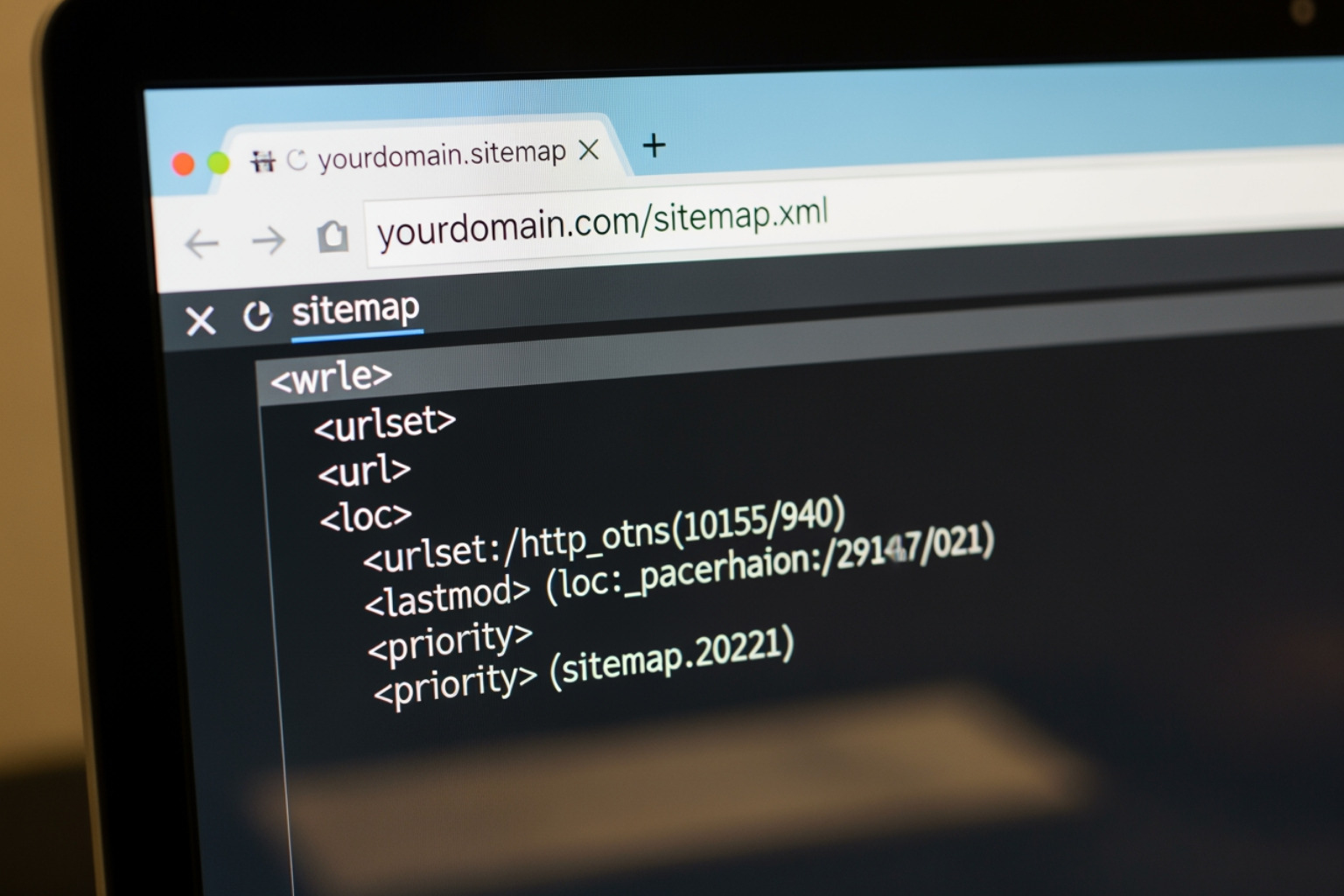
Finding your Shopify sitemap is quite straightforward. Shopify automatically generates and hosts it at a predictable location:
- URL Structure: Your main sitemap file will always be found by appending
/sitemap.xmlto your store's primary domain. - Example URL: If your store's domain is
www.myawesomestore.com, you can view your sitemap by navigating tohttps://www.myawesomestore.com/sitemap.xmlin your web browser.
Just type that URL into your browser's address bar, and you'll see the sitemap index file. It might look a bit like code, but don't worry, it's meant for machines, not for me or you to read directly in an aesthetically pleasing way.
The Parent and Child Sitemap Structure
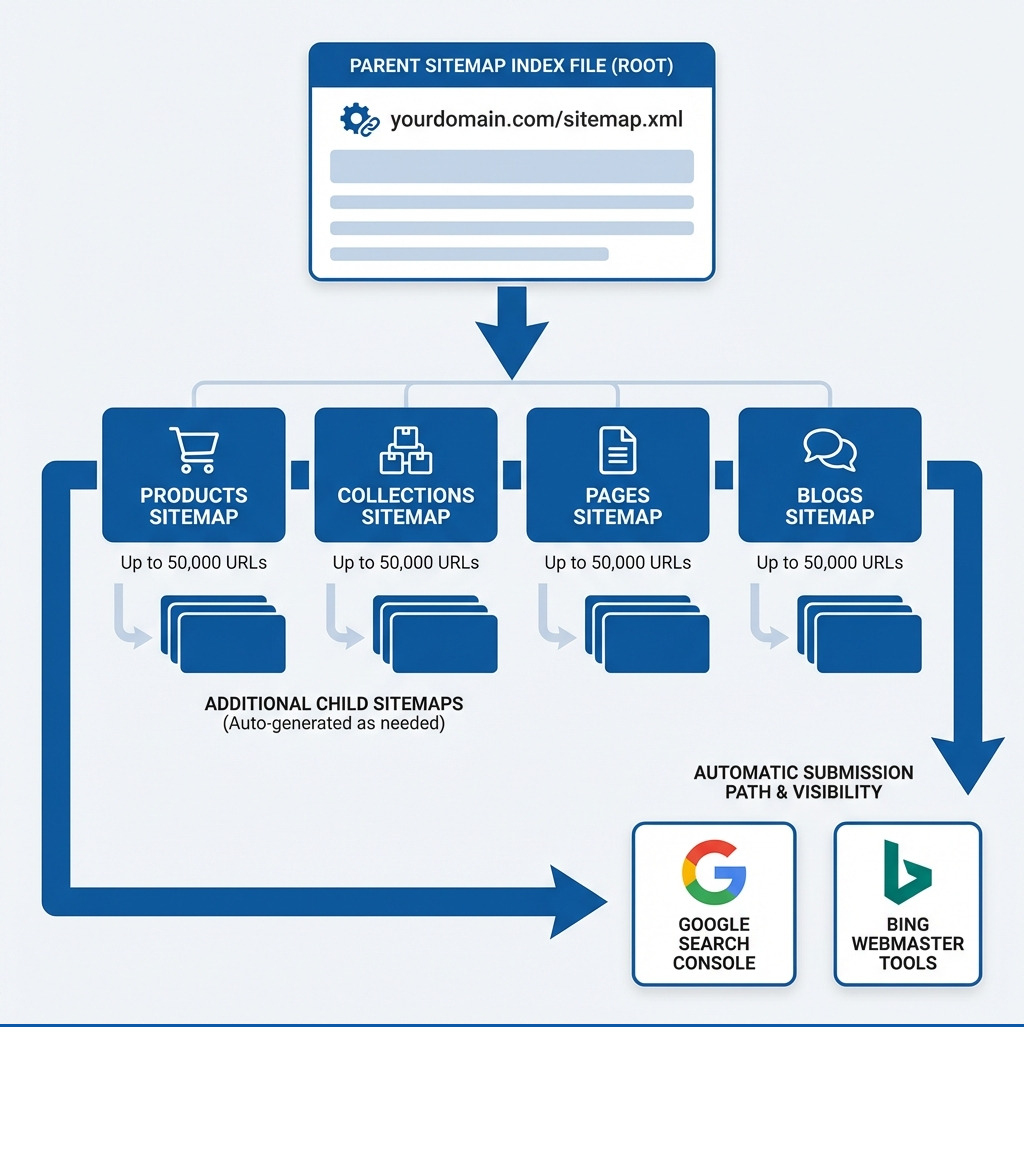
When you view your sitemap.xml file, you'll likely see what's called a sitemap index file. This is a parent sitemap that contains links to several other, more specific sitemaps. Think of it as a table of contents for your entire website. As explained by Google's guidelines on sitemap index files, this structure helps manage larger sites by breaking them into smaller, more manageable parts.
A typical Shopify sitemap index file usually includes four links to child sitemaps, categorized by page type:
- Products Sitemap: This child sitemap (
sitemap_products_1.xml) lists all your product pages, including their URLs, the last modification date, change frequency, and information about the primary product image. It's crucial for getting your inventory indexed. - Collections Sitemap: This (
sitemap_collections_1.xml) contains URLs for all your collection pages. These are important for category-based browsing and SEO. - Pages Sitemap: Your static pages, like "About Us," "Contact," or "FAQ," are listed here (
sitemap_pages_1.xml). - Blogs Sitemap: This (
sitemap_blogs_1.xml) includes all your blog posts, which are vital for content marketing and driving organic traffic.
URL Limits and Pagination for Large Stores:
Shopify manages these child sitemaps efficiently, especially for larger stores. Each XML sitemap has certain limitations: it cannot be larger than 50 MB uncompressed and cannot contain more than 50,000 URLs. If any of your child sitemaps (for example, your products sitemap) exceeds 5,000 URLs, Shopify automatically creates additional child sitemaps to accommodate the extra pages. So, you might see sitemap_products_2.xml, sitemap_products_3.xml, and so on. This ensures all your content remains findable by search engines, regardless of your store's size.
Submitting and Managing Your Shopify Sitemap
Generating a sitemap is only half the battle; the other half is making sure search engines actually know about it. Submitting your Shopify sitemap to search engines is a proactive step that tells them, "Hey, I've got new content here, come check it out!" This direct communication helps ensure your pages are crawled and indexed more efficiently.

This process is about more than just getting listed; it’s about establishing clear communication with search engines and monitoring how they interact with your store. It allows you to track crawl status, identify issues, and ensure your hard work in creating products and content pays off in search visibility. If you ever need a deeper dive into optimizing your presence online, remember we offer specialized SEO services here at First Pier.
Submitting to Google Search Console
Submitting your Shopify sitemap to Google Search Console (GSC) is a crucial step for any e-commerce business. GSC is a free tool from Google that helps me monitor my store's performance in Google Search results.
Here’s how I do it:
- Account Setup: First, you need a Google Search Console account. If you don't have one, you'll need to create one.
- Domain Verification: Before you can submit a sitemap, Google needs to confirm you own the Shopify store. I recommend using the 'URL prefix' property method and verifying with the HTML tag.
- Disable your store's password protection temporarily.
- In GSC, add your domain as a 'URL prefix' property.
- Select the 'HTML tag' verification method and copy the meta tag provided.
- In your Shopify admin, go to
Online Store > Themes. Find your current theme, clickActions > Edit code. - Open the
theme.liquidfile. Paste the copied meta tag immediately after the opening<head>tag. - Save the changes and then click 'Verify' back in GSC.
- Submitting the
sitemap.xmlURL: Once verified, go to GSC.- In the 'Indexing' section, click
Sitemaps. - In the 'Add a new sitemap' section, enter
sitemap.xml(you don't need to enter your full domain, as GSC already knows it). - Click 'Submit'.
- In the 'Indexing' section, click
Google will then process your sitemap. It might take some time for Google to crawl and index your site, so patience is a virtue here!
Submitting to Bing Webmaster Tools
While Google dominates the search landscape, Bing still holds a significant market share, and it's wise not to overlook it. Submitting your Shopify sitemap to Bing Webmaster Tools ensures your store is findable on Bing, Yahoo, and other Microsoft-powered search engines.
The process is quite similar to Google:
- Account Setup: You'll need a Bing Webmaster Tools account.
- Site Verification: You can often import your verified sites directly from Google Search Console, which is a convenient shortcut. Otherwise, you'll need to verify your site, usually using an HTML meta tag method, similar to Google's process.
- Manual Submission: Once your site is verified in Bing Webmaster Tools, steer to the 'Sitemaps' section and submit your
sitemap.xmlURL.
Can You Manually Edit Your Shopify Sitemap?
This is a common question I hear, and it comes with a straightforward answer: no, you cannot directly manually edit or upload a custom sitemap.xml to your Shopify store. Shopify operates as a closed system in this regard, meaning it automatically generates and updates your sitemap, and you don't have direct access to modify the file itself. This has been confirmed by Shopify support.
However, not being able to directly edit it doesn't mean you have no control. You can influence what appears in your sitemap:
- Influencing Content via
noindexTags: If there are specific pages you do not want search engines to crawl and index (e.g., thin content, private pages, or certain landing pages), you can add anoindexmeta tag to those pages. When a page isnoindexed, search engines will typically remove it from their index and, by extension, from your sitemap. - Using Apps for
noindexControl: Shopify apps can help with more granular control over page indexation. For instance, some apps allow you to easily addnoindexvalues to specific pages, ensuring they won't appear in your sitemap or search results. This is a good way to manage pages that don't need to be publicly visible to search engines. - Workarounds for Custom Sitemaps (Advanced): For highly specialized cases, some might attempt a workaround by creating a static XML sitemap externally, uploading it to Shopify's CDN (Content Delivery Network), and then creating a 301 redirect from a dummy URL on their domain to that CDN-hosted sitemap. This is a complex process and requires careful execution to avoid errors, and I generally advise against it unless you have a very specific, advanced SEO need that Shopify's native sitemap cannot meet. For most stores, Shopify's automated sitemap is perfectly adequate and reliable.
Troubleshooting Common Issues and Advanced Topics
Even with Shopify's excellent automation, sometimes things go awry. It's important to know how to identify and address common sitemap issues, as well as understand more advanced topics like international sitemaps, to keep your store's search performance humming.
Common Sitemap Errors in Google Search Console
Google Search Console is my go-to tool for monitoring sitemap health. It provides invaluable feedback on how Google is interacting with your site. Here are a couple of common errors you might encounter:
"Couldn't fetch" error: This error often means Google couldn't access your
sitemap.xmlfile. Common reasons for Shopify stores include:- Password-Protected Stores: If your Shopify store is password-protected, Google's crawlers can't access it. Always ensure your store is publicly accessible when submitting and expecting your sitemap to be crawled.
- Incorrect Domain Property Setup: Make sure your Google Search Console property is set up using your actual root domain (e.g.,
www.yourstore.com), not your temporary.myshopify.comsubdomain. If GSC is looking for the sitemap on the wrong domain, it won't find it.
"Indexed, not submitted in sitemap": You might see this in your Index Coverage report in GSC. This means Google has indexed pages on your site that are not listed in your submitted sitemap. For Shopify, this can sometimes be due to:
- False Positives: Sometimes GSC reports this for pages that are indeed canonical and indexed, but for some reason, it didn't attribute their findy to the sitemap.
/collections/all/Pages and Pagination: Shopify's sitemap typically doesn't include/collections/all/pages or their paginated URLs. If these are indexed, they might show up in this report. For most cases, this isn't a critical issue, but it's good to be aware of.- Other Paginated URLs: Similar to collections, other paginated content (like blog categories) might be indexed but not explicitly in the sitemap, leading to this notice.
For the "Indexed, not submitted" issue, I often export these URLs from GSC and use a tool like Screaming Frog in 'List Mode' to investigate further. This can show me exactly what pages are being indexed outside of my sitemap and help determine if they are valuable or should be noindexed.
How International Domains Affect Your Shopify Sitemap
For Shopify stores targeting international markets, sitemaps become a bit more nuanced but still very manageable. Shopify supports international domains, allowing you to have different domains or subdomains for different countries or languages.
Here's how it works:
- Region-Specific Sitemaps: Shopify dynamically generates separate sitemap files for each international domain you have set up. For example, if you have
yourstore.comfor the US andyourstore.cafor Canada, each will have its ownsitemap.xml. hreflangTags: For international SEO,hreflangtags are critical. These HTML attributes tell search engines about the language and geographical targeting of a webpage. Shopify generally handleshreflangtags automatically when you use its international domains feature (Shopify Markets). You can also implementhreflangthrough theme code, apps, or even directly within your sitemaps, though Shopify's automatic generation is usually sufficient.- Submitting Sitemaps for Each Domain: It's essential to submit the
sitemap.xmlfile for each international domain to the respective Google Search Console (and Bing Webmaster Tools) property. This ensures that search engines correctly understand and index your content for each target region. - SEO Strategy for Multiple Markets: Your international SEO strategy should align with your sitemap management. Ensure that each country-specific domain has a clean, up-to-date sitemap submitted, and that
hreflangtags are correctly implemented across all versions of your site.
Best Practices for Sitemap Management
While Shopify automates much of the sitemap process, there are still best practices I follow to ensure optimal performance:
- Regularly Check GSC: Make it a habit to log into Google Search Console and check the 'Sitemaps' and 'Index Coverage' reports. This helps you catch any errors early and monitor Google's indexing progress.
- Ensure Pages You Want Indexed Are Live: Double-check that any page you want to appear in search results is set to 'active' in Shopify, part of your 'online store' sales channel, and not password-protected.
- Use
noindexfor Thin or Private Pages: For pages with little content, duplicate content, or private pages (like thank-you pages or internal admin pages), use thenoindextag. This keeps them out of your sitemap and search results, preserving your crawl budget for more important content. - Don't Block Crawlers in
robots.txt: While Shopify manages yourrobots.txtby default, be careful if you ever modify it. Accidentally blocking search engine crawlers from important sections of your site can severely impact your SEO. Therobots.txtfile already refers to your sitemap, which is the best way to ensure proper findy. - Monitor for Broken Links: While not directly a sitemap issue, broken links can waste crawl budget and frustrate users. Regularly auditing your site for broken links, especially after migrations or major updates, is a good practice.
- Prioritize High-Quality Content: The sitemap makes it easier for search engines to find your content, but the quality of that content ultimately determines its ranking. Focus on creating valuable product descriptions, informative blog posts, and user-friendly pages.
For those looking to dive deeper into how to structure their Shopify store for long-term growth and technical excellence, exploring comprehensive Shopify development strategies can be a game-changer.
Conclusion
Your Shopify sitemap is more than just a technical file; it's a powerful tool in your SEO arsenal, acting as a direct line of communication between your online store and the search engines that drive customer traffic. While Shopify handles the heavy lifting of automatic generation and updates, understanding its structure, how to submit it, and how to troubleshoot common issues is essential for any savvy e-commerce owner.
By proactively managing your sitemap, submitting it to Google Search Console and Bing Webmaster Tools, and regularly monitoring its health, you ensure that every valuable product, collection, and piece of content on your Shopify store has the best possible chance of being found and indexed. This attention to detail can lead to faster indexing, better search visibility, and ultimately, more organic traffic and sales.
At First Pier, we understand the nuances of Shopify SEO and how to make every technical element, including your sitemap, work harder for your business. If you're ready to take your Shopify store's search performance to the next level, I invite you to contact our award-winning Shopify ecommerce agency for expert help. We're here in Portland, ME, ready to help you build a high-performance online business.





.png)
.png)

