



Why Shopify Website Development Matters for Growth
Summary
- Shopify website development involves strategic planning, design, technical execution, and ongoing optimization for online stores.
- Stores are built using Shopify’s customizable themes, custom code, or by partnering with a specialized Shopify agency.
- Shopify provides essential features like hosting, security, an app marketplace, built-in SEO tools, and AI capabilities such as Shopify Magic and Sidekick.
- Costs include monthly subscription fees, theme purchases, and custom development, which can range significantly based on complexity.
- SEO strategies are used to improve search engine rankings and organic traffic for a Shopify store.
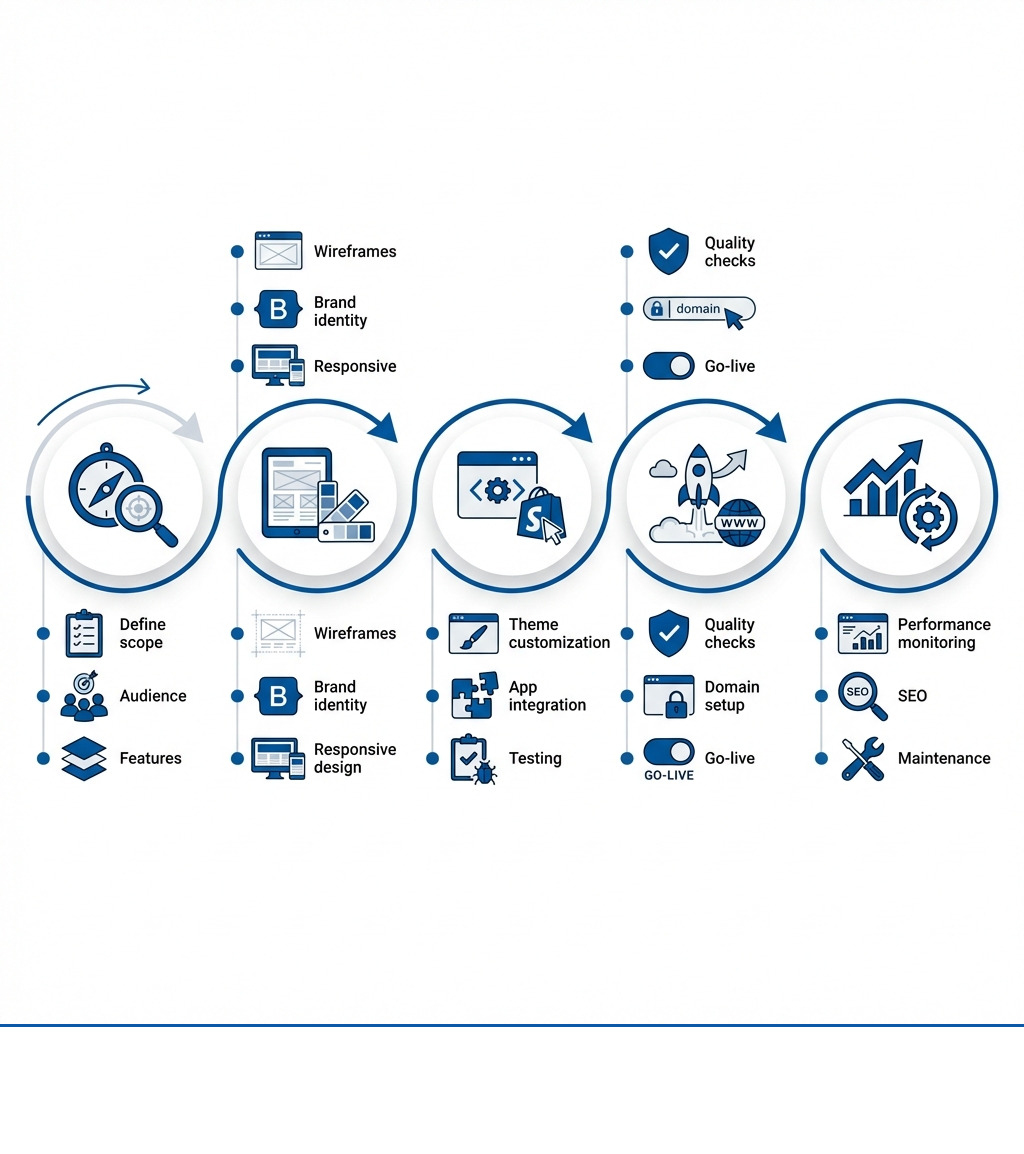
Shopify website development is the process of building an online store on the Shopify platform. It typically involves:
- Planning and Strategy: Define your business goals, target audience, and required features
- Design and Build: Create a custom design using themes or custom code, then implement front-end and back-end functionality
- Testing and Launch: Test all features, performance, and checkout flow before going live
- Ongoing Optimization: Monitor performance, update content, and improve SEO to maintain and increase sales
- Cost Range: Expect $5,000–$20,000+ for custom development, plus monthly Shopify fees and apps
The platform itself handles hosting, security, and core ecommerce features. You focus on building your brand and driving sales.
Every established Shopify store started with the same question: How do we build something that actually converts? The answer isn't just picking a template and adding products. A successful store is built with both immediate launch needs and long-term performance in mind, requiring a clear plan for design, technical implementation, and how customers will find the store through search.
Whether launching a new brand or migrating from another platform, the development process follows a similar structure. It requires understanding Shopify's native features, knowing when custom development is necessary, and setting up the store for search visibility from the start. The platform is flexible, but that flexibility is only an advantage if you have a clear plan.
Here at our Shopify agency in Portland, Maine, I've led teams through hundreds of Shopify website development projects for brands like Wyman's Blueberries and Hyperlite Mountain Gear. We build stores designed to increase sales and customer engagement. This guide walks through our process, from initial planning to ongoing maintenance.
Shopify website development further reading:
Understanding the Groundwork: Web Development Fundamentals
When we talk about building an online store, it’s important to understand the basic concepts of web development. This helps clarify what goes into creating a functional, attractive, and well-performing Shopify site.
Web Design vs. Web Development
Often, the terms web design and web development are used interchangeably, but they represent distinct phases of building a website.
Web design focuses on the visual and aesthetic aspects of a website. This includes the layout, color schemes, typography, imagery, and overall look and feel. A web designer’s goal is to create an intuitive and appealing user interface (UI) and a positive user experience (UX). They think about how users will interact with the site, ensuring ease of navigation and a pleasant visual journey. For a Shopify store, good web design means making products look appealing, making it simple to find what you want, and guiding customers through the purchase process. Website Design is about creating that visual and interactive experience.
Web development, on the other hand, is the technical implementation and functionality of the site. This is where the code comes in—the structure, the logic, and the systems that make the design work. Developers build the website’s foundation, ensuring it functions correctly, loads quickly, and performs reliably. In the context of Shopify, this could involve customizing themes with Liquid (Shopify’s templating language), integrating third-party apps, or building custom features that extend the platform’s core capabilities. The developer's work is the technical foundation that makes the designer's vision functional.
Core Components of Website Development
To build any website, including a robust Shopify store, we rely on a few key components:
- Front-end development: This is everything users see and interact with directly in their web browser. It’s often called the "client-side." Front-end developers use languages like HTML (for structuring content), CSS (for styling and layout), and JavaScript (for interactivity and dynamic elements). On Shopify, much of the front-end is built using themes, which are essentially pre-packaged front-end code that can be customized. Frameworks like React, Angular, and Vue.js are often used to build more complex, interactive user interfaces.
- Back-end development: This is the "server-side" of the website, handling data storage, server logic, and communication with databases. Users don’t see the back-end directly, but it’s essential for functionality like processing orders, managing customer accounts, and storing product information. Back-end languages include PHP, Python, Ruby, and Node.js. Shopify provides its own back-end infrastructure, so merchants don't typically manage servers or databases themselves. However, custom app development or complex integrations often involve back-end logic that interacts with Shopify's APIs.
- Full-stack development: A full-stack developer has expertise in both front-end and back-end development. They can handle every aspect of a website build, from designing the user interface to managing server-side operations. This broad skill set is valuable for Shopify website development projects that require deep customization and integration.
Shopify itself is a full-stack platform, providing both the visual tools for merchants and the underlying infrastructure. For developers, understanding these distinctions helps when adding custom features or integrations to Shopify. Shopify Dev Docs offer extensive resources on the technical details of both front-end (theme development) and back-end (app development) on the platform.
Comparing Shopify Website Building Methods
When you decide to build a store on Shopify, you generally have a few different paths you can take. Each has its own benefits and drawbacks, depending on your budget, technical skill, and specific business needs.
| Method | Ease of Use | Scalability | Customization | Maintenance |
|---|---|---|---|---|
| Shopify Theme-Based Build | High. The theme editor allows for visual changes without code. | Good. Can handle high traffic, but functionality is limited by the theme and available apps. | Limited. Restricted to the options provided by the theme developer and app integrations. | Low. Shopify handles hosting and security. Maintenance involves updating the theme and apps. |
| Custom Shopify Development | Low. Requires technical expertise in Liquid, CSS, and JavaScript. | High. Can be built to specific performance standards and feature requirements. | High. Offers full control over the store’s design, features, and integrations. | Medium. Custom code must be maintained, tested, and updated by a developer. |
| Agency-Built Shopify Store | High (for the merchant). The agency manages all technical aspects of the build. | Very High. Built by experts with a focus on long-term growth and specific business logic. | Very High. Combines agency expertise with custom code for bespoke solutions. | Varies. Typically managed by the agency through an ongoing support or retainer agreement. |
Understanding the Groundwork: Web Development Fundamentals
When we talk about building an online store, it’s important to understand the basic concepts of web development. This helps clarify what goes into creating a functional, attractive, and well-performing Shopify site.
Web Design vs. Web Development
Often, the terms web design and web development are used interchangeably, but they represent distinct phases of building a website.
Web design focuses on the visual and aesthetic aspects of a website. This includes the layout, color schemes, typography, imagery, and overall look and feel. A web designer’s goal is to create an intuitive and appealing user interface (UI) and a positive user experience (UX). They think about how users will interact with the site, ensuring ease of navigation and a pleasant visual journey. For a Shopify store, good web design means making products look appealing, making it simple to find what you want, and guiding customers through the purchase process. Website Design is about creating that visual and interactive experience.
Web development, on the other hand, is the technical implementation and functionality of the site. This is where the code comes in—the structure, the logic, and the systems that make the design work. Developers build the website’s foundation, ensuring it functions correctly, loads quickly, and performs reliably. In the context of Shopify, this could involve customizing themes with Liquid (Shopify’s templating language), integrating third-party apps, or building custom features that extend the platform’s core capabilities. The developer's work is the technical foundation that makes the designer's vision functional.
Core Components of Website Development
To build any website, including a robust Shopify store, we rely on a few key components:
- Front-end development: This is everything users see and interact with directly in their web browser. It’s often called the "client-side." Front-end developers use languages like HTML (for structuring content), CSS (for styling and layout), and JavaScript (for interactivity and dynamic elements). On Shopify, much of the front-end is built using themes, which are essentially pre-packaged front-end code that can be customized. Frameworks like React, Angular, and Vue.js are often used to build more complex, interactive user interfaces.
- Back-end development: This is the "server-side" of the website, handling data storage, server logic, and communication with databases. Users don’t see the back-end directly, but it’s essential for functionality like processing orders, managing customer accounts, and storing product information. Back-end languages include PHP, Python, Ruby, and Node.js. Shopify provides its own back-end infrastructure, so merchants don't typically manage servers or databases themselves. However, custom app development or complex integrations often involve back-end logic that interacts with Shopify's APIs.
- Full-stack development: A full-stack developer has expertise in both front-end and back-end development. They can handle every aspect of a website build, from designing the user interface to managing server-side operations. This broad skill set is valuable for Shopify website development projects that require deep customization and integration.
Shopify itself is a full-stack platform, providing both the visual tools for merchants and the underlying infrastructure. For developers, understanding these distinctions helps when adding custom features or integrations to Shopify. Shopify Dev Docs offer extensive resources on the technical details of both front-end (theme development) and back-end (app development) on the platform.
Comparing Shopify Website Building Methods
When you decide to build a store on Shopify, you generally have a few different paths you can take. Each has its own benefits and drawbacks, depending on your budget, technical skill, and specific business needs.
| Method | Ease of Use | Scalability | Customization | Maintenance |
|---|---|---|---|---|
| Shopify Theme-Based Build | High. The theme editor allows for visual changes without code. | Good. Can handle high traffic, but functionality is limited by the theme and available apps. | Limited. Restricted to the options provided by the theme developer and app integrations. | Low. Shopify handles hosting and security. Maintenance involves updating the theme and apps. |
| Custom Shopify Development | Low. Requires technical expertise in Liquid, CSS, and JavaScript. | High. Can be built to specific performance standards and feature requirements. | High. Offers full control over the store’s design, features, and integrations. | Medium. Custom code must be maintained, tested, and updated by a developer. |
| Agency-Built Shopify Store | High (for the merchant). The agency manages all technical aspects of the build. | Very High. Built by experts with a focus on long-term growth and specific business logic. | Very High. Combines agency expertise with custom code for bespoke solutions. | Varies. Typically managed by the agency through an ongoing support or retainer agreement. |





.png)
.png)

