


Why Performance Max Shopify Integration Matters for E-commerce Growth
Summary
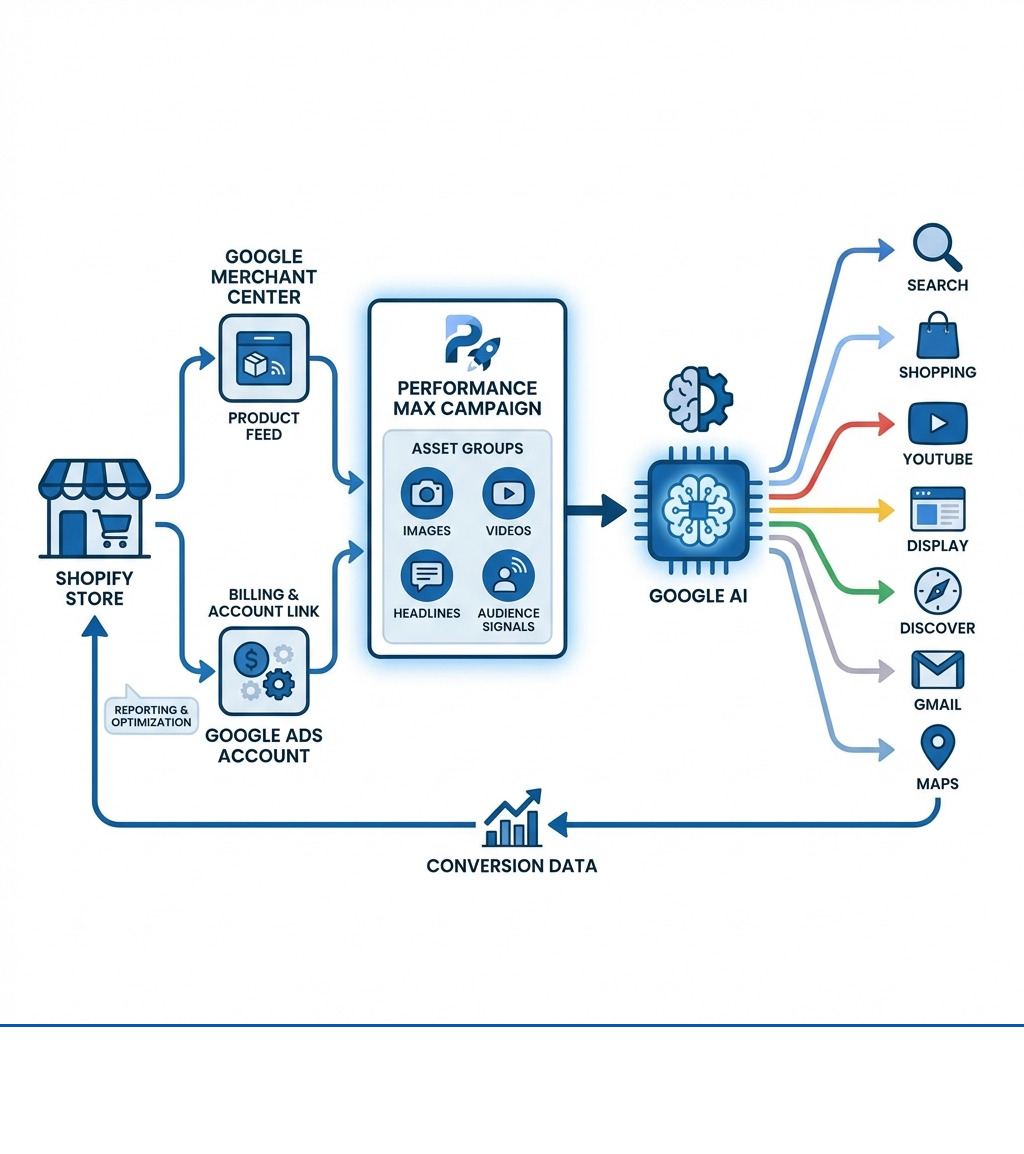
- Performance Max Shopify integration lets Shopify merchants run AI-powered campaigns across all Google advertising channels (Search, Shopping, YouTube, Display, Find, Gmail, and Maps) from a single campaign.
- Setup requires the Google & YouTube app in Shopify, a linked Google Merchant Center account, and a Google Ads account with billing configured.
- Performance Max relies on Google AI to adjust bidding, budget, audiences, and creatives based on your conversion goals, requiring high-quality product feeds and creative assets as inputs.
- The native Shopify integration has a conversion tracking limitation: it reports only product subtotal (excluding shipping and tax), which can understate true ROAS.
- Advertisers using Performance Max with video assets see an average 12% increase in total conversions, and those who use final URL expansion see a 9% increase in conversions at similar CPA or ROAS.
Performance Max Shopify campaigns represent a shift in how e-commerce businesses advertise on Google. Instead of managing separate campaigns for Search, Shopping, Display, and YouTube, Performance Max combines everything into one goal-based campaign that uses Google AI to find customers across all Google properties.
Key Benefits for Shopify Merchants:
- Increased Reach: Access YouTube, Display, Search, Find, Gmail, and Maps from one campaign
- AI-Powered Adjustments: Google's machine learning adjusts bids, budgets, and creative in real-time
- Simplified Management: Set conversion goals and provide assets; Google handles the rest
- Cross-Channel Attribution: Data-driven attribution tracks customer journeys across multiple touchpoints
What You Need to Get Started:
- Google & YouTube app installed in Shopify
- Google Merchant Center account with product feed
- Google Ads account linked to Merchant Center
- High-quality creative assets (images, videos, headlines, descriptions)
- Audience signals to guide Google's AI
The setup process is straightforward through the Shopify admin, but getting strong results requires careful attention to product feed quality, creative asset diversity, and ongoing work based on performance data.
One important limitation to understand upfront: the Google & YouTube app for Shopify currently tracks conversion value as product subtotal only, excluding shipping and tax. For stores with higher shipping costs or tax rates, this means your reported ROAS in Google Ads will be lower than your actual return. Advanced advertisers often use Google Analytics 4 or Google Tag Manager workarounds to track full order values accurately.
Real-world results show the effect of this campaign type when properly configured. For example, hair care retailer Hairstory used Performance Max with new customer acquisition goals and achieved a 31% increase in ROAS and a 545% increase in new customers converted.
We've set up performance max shopify campaigns for numerous clients, learning what works and what doesn't when it comes to Google's AI-powered advertising.
Find more about performance max shopify:
- shopify product feed
- shopify email marketing
- upselling shopify
What are Performance Max Campaigns?
Google Performance Max campaigns represent a change in online advertising. They are a goal-based campaign type designed to help advertisers find more converting customers across all of Google's advertising channels. Instead of manually setting up and managing separate campaigns for different ad formats and placements, Performance Max uses Google AI to automate and simplify the process.
At its core, Performance Max is an all-in-one campaign type that gives you access to Google's entire advertising inventory. This includes YouTube, Display, Search, Find, Gmail, and Maps. The system uses Smart Bidding, meaning Google's AI automatically adjusts bids in real-time to meet your specific conversion goals, whether that's online sales, lead generation, or local store visits. This cross-channel approach means your ads appear where Google's AI determines they are most likely to convert a customer, regardless of the platform.
For more on the general concepts of these campaigns, you can refer to Google's own documentation on About Performance Max campaigns.
How PMax Benefits Shopify Stores
For Shopify merchants, Performance Max offers several benefits. First, it brings increased reach. Your products can appear across a wider array of Google properties, helping you connect with potential customers at various stages of their buying journey. This comprehensive reach helps you find new customers you might not have reached with traditional, siloed campaigns.
Second, the data-driven adjustments from Google AI can improve your campaign results. By feeding the system your conversion goals and high-quality assets, the AI takes over, constantly learning and adjusting to get better results. This means more efficient ad spend and a better return on ad spend (ROAS). For example, Hairstory, a hair care retailer, saw a 31% increase in ROAS and a 545% increase in new customers after focusing on new customer acquisition with Performance Max.
Third, Performance Max offers simplified management. While some initial setup and ongoing input are necessary, the campaign type automates much of the work involved in adjusting bids and placements. This frees up your time to focus on other aspects of your Shopify store, like product development or customer service. It really does simplify how you access all Google inventory.
Here at First Pier, we've seen how much a strong PPC plan can help e-commerce brands. If you're looking to understand more about how paid advertising fits into your overall plan, you can read our resources on More info about Ecommerce PPC.
Potential Drawbacks and Considerations
While the benefits are clear, it's also important to be aware of the potential drawbacks and considerations when using Performance Max. One of the main concerns is the dependence on AI. This means less manual control over certain aspects of your campaigns, such as specific placements or keyword targeting. Some advertisers refer to this as a "black box" because the AI's decision-making process isn't always transparent.
This leads to another point: the need for high-quality inputs. Since Google AI is running the show, the quality of the data and assets you provide is critical. If your product feed is messy or your creative assets are subpar, the AI has less to work with, and your campaign performance will suffer.
Finally, while the setup can be straightforward, getting the most out of Performance Max often requires a certain level of technical expertise. Understanding how to structure asset groups, interpret performance insights, and use advanced tracking solutions can be complex, especially for merchants without a dedicated marketing team. It's not a set-it-and-forget-it solution if you want the best results.
Setting Up Performance Max for Your Shopify Store
Setting up a Performance Max campaign for your Shopify store involves a few key steps, primarily through the Google & YouTube app in your Shopify admin. This app acts as the bridge between your Shopify store and Google's advertising ecosystem.
The initial setup requires you to have:
- The Google & YouTube app installed and configured in your Shopify store.
- A Google Merchant Center account, which houses your product feed.
- A Google Ads account, where your campaigns will live.
- Billing information set up in your Merchant Center or Google Ads account.
If you haven't already, the first step is to set up the Google & YouTube app on Shopify. This links your Shopify store to your Google Merchant Center and Google Ads accounts, allowing for the automatic transfer of product data and conversion tracking. For more detailed guidance on connecting your Shopify store with Google Ads, I recommend reading our guide on More info about Google Ads for Shopify.
Step-by-Step Campaign Creation
Once your accounts are linked, creating a Performance Max campaign from your Shopify admin is straightforward:
- Go to the Google & YouTube app: In your Shopify admin, go to the "Google & YouTube" channel.
- Access Performance Max module: Scroll down to find the Performance Max campaign module.
- Connect Google Ads: Select your Google Ads account and click "Connect."
- Create Campaign: Click "Create Campaign." This will typically redirect you to the Google Merchant Center's Ads onboarding flow.
- Provide Details: In Merchant Center, you'll need to provide payment information (if not already done), set a daily budget, and give your campaign a name.
- Launch: Click "Create" to launch your campaign.
For complete, up-to-the-minute setup instructions, Google's Merchant Center Help documentation on Create a Performance Max campaign in Shopify is the best source.
Structuring Campaigns and Asset Groups
Effective campaign structure is important for Performance Max, even though the AI automates much of the delivery. The primary building blocks are campaigns and asset groups.
Campaign Structure Best Practices:While Google AI works best with combined campaigns, there are valid reasons to create multiple Performance Max Shopify campaigns. For instance, you might want separate campaigns for:
- Different countries or languages.
- Distinct budgets.
- Specific ROAS targets for different product lines.
Asset Group Structure:Think of asset groups like the ad groups you're familiar with in traditional Search campaigns. They are where you group creative assets and audience signals that share a common theme. For example, if you sell both men's and women's apparel, you might have separate asset groups for each, containing gender-specific images, headlines, and audience signals. You can segment asset groups by product or product category for more targeted advertising, especially for best-sellers.
Required Creative Assets for an Asset Group:
- Images: At least 5 high-quality images (landscape, square, portrait).
- Logos: At least 1 square logo.
- Videos: Up to 5 videos (even if Google auto-generates them if you don't provide any, providing your own is better).
- Headlines: Up to 5 short headlines (30 characters each) and 5 long headlines (90 characters each).
- Descriptions: Up to 4 descriptions (60-90 characters each).
- Business Name: Your store's name.
- Call to Action: A clear call-to-action button (e.g., "Shop Now", "Learn More").
- Final URL: The landing page URL for your ads.
Audience signals are also a critical input at the asset group level, guiding Google's AI to the most relevant customers. We'll discuss these in more detail shortly. For insights into how to best target your campaigns, see our guide on More info about Performance Max Targeting.
Improving Your Inputs for Better Performance Max Shopify Results
The success of your Performance Max Shopify campaigns depends on the quality of the inputs you provide. Google AI is effective, but it needs good fuel to run efficiently. This means focusing on your product feed quality, creative asset diversity, relevant audience signals, and using features like final URL expansion.
Consider these statistics: Advertisers that included at least one video in their Performance Max campaigns saw an average increase of 12% in total conversions. Furthermore, those who use final URL expansion with Performance Max campaigns see an average increase of over 9% in conversions or conversion value at a similar CPA or ROAS. These numbers highlight the direct impact of providing high-quality inputs.

Improving Your Product Feed
Your product feed is fundamental to any e-commerce advertising on Google, especially for Performance Max. A well-maintained feed ensures your products are accurately represented and findable.
Key areas to focus on include:
- Product Titles: Make them descriptive and keyword-rich, including brand, product type, and key attributes.
- High-Resolution Images: Provide clear, high-quality images that show your products effectively.
- Product Descriptions: Write comprehensive and good descriptions that highlight benefits and features.
- Google Product Category: Accurately categorize your products using Google's taxonomy.
- Custom Labels: Use custom labels to segment your products for bidding plans (e.g., high-margin items, best-sellers, seasonal products). This helps the AI understand which products are high-priority.
- Pricing and Availability: Keep your pricing and stock levels accurate and up-to-date.
Regularly auditing and improving your product feed will contribute to your campaign's performance. For further guidance on improving your product listings for Google, you can refer to our resources on More info about Google Shopping Campaigns.
Providing High-Quality Creative Assets and Audience Signals
Beyond your product feed, the creative assets and audience signals you provide are crucial for guiding Google AI.
Creative Assets:As mentioned, asset groups require a variety of creative elements. These include:
- Images: High-quality lifestyle and product images.
- Logos: Your brand logos in various formats.
- Videos: Good videos that show your products or brand story. If you don't provide videos, Google will often generate them, but your own well-produced videos will generally perform better.
- Headlines and Descriptions: Good copy that resonates with your target audience.
The more diverse and high-quality your assets, the more options Google AI has to create relevant ad combinations across its various channels.
Audience Signals:Audience signals are hints you give to Google's AI about who your most valuable customers are. They are not rigid targeting parameters but rather suggestions that help the AI find similar audiences. Providing good audience signals is important.
Types of audience signals you can use:
- Customer Match Lists: Upload lists of your existing customers (e.g., email addresses) to help Google find similar new customers.
- Custom Segments: Create segments based on search terms, URLs visited, or app usage to identify potential customers.
- Interests and Demographics: Provide information about the interests, behaviors, and demographic characteristics of your ideal customer.
By giving Google AI these signals, you're helping it learn faster and more accurately identify potential buyers for your Shopify store.
Measuring, Tracking, and Refining Your Campaigns
Running a Performance Max Shopify campaign isn't a one-time setup; it requires continuous measurement, tracking, and refinement. Understanding how your campaigns perform and acting on those insights is how you improve results over time.
You can track the performance of your marketing efforts directly within your Shopify admin by navigating to the Marketing page. This section provides a summary of key metrics like online store sessions, conversion rate, average order value (AOV), and total sales attributed to marketing. It also offers reports on traffic sources, locations, and channel performance. Staff members need Home, Reports, and Marketing permissions to view this data.
For more specific campaign details and granular data, you'll primarily rely on your Google Ads account. Here, you can access detailed reports on ROAS (Return on Ad Spend), CPA (Cost Per Acquisition), conversion rates, and more. This is where you'll see the direct impact of your Performance Max efforts. For comprehensive support in this area, consider reading about our More info about Digital Marketing Services for Ecommerce.
Addressing the Conversion Value Limitation for performance max shopify
One crucial limitation to be aware of when tracking Performance Max Shopify campaigns through the native Google & YouTube app is how it handles conversion value. The app currently reports conversion value to Google Ads based on the product subtotal only. This means it excludes important components like shipping costs and taxes.
For many e-commerce stores, especially those with higher shipping fees or sales tax, this underreporting of the actual total order value can significantly skew your reported ROAS in Google Ads. Your campaigns might be performing better than they appear, leading to potentially less effective bidding decisions by Google AI.
To overcome this, advanced advertisers often use workarounds using Google Analytics 4 (GA4) or Google Tag Manager (GTM). These tools allow you to customize your conversion tracking to include the full purchase value, including shipping and tax. This provides a more accurate picture of your true ROAS, helping Google AI to adjust more effectively towards your actual profit margins. Understanding how your Google Ads pixel integrates with Shopify is a key part of this, and you can learn more on our page about More info about Google Ads Pixel Shopify.
Using Insights for Ongoing Improvement
Google Ads provides many reports and insights to help you evaluate Performance Max campaign performance and identify areas for improvement.
Key reports and features include:
- Asset Group Reporting: See how different asset groups influence performance.
- Explanations: Understand changes in performance and recommended actions.
- Bid Plan Report: Gain insights into the top signals influencing your bidding.
- Ad Strength: Assess the quality of your creative assets and identify areas for improvement.
- Combinations Report: See which asset combinations are performing best.
- Audience Insights: Understand the interests and behaviors of your converting customers.
- Search Terms Insights: Find what customers are searching for when your ads appear.
- Product Insights, Category Insights, Best Sellers Report, Price Competitiveness Report: Retail-specific reports to identify product-level improvement opportunities and market trends.
Regularly reviewing these insights is essential for continuous improvement. Use them to refine your product feed, update creative assets, adjust audience signals, and make informed decisions about your budget and bidding plans. Google offers comprehensive Retailer best practices for AI-powered Performance Max campaigns that can guide your improvement efforts.
Frequently Asked Questions about Performance Max for Shopify
Here are some common questions I hear from Shopify merchants about Performance Max campaigns.
Should I stop my standard Search campaigns when running Performance Max?
No, you typically shouldn't stop your standard Search campaigns when running Performance Max. Performance Max is designed to complement keyword-based Search campaigns, not replace them. Google's system has a clear hierarchy: if a user's query exactly matches an exact match keyword in your standard Search campaign, that Search campaign is prioritized. This ensures your highly targeted, high-performing Search campaigns maintain their control.
However, Performance Max can still show for branded keywords if it determines it's the best path to conversion. To manage this, you can use brand exclusions or negative keywords to prevent overlap if you want your Search campaigns to exclusively handle branded queries.
What are audience signals and why are they important?
Audience signals are important hints you provide to Google's AI, guiding it towards the types of customers most likely to convert. They are not strict targeting parameters, meaning Google AI won't limit itself only to these audiences. Instead, it uses them as a starting point to understand your ideal customer and then expands its reach to find new, similar audiences across its network.
They are important because they reduce the AI's learning curve, helping it find relevant customers faster and more efficiently. Using your first-party data through Customer Match lists (emails of existing customers), custom segments (based on search behavior), and in-market segments (people actively researching products like yours) are effective ways to provide these signals.
Can I add negative keywords to a Performance Max campaign?
Yes, you can add negative keywords to Performance Max campaigns, though the process is a bit different than with standard Search campaigns. You can apply negative keywords at the account level, which will apply across all campaigns, including Performance Max.
For more granular control, Google also allows for brand exclusions at the campaign level, which helps prevent your ads from showing for specific brand terms you might want to reserve for your Search campaigns. If you need to add specific negative keyword lists directly to a Performance Max campaign, you typically have to contact Google support to have them added. This level of control helps you avoid showing for irrelevant searches and maintain brand safety.
To Sum Up
Performance Max Shopify campaigns offer a way for e-commerce businesses to expand their reach, find new customers, and drive sales through Google's advertising network. By using Google AI, these goal-based campaigns simplify management and improve performance across multiple channels, from YouTube to Search and Display.
However, success with Performance Max is not passive. It requires providing high-quality inputs: a carefully maintained product feed, diverse and good creative assets, and intelligent audience signals. Continuous monitoring, understanding the nuances of conversion tracking (especially the subtotal limitation for Shopify's native integration), and acting on the insights available in Google Ads are all key to improving your return.
Here at First Pier, we work with Shopify merchants in Portland, Maine, to manage digital advertising. We help businesses use platforms like Performance Max, ensuring their campaigns are set up correctly and continuously improved for growth. If you're looking to improve your e-commerce advertising plan and get the most out of Google Performance Max, see our full range of More info about our e-commerce services.





.png)
.png)

