



Why E-commerce Checkout Design is Your Make-or-Break Moment
Summary
- E-commerce checkout design refers to creating the user experience from shopping cart to purchase completion.
- Poor design is a leading cause of shopping cart abandonment, impacting up to 70% of potential sales.
- An optimized checkout flow reduces friction, builds trust, and simplifies the transaction process.
- Effective checkout design directly increases conversion rates, revenue, and customer retention.
- Continuous testing and a mobile-first approach are vital for ongoing optimization efforts.
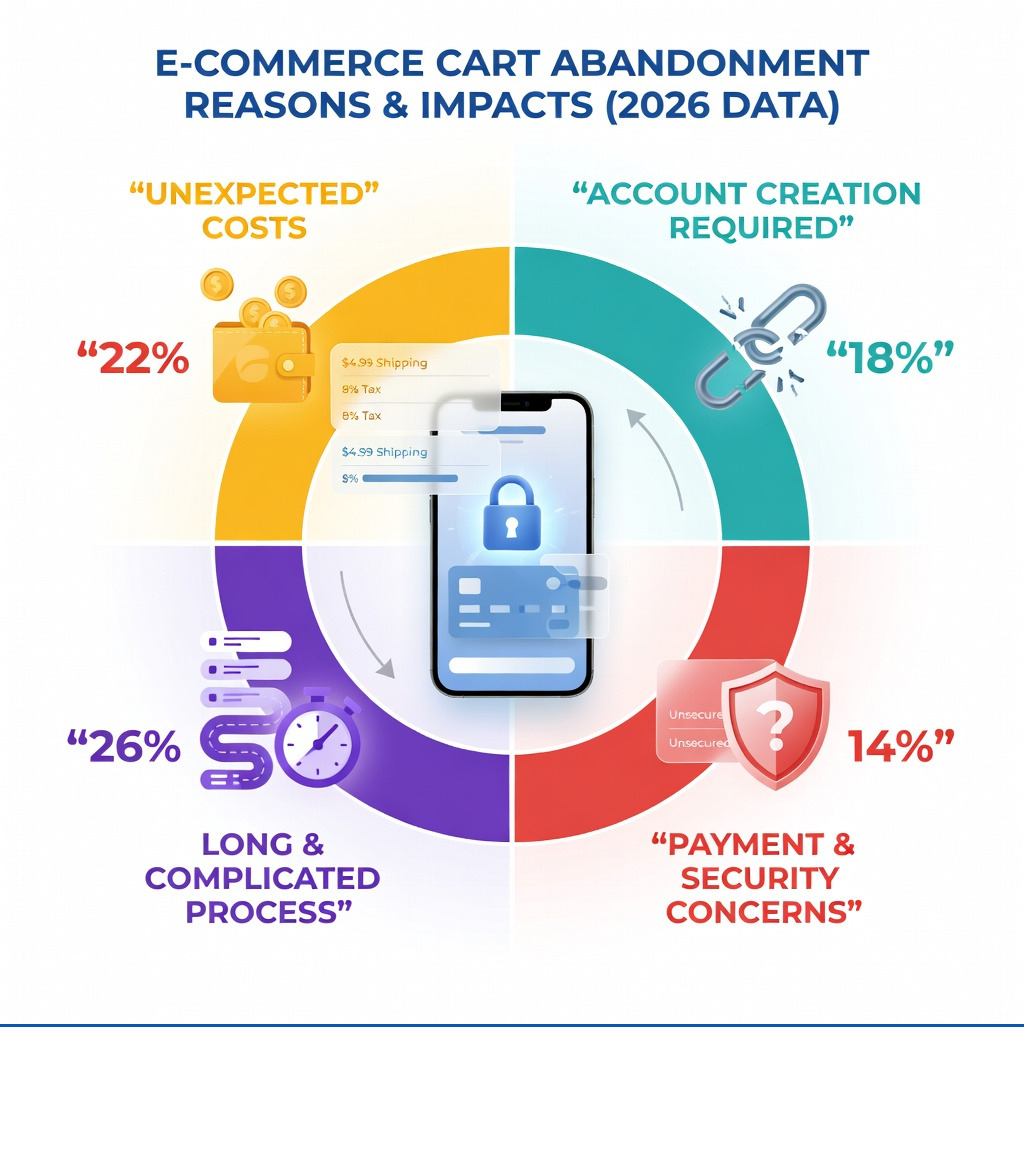
The e-commerce checkout design is the final step in your customer's journey, and it's where countless sales are won or lost. About 70% of e-commerce shoppers abandon their carts without making a purchase. A significant 18% of these shoppers point to a bad checkout experience as the reason. This means a poorly designed checkout can cost your online store valuable revenue.
It's not enough to attract customers; you must guide them smoothly through the purchase. The checkout process needs to be fast, clear, and trustworthy. Every detail, from form fields to payment options, impacts whether a customer completes their order. This guide will show you how to build a checkout experience that keeps customers coming back.
As Steve Pogson, a Shopify Expert and E-commerce Growth Specialist, I've spent over two decades helping businesses succeed with optimized e-commerce checkout design. My passion lies in scaling Shopify stores to their full potential through a comprehensive e-commerce ecosystem.
Why E-commerce Checkout Design Dictates Your Bottom Line
When I talk to store owners here in Portland, Maine, the conversation often turns to traffic. "How do I get more people to the site?" they ask. But getting them there is only half the battle. If your e-commerce checkout design is clunky, you are essentially filling a leaky bucket.
The statistics are sobering. Nearly 70% of online customers abandon their carts. Think about that for a second. For every ten people who find a product they love and click "add to cart," seven of them walk away at the finish line. According to research by the Baymard Institute, 18% of those people leave specifically because the checkout process was too long or complicated.
This isn't just about a single lost sale. It’s about customer retention and brand trust. A bad experience doesn't just lose you $50 today; it loses you the hundreds of dollars that customer might have spent over the next three years. In fact, 88% of customers say they are less likely to return to a site after a bad experience.
Optimizing your checkout is the most direct way to increase your revenue without spending an extra dime on ads. It turns the traffic you already have into actual buyers. When we handle Shopify development services at First Pier, we focus on the "Cognitive Ease" of the checkout. This is a psychological concept where people feel better about a decision when it feels familiar and easy. If a customer has to think too hard about how to give you their money, they’ll simply stop doing it.
Essential Components of a High-Converting E-commerce Checkout Design
To build a checkout that actually works, you need to include a few non-negotiable elements. I like to think of these as the pillars of a stable transaction.
The Power of the Guest Checkout
If there is one thing that kills a sale faster than anything else, it’s a forced account creation screen. One study found that 24% of shoppers will abandon their cart if they are made to create an account before buying. People are tired of remembering passwords and worried about spam.
The solution is simple: allow guest checkout. You can always ask them to create an account on the "Thank You" page after the money has changed hands. At that point, you already have their info, and it’s just a matter of them choosing a password.
Progress Indicators: Managing Expectations
Nobody likes a surprise that involves more work. If a customer thinks they are on the last step, only to find three more pages of forms, they get frustrated. A clear progress bar tells the customer exactly where they are: Shipping → Payment → Review. It reduces the "are we there yet?" anxiety that leads to abandonment.
Order Summaries and Trust Signals
Your customers should never have to hit the "back" button to remember what they are buying or how much it costs. A persistent order summary that shows product images, quantities, and the final price (including taxes and shipping) is vital.
You also need to show that you are trustworthy. This means displaying security badges, SSL certificates, and recognizable payment icons (like Visa, Mastercard, or PayPal) right where the customer enters their card info.
Single-Page vs. Multi-Step Layouts
There is a long-running debate in the UX world about whether a single-page checkout is better than a multi-step one.
| Feature | Single-Page Checkout | Multi-Step Checkout |
|---|---|---|
| Speed | Feels faster, fewer clicks | Can be slower due to page loads |
| Focus | All info is visible at once | Breaks info into bite-sized pieces |
| Mobile | Can feel long and overwhelming | Often easier to navigate on small screens |
| Data | Harder to track where users drop off | Easy to see which step causes abandonment |
Regardless of which you choose, the goal is to minimize the "noise." For many of our clients, we suggest looking into the new one-page checkout on Shopify, which combines the speed of a single page with the logic of a multi-step flow.
Mobile-First Design and the Thumb Zone
Mobile devices now account for over 50 percent of ecommerce traffic. If your e-commerce checkout design isn't optimized for a five-inch screen, you are ignoring half of your customers.
Designing for Thumbs, Not Mice
When someone uses a phone, they aren't using a precise mouse cursor; they are using a thumb. As coined by Scott Hurff, the "Thumb Zone" is the area of the screen that is easiest to reach during one-handed use.
Key buttons, like "Pay Now" or "Continue to Shipping," should be placed in this comfortable zone. They should also be large enough to hit. A good rule is to make buttons at least 44 pixels tall. Anything smaller leads to "fat-finger" errors, where the user accidentally clicks the wrong thing and gets frustrated.
Font Size and Keyboards
Have you ever clicked into a text field on your phone and the screen suddenly zoomed in? That happens because the font size is smaller than 16px. To prevent this jarring experience, ensure all your input labels and text fields use at least a 16px font.
Also, use the right HTML5 tags to trigger the correct keyboard. If a customer is entering a phone number or a credit card, the numeric keypad should pop up automatically. If they are entering an email, the "@" symbol should be visible. These small touches make the process feel much faster.
For those looking to customize this experience further, Shopify checkout extensions allow us to add custom fields and logic that still feel native to the mobile experience.
Reducing Friction in Payment and Shipping Information
The payment section is the "scary" part of the checkout. It’s where the customer has to do the most work and take the most risk. Your job is to make it feel safe and effortless.
Smart Credit Card Fields
Entering a 16-digit card number is a chore. Research shows that 23% of buyers naturally type their card numbers in four-digit blocks. Your form should allow for spaces or auto-format them as the user types.
I also recommend using auto-detection for the card type. As soon as the user types the first few digits, the Visa or Amex logo should light up. This gives the user immediate feedback that they are on the right track.
Accurate Delivery Dates
Customers don't care about "Standard Shipping (3-5 business days)." They care about when the box will show up at their door. Use "Delivery Dates" instead of "Delivery Speeds." Saying "Arrives by Friday, Oct 12" is much more helpful than "3-5 days."
Address Finders and Transparent Costs
Address finders (like Google Autocomplete) are a godsend. They allow a user to start typing their street address and select the correct one from a list, automatically filling in the city, state, and zip code. This reduces typing by about 80%.
Finally, be transparent about costs. Unexpected shipping fees are the number one reason for cart abandonment. Show these costs as early as possible. If you need help setting this up, we offer Shopify shipping optimization support to ensure your rates are accurate and clearly communicated.
Continuous Optimization and A/B Testing Your Checkout Flow
An e-commerce checkout design is never truly "finished." It is a living part of your business that should be constantly tested.
Adaptive Error Messages
Generic error messages like "Invalid Input" are useless. If a customer forgets a digit in their phone number, the error should say "Please enter a 10-digit phone number." This helps them fix the mistake immediately rather than guessing what went wrong.
The 3-Second Rule
Speed is a feature. 85% of mobile users expect pages to load as fast or faster than desktop. If your checkout takes more than three seconds to load, 57% of your visitors will give up. We use Shopify CRO services to strip away unnecessary scripts and heavy images that slow down the final steps.
Post-Purchase Opportunities
The checkout isn't just for taking money; it’s for building value. Research shows that add-ons in the cart or immediately after the purchase can account for 10-30% of total revenue. We often implement Shopify post-purchase upsells that offer a complementary product at a discount right after the customer clicks "Buy." Since you already have their payment info, these are often "one-click" purchases that don't add any extra friction.
Frequently Asked Questions about Checkout Design
Why is guest checkout important for e-commerce checkout design?
Forcing account creation is a major hurdle. 24% of people will leave if they have to create an account. Guest checkout removes this barrier, allowing for a quick and anonymous purchase. You can always use post-purchase Shopify strategies to encourage them to register once the order is confirmed.
How does page speed affect e-commerce checkout design?
Page speed is everything. If your checkout is slow, customers lose trust and get annoyed. A load time of over three seconds leads to a 57% abandonment rate. You can use tools like Google PageSpeed Insights to identify what is slowing you down.
What are the best payment methods to include?
You should offer a mix of traditional and modern options. 13% of shoppers will leave if their preferred method isn't available. At a minimum, you should have credit cards, PayPal, and digital wallets like Apple Pay or Google Pay. For higher-priced items, "Buy Now, Pay Later" options are also very effective. If you're just starting, our Shopify setup services can help you integrate the right mix for your audience.
To Sum Up
Designing a checkout that converts isn't about being fancy; it’s about being helpful. It’s about removing the tiny annoyances that add up to a "no." From the thumb-friendly buttons on a mobile screen to the transparent shipping costs, every choice you make should aim to make the customer's life easier.
At First Pier, we live and breathe this stuff. Based right here in Portland, Maine, we help brands across the country turn their Shopify stores into high-performance machines. Whether you need a full e-commerce UX design overhaul or just a technical audit to see why your conversion rate is dipping, we have the expertise to help you grow.
Don't let your hard-earned traffic go to waste. Start looking at your checkout through your customer's eyes, and you'll find plenty of ways to turn those "maybe later" carts into "thank you for your order" confirmations.





.png)
.png)

