


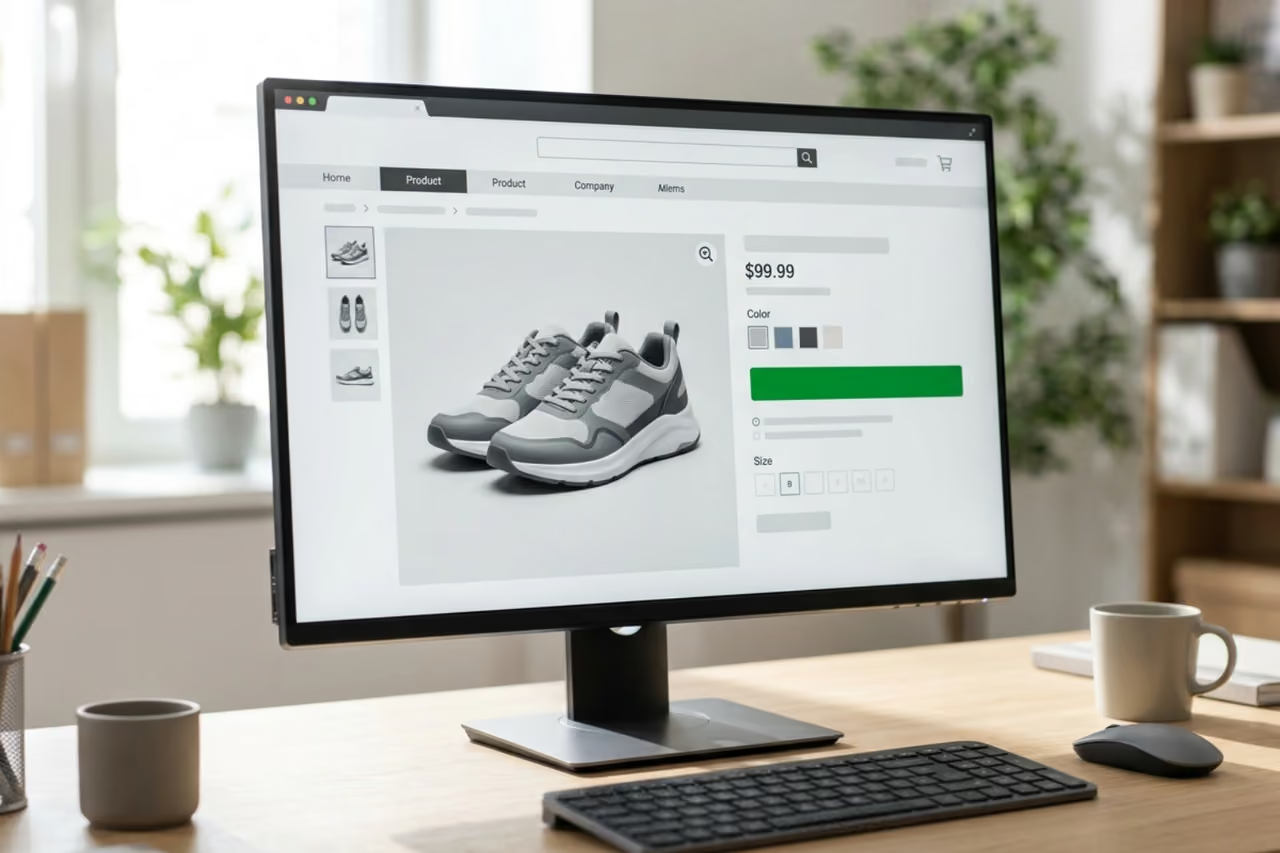

Why Your Shopify Add-to-Cart Rate Is the Metric That Deserves Your Attention First
If you want to improve your Shopify add to cart rate, here are the most effective changes to make:
- Make the Add to Cart button the most visible element above the fold — high contrast, clearly labeled, sticky on mobile.
- Show shipping costs upfront — hidden fees are the #1 reason shoppers leave without adding to cart.
- Place trust signals near the button — return policy, security badges, and star ratings reduce hesitation right where it counts.
- Improve mobile page speed — pages that take more than 3 seconds to load lose a significant share of mobile shoppers before they even see the product.
- Use benefit-focused product descriptions — scannable, short, and written around what the buyer gains.
- Add ethical urgency — real low-stock alerts or shipping cutoffs, not fabricated countdowns.
- Upgrade product images and video — multiple angles, lifestyle shots, and short demo clips build confidence faster than copy alone.
Your add-to-cart rate is one of the clearest signals your product pages send you. It tells you exactly how many visitors saw what you sell — and still didn't take action.
The average Shopify store sees an add-to-cart rate of around 4% to 5%. Top-performing stores push past 8%, and the best-in-class hit double digits. If your store gets solid traffic but a fraction of that converts to cart additions, the problem is almost never your ad spend. It's what happens after the click.
A store with 300 visits and only 6 add-to-carts — a 2% rate — is a common pattern. It's not a traffic problem. It's a product page problem. Factors like blurry images, unclear pricing, slow mobile load times, and missing trust signals can each quietly kill purchase intent before a visitor ever reaches the button.

Terms related to improve shopify add to cart rate:
Summary
- The average Shopify add-to-cart rate ranges between 4% and 5%, while top-performing stores exceed 8%.
- Page speed and mobile layout are critical technical factors that directly influence whether a user adds an item to their cart.
- Clear visual hierarchy, prominent call-to-action buttons, and transparent pricing reduce friction.
- Trust signals placed near the purchase button directly impact cart additions by reducing buyer hesitation.
What is Add-to-Cart Rate and Why It Matters
Your add-to-cart rate is the percentage of total website sessions where a visitor adds at least one product to their shopping cart. Unlike your overall purchase conversion rate, which measures completed transactions, the add-to-cart rate is a pure measure of product page performance and initial buyer interest.
If you want to understand how well your traffic source aligns with your product offering, this is the metric to watch. A healthy conversion funnel on Shopify relies on a strong top-of-funnel interest indicator. When your add-to-cart rate is healthy, it means your product presentation, pricing, and initial trust-building are doing their jobs. You are successfully turning passive browsers into active shoppers.
How to Calculate Your Store's Add-to-Cart Rate
Calculating this metric is straightforward. The formula uses two primary numbers from your store's analytics:
Add-to-Cart Rate = (Sessions with at least one add-to-cart action / Total sessions) x 100
For example, if your store receives 10,000 visitor sessions in a month, and during 450 of those sessions a visitor clicks "Add to Cart," your rate is 4.5%.
You do not need to calculate this manually every day. You can find this data directly inside your Shopify Admin. Go to Analytics > Reports and open the Online store conversion over time report. This report visualizes your shopping funnel, showing the exact drop-off points from product views to cart additions, checkouts, and completed transactions.
What is a Good Add-to-Cart Rate for Shopify?
While benchmarks vary slightly depending on your product category, price point, and traffic source, there are clear industry standards:
- Average Shopify Store: 4.4% to 5% is the typical baseline for most stores.
- Top 20% of Stores: Exceeding 7.6% puts your store in the top tier of Shopify merchants.
- Excellent / Top Performers: Stores hitting 8% to 10% (or higher) are considered highly optimized.
If your current rate is below 4%, you are leaving significant revenue on the table. Improving this metric from 3% to 6% effectively doubles the volume of high-intent shoppers entering your checkout sequence, directly impacting your overall ecommerce conversion rates.
Why Your Store Has a Low Add-to-Cart Rate Despite High Traffic
It is incredibly frustrating to watch high traffic volumes roll in from paid ads or organic search without seeing a corresponding rise in cart additions. When this happens, it is usually a sign that your marketing campaigns are doing their job, but your landing pages are failing to convert that interest into action.
A high bounce rate on your product pages is a strong indicator of friction. When visitors land on your site and immediately exit, it means the page did not meet their expectations or presented too many immediate hurdles. To solve this, you must first address the common friction points that drive visitors away.

Common Reasons Visitors Leave Without Adding to Cart
- Hidden Shipping Costs: According to industry data, unexpected shipping fees are the single largest driver of cart abandonment and page exits. If a buyer cannot see what shipping will cost before they click the button, they will often leave to avoid a surprise at checkout.
- Lack of Trust: Visitors who are unfamiliar with your brand need immediate reassurance. If your page lacks customer reviews, clear return policies, or secure payment logos, buyers will hesitate to take the first step.
- Unclear Product Descriptions: If a customer cannot figure out the exact dimensions, materials, or benefits of a product within a few seconds, they will not buy. Confused buyers always say no.
- Decision Fatigue: Offering too many choices — such as dozens of minor color variants, complex size guides, or intrusive popups — paralyzes the shopper. Keep the selection process simple.
Mobile Performance and Page Speed Barriers
Mobile traffic makes up more than 60% of all ecommerce visits, yet mobile conversion rates regularly trail desktop performance. The culprit is almost always mobile page speed and layout friction.
Google research shows that even a 1-second delay in mobile load times can drop overall conversions by up to 20%. If your product page takes more than 3 seconds to load on a standard mobile connection, a large portion of your audience will bounce before the page even renders.
To diagnose this, run your product URLs through Google PageSpeed Insights. If your mobile performance score is below 60, focus on compressing your images to WebP format, removing unused Shopify apps that load heavy JavaScript, and using a modern, lightweight Shopify theme. You can find more tips on keeping visitors engaged in this guide on how to reduce ecommerce bounce rate.
How to Improve Shopify Add to Cart Rate with Product Page Design
The layout of your product page should guide the user's eyes directly to your primary action. In ecommerce design, there is no neutral space; every element on the page either helps build desire or adds friction to the purchase decision.

To design a high-converting Shopify PDP (Product Detail Page), keep your layout clean, structured, and highly visual. The majority of online shoppers expect a standard layout: product media on the left, and purchase details on the right. Deviating too far from this established pattern for the sake of "creativity" often confuses users and hurts your conversion rate.
Optimize the Button to Improve Shopify Add to Cart Rate
The "Add to Cart" button is the most important element on your page. It must stand out visually from every other component.
- High Contrast Color: Your button color should not blend into your theme. Use a bright, brand-aligned accent color that contrasts sharply with the page background. If your page background is white, use a bold black, blue, or green button.
- Clear, Decisive Text: Stick to clear, action-oriented labels like "Add to Cart" or "Add to Bag". Avoid vague or overly creative phrases that might confuse the buyer.
- Above-the-Fold Placement: On both desktop and mobile, the purchase button must be visible without scrolling. Keep your product title, price, key variants, and the button within the top 600 to 700 vertical pixels on mobile screens.
- Use a Sticky CTA: On long product pages with detailed descriptions, use a sticky button. A sticky add to cart bar remains pinned to the top or bottom of the screen as the user scrolls, keeping the purchase option just one tap away at all times.
Upgrade Product Media and Descriptions to Improve Shopify Add to Cart Rate
Your product media must replace the physical experience of holding a product in a retail store.
- Use Multiple Angles and Context: Provide at least six high-quality images. Include clean studio shots on a white background, close-ups of textures and materials, and lifestyle images showing the product in use.
- Incorporate Video: Shoppers who watch a product demo video are 1.81 times more likely to make a purchase than non-viewers. Use short, muted, autoplaying video loops in your media gallery to show scale and movement.
- Write Benefit-Focused Copy: Do not just list technical features. Explain how the product solves the customer's problem. Break your descriptions into short, scannable paragraphs and bullet points.
- Optimize for Search and Readability: Keep your descriptions between 150 and 300 words. This ensures you have enough content to satisfy both human readers and search engines. For a deeper look at balancing copy for both audiences, read about Shopify product page SEO.
Trust Signals, Pricing, and Urgency Tactics
Once a visitor understands what your product does, they need to feel safe buying it. Building trust and offering clear, transparent pricing right next to your call-to-action is the fastest way to remove buying hesitation.
| Urgency Tactic | Ethical Approach | Unethical Approach (Avoid) |
|---|---|---|
| Stock Levels | "Only 3 items left in stock" (Based on real-time inventory) | Fake stock counters that reset on page reload |
| Shipping Cutoffs | "Order within 2 hours for same-day shipping" | Fake countdown timers tied to generic discounts |
| Promotions | "10% off ends Sunday at midnight" | "Offer expires in 05:00" loop timers |
Building Trust Near the Call to Action
The space directly beneath your "Add to Cart" button is highly influential. Placing micro-reassurances here can significantly reduce purchase anxiety.
- Security Badges: Displaying recognizable trustmarks (like secure SSL indicators or accepted payment logos) reassures buyers that their payment information is safe. Adding a security trustmark can lift sales on its own.
- Risk-Reversal Guarantees: Add a simple badge or line of text highlighting your return policy, such as "30-Day Money-Back Guarantee" or "No-Risk Free Returns." Placing a clear guarantee badge directly under the purchase button is a change worth testing.
- Social Proof: Display your star rating and total review count right next to the product price. If you have photo reviews from real customers, showcase them prominently; photo reviews are highly influential in building immediate trust.
Pricing Transparency and Ethical Urgency
Surprise costs are the primary enemy of conversion. To keep buyers moving forward, make your pricing completely transparent.
- Upfront Shipping Costs: State your shipping rates directly on the product page. If you offer free shipping over a certain dollar amount, use an announcement bar or a progress indicator near the cart button to show how close the buyer is to qualifying.
- Ethical Urgency: Use low-stock alerts only when inventory actually drops below a certain threshold (e.g., "Only 2 left at this price"). This creates genuine scarcity without damaging your brand's credibility.
- Exit-Intent Offers: If a user moves their cursor to close the page, display a targeted exit popup. Offering a small, time-limited discount or a free shipping upgrade can recover some abandoning visitors and encourage them to complete their purchase.
Prioritizing Quick Wins vs. Long-Term CRO Efforts
Improving your store's performance is an ongoing process. To avoid overwhelming your resources, it helps to categorize your optimization tasks using an Impact vs. Effort framework.
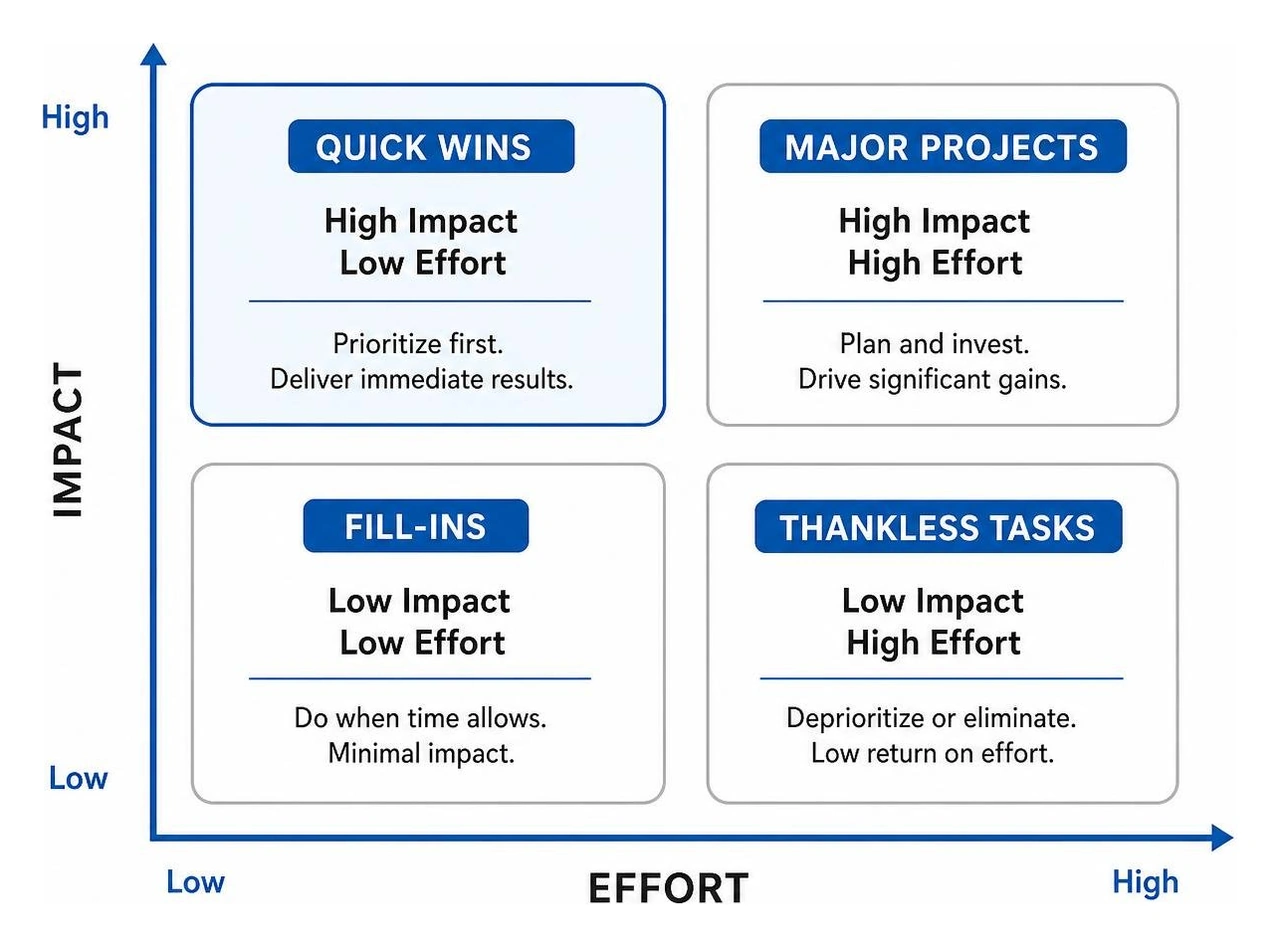
By prioritizing high-impact, low-effort changes first, you can secure quick wins that generate immediate revenue. This revenue can then fund your more complex, long-term conversion rate optimization efforts.
Quick Wins to Implement Today
These simple changes take minimal technical effort but can quickly improve your store's performance:
- Enable a Sticky Purchase Button: Keep your buy button accessible on mobile devices at all times.
- Display Shipping Policies Clearly: Add a line of text below your button stating "Free shipping on orders over $50" or "Flat-rate $5 shipping."
- Add Trust Badges: Place your payment icons and satisfaction guarantees directly under your primary call-to-action.
- Simplify Variant Selectors: Use visual color swatches and clear size buttons instead of drop-down menus to reduce decision fatigue.
Implementing these quick changes is a great starting point to help reduce checkout abandonment.
Long-Term Conversion Rate Optimization Strategies
Once your quick wins are in place, you can focus on more advanced strategies that yield compounding returns over time:
- Systematic A/B Testing: Use A/B testing tools to test one variable at a time — such as your main hero image, button color, or headline copy. Never rely on hunches; let real customer data guide your design decisions.
- Personalized Product Recommendations: Use Shopify's built-in recommendation engines to display relevant, complementary products on your PDPs to increase your average order value.
- Interactive Shopping Quizzes: Guided product finder quizzes help first-time visitors find the exact item they need, reducing decision anxiety. Merchants often see add-to-cart rates jump by 20% after implementing a helpful product quiz.
For a structured approach to these advanced tactics, check out our Shopify conversion rate optimization services and our guide on how to increase conversion on your Shopify store.
Frequently Asked Questions about Shopify Add-to-Cart Rates
What is a typical add-to-cart rate for Shopify stores?
The average add-to-cart rate for Shopify stores sits around 4% to 5%. Hitting an 8% rate puts your store in the top tier of merchants, while double-digit rates are considered excellent.
Why is my add-to-cart rate high but conversion rate low?
A high add-to-cart rate paired with a low conversion rate typically points to checkout friction. This is often caused by unexpected shipping fees, a complicated checkout process, or a lack of local payment methods. To recover these lost sales, simplify your checkout flow and set up automated Shopify cart abandonment emails to bring high-intent shoppers back to your store.
How does page speed affect my add-to-cart rate?
Slow page speed directly lowers your add-to-cart rate by causing frustrated users to bounce before they can act. Even a one-second delay in mobile load times can drop conversions noticeably. Keep your page fast by compressing images, using modern video formats, and keeping your Shopify theme updated.
To sum up
Improving your Shopify add-to-cart rate does not require a complete store redesign. By focusing on mobile usability, button visibility, upfront pricing, and trust-building elements, you can systematically remove the friction points that cause visitors to leave. Start with the quick wins today, track your performance in Shopify Analytics, and use data-driven testing to build a more profitable shopping experience over time.
If you would like help with Shopify conversion rate optimization, get in touch with us here at First Pier at https://www.firstpier.com/contact.





.png)
.png)

