




Why Shopify Best Practices Matter for Your Growing Store
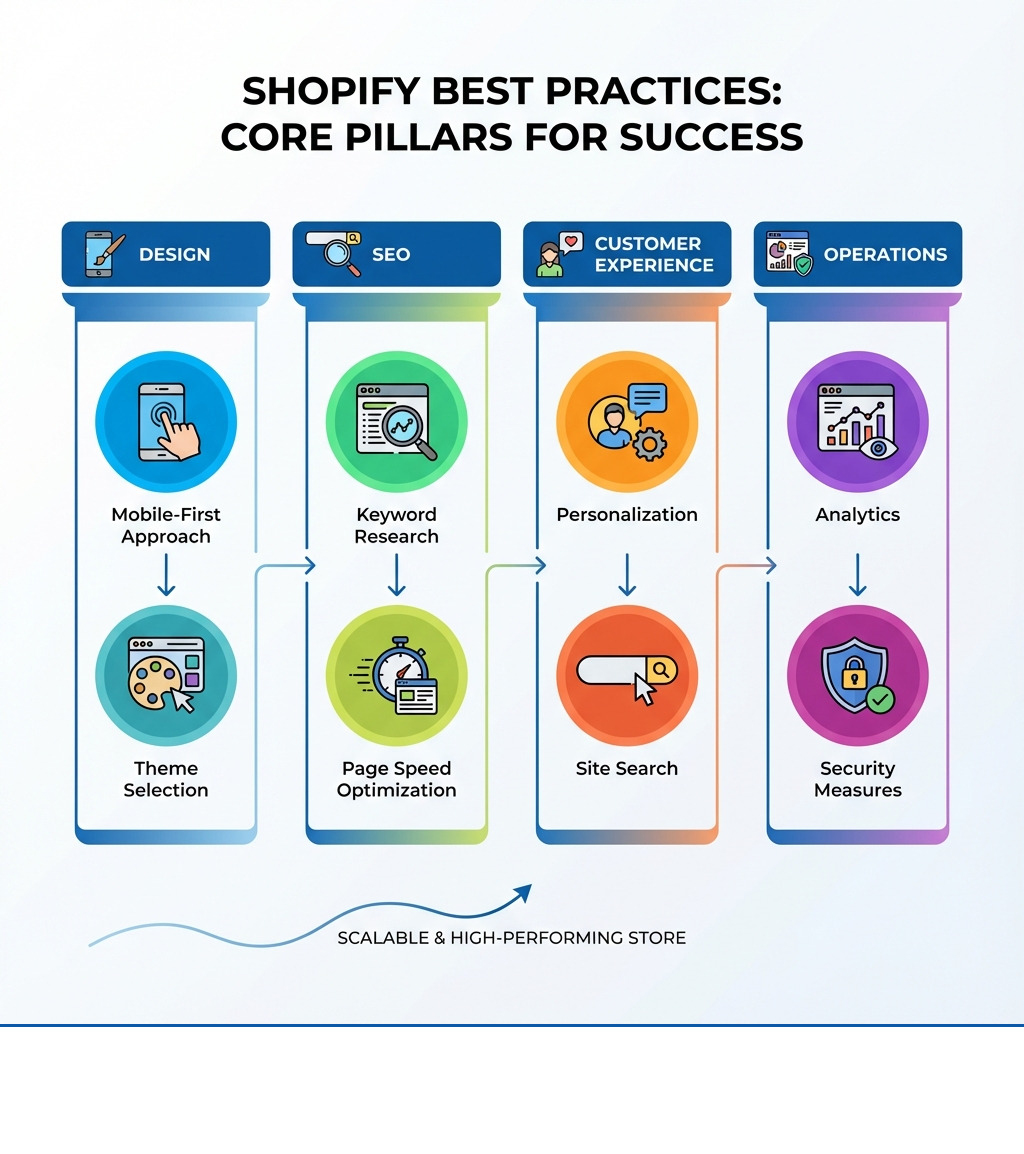
Shopify best practices are proven strategies for building a high-performing online store that drives conversions and revenue. Key areas to focus on include:
- Design & UX: Use responsive, mobile-first themes and a simple checkout.
- SEO & Performance: Do keyword research, optimize pages, and keep load times under 2 seconds.
- Customer Experience: Show customer reviews, personalize experiences, and improve site search.
- Trust & Security: Use SSL, show social proof, and have clear policies.
- Marketing Automation: Set up abandoned cart emails and other workflows.
- Analytics: Track key metrics and use A/B testing.
With most websites getting no organic traffic, a strategic approach is vital. Think of these practices as your foundation. A one-second page load delay can hurt conversions, while a poor checkout can lose customers. Getting it right with fast speeds, mobile optimization, and clear navigation turns visitors into loyal customers.
I'm Steve Pogson, founder of First Pier, a Shopify Expert Agency. I've helped brands like Wyman's Blueberries and Hyperlite Mountain Gear use Shopify best practices to scale their stores. This guide offers actionable strategies, backed by data, that you can use today to improve your store.
Designing for Success: User Experience and Conversions
Creating a visually appealing and user-friendly store is about guiding your customers effortlessly towards a purchase. Here's how to improve design for better user experience and conversions.
Choosing the Right Shopify Theme
Your theme is the foundation of your store's design. When choosing one, what are the key considerations? First, look for themes built for performance, as speed affects conversions. The Shopify Theme Store has many fast options, like Dawn. Next, consider your catalog size and industry. Themes like Enterprise are for large catalogs, while Symmetry suits fashion. Shopify lets you filter by industry to find relevant options. Themes should also be accessible, creating an inclusive experience for all users. Finally, consider customization. A good theme offers flexibility without being overwhelming, making it easy to match your brand.

I encourage you to visit the Shopify Theme Store and explore the options. For example, you might find a theme like Symmetry that fits your brand. If you need assistance with tailoring your chosen theme, you can find more info about Shopify Theme Customization Help.
Creating a Great User Experience
To improve UX and conversions, focus on these areas. A mobile-first design is essential, as 72% of e-commerce sales in 2023 were on mobile. Test your site on various devices. For navigation, use clear menu labels and mega menus for large stores. Product filters and a prominent search bar help customers find items quickly. For typography, use a maximum of three readable, consistent fonts. Your color scheme should align with your brand. Digital accessibility is also important. Building with accessibility in mind ensures an inclusive experience for users with disabilities.
For a deeper dive into creating a seamless shopping experience, explore more info about E-commerce UX Design.
High-Impact Product Pages
Your product pages are your digital storefront. How do high-quality images and descriptions contribute to sales? They build trust and help customers visualize the product. High-quality images and videos are non-negotiable. Use professional photos from multiple angles, in-use lifestyle shots, and a zoom function. Videos or 360° images can add a dynamic element. Alongside visuals, write unique, detailed product descriptions. Go beyond generic copy to highlight benefits and address customer needs. Use clear formatting like subheadings and bullet points to make them easy to read.

For more detailed guidance on optimizing these crucial pages, check out more info about Shopify PDP.
Streamlining the Checkout Process
A complicated checkout can cause cart abandonment. What are the best practices for streamlining it? First, offer a guest checkout option. Forcing account creation is a barrier. Next, enable accelerated payments like Shop Pay, Apple Pay, and PayPal. These allow for quick purchases. Buy Now, Pay Later (BNPL) options like Affirm, Klarna, or AfterPay can also make higher-priced items more accessible. Be transparent about all costs, including shipping and taxes, early on. Minimize form fields and use security badges to build trust. Finally, set up abandoned cart recovery emails to remind customers to complete their purchase. For more insights, explore more info about Shopify Checkout Extensions and how to reduce Cart Abandonment Rate.
Boosting Your Store with SEO and Performance
Visibility and speed are paramount in the online world. This section explains how to improve your store's visibility on search engines and ensure it runs quickly, capturing more potential customers.
Core E-commerce SEO Strategy
A strong SEO strategy is a top Shopify best practice. With 96.55% of websites getting no organic traffic from Google, visibility is crucial. Here’s how to build a strong SEO strategy:
- Keyword Research: Use tools like Ahrefs or Moz to find what customers are searching for. Focus on long-tail keywords (e.g., "blue candle cactus for sale") which have higher purchase intent. You can find more info about E-commerce SEO.
- On-Page Optimization: Weave keywords into your content. Craft compelling title tags (30-60 characters) and meta descriptions (under 160 characters). Use your main product name as the H1 heading. Optimize collection pages with unique descriptions, as they often rank well for generic terms. For product pages, write unique descriptions to avoid duplicate content.
- Technical SEO: Shopify handles many technical basics like sitemaps. Ensure your site structure is logical for search engines to crawl. Optimize images with descriptive alt text.
- Link Building: Get quality backlinks from authoritative sites to signal trust to Google. Also, use internal linking to connect related products, collections, and blog posts.
The Role of Website Speed in Shopify Best Practices
What role does website speed play? A slow site kills conversions and hurts SEO, as Google uses page speed as a ranking factor. A one-second delay can sabotage sales. Here's how to check and improve your store's speed:
- Monitoring Tools: Use Shopify's speed score and external tools like PageSpeed Insights or GTmetrix. Aim for a load time under two seconds.
- Image Optimization: Compress images before uploading using tools like TinyPNG. Use modern formats like WebP.
- Minimize Apps: Too many apps can slow your site. Review and remove any you don't need.
- Code Optimization: Ensure your theme's code is clean by minimizing JavaScript and CSS files.
- Content Delivery Network (CDN): Shopify has a built-in CDN that you can enable to speed up loading for customers worldwide.
- Lazy Loading: Use lazy loading so images and videos only load as a user scrolls to them.
For more detailed steps, you can read more info about how to Improve Shopify Site Speed.
Using a Blog to Improve SEO
How can merchants use a blog for SEO? A blog is a powerful tool to establish authority and attract traffic. Create valuable content that answers customer questions. Research keywords related to your products (e.g., "how to care for succulents") and write helpful guides or tips. The content should be unique and add value. Internally link from blog posts to relevant product pages to guide readers toward a purchase. This builds topical authority and signals your expertise to Google. While AI tools can help, ensure the final content is unique and helpful.
For a complete strategy on content creation, refer to more info about Content Strategy for Digital Marketing.
The Benefits of Structured Data (Schema Markup)
What are the benefits of using structured data? It helps search engines understand your content, leading to rich snippets in search results. These are extra details like star ratings, prices, and availability that make your listing stand out and can increase click-through rates. Shopify automatically adds some product schema, but you can improve it by using apps that collect and display customer review ratings. This data can then appear directly in Google search results. Use Google's testing tools to ensure your structured data is implemented correctly.
To understand how to implement and optimize this on your store, explore more info about Schema Markup Shopify.
Building Trust and Improving the Customer Journey
Building a successful online store isn't just about getting traffic; it's about converting that traffic into loyal customers. This requires trust and a seamless, personalized customer experience.
Using Social Proof and Customer Reviews
How can merchants use reviews and social proof to build trust? People trust other people; 91% of young adults trust reviews as much as personal recommendations. Display customer reviews on product pages using apps like Yotpo or Stamped. These can automate review collection after a purchase. User-generated content (UGC), like customer photos, is also powerful. Displaying this authentic content helps shoppers see products in real-life settings, building their confidence to buy. You can also use subtle social proof like recent sales pop-ups to create a sense of activity.
For a deeper dive into using the power of customer content, refer to more info about User Generated Content Shopify.
Personalizing the Shopping Experience
Personalization is now an expectation. How can you implement it effectively? Use customer data to tailor the shopping experience. Show personalized product recommendations based on browsing history or past purchases. Use personalized emails, such as a welcome series for new subscribers or post-purchase follow-ups with related product suggestions. You can also personalize search results. If a user has been browsing men's clothing, a search for "shorts" should show men's shorts first. This makes customers feel understood and increases conversions throughout their Customer Journey.
Optimizing On-Site Search for Product Findy
The search bar is a key tool, with 69% of consumers using it immediately. How can you improve your site search? Make the search box prominent, especially on mobile. Add features to improve the experience:
- Autocomplete: Suggest popular products or terms as a user types.
- Error Tolerance: Understand misspellings and synonyms.
- Faceted Search: Allow customers to filter results by color, size, price, etc.
- Rich Merchandising: Show product images and prices in search results.
- "No Results" Strategy: If no products are found, suggest alternatives or related categories.
Use Shopify's native Search & Findy app or third-party tools like Klevu or Algolia to add these features. For more on these powerful tools, see more info about Shopify Search Apps.
Providing Excellent Customer Service
What are the best practices for customer service? Responsive and helpful service turns buyers into loyal advocates. Offer multiple support channels, including live chat, email, and a phone number. A live chat can answer questions in real-time and prevent lost sales. Be transparent with a clear, easy-to-find returns policy. A detailed FAQ page is another great self-service option, answering common questions about shipping, returns, and products. This enables customers to find answers quickly on their own. For details on integrating chat features, refer to more info about the Shopify Chat Feature.
Advanced Shopify Best Practices for Growth
Once your core store is optimized, it's time to think about growth. This section details strategies for scaling your store, from marketing automation to security.
Using Analytics for Data-Driven Decisions
How can merchants use data to make informed decisions? Set up tracking and regularly review the data to understand customer behavior. Connect both Shopify Analytics and Google Analytics to your store. Monitor key performance indicators (KPIs) like conversion rates, average order value (AOV), and site speed. Use this data to run A/B tests on page layouts, calls-to-action, or pricing to see what works best with your audience. Making decisions based on data is key to sustained growth. For a full breakdown of how to track and interpret your store's performance, see more info about E-commerce Analytics & Analysis.
The Power of Email Marketing Automation
What are the advantages of automated email workflows? They are highly effective for engaging customers and recovering sales. Set up key automated sequences:
- Welcome Series: Introduce your brand to new subscribers, often with a discount.
- Abandoned Cart Emails: Remind customers about items left in their cart to recover lost sales.
- Post-Purchase Follow-ups: Ask for reviews or suggest related products.
- Win-back Campaigns: Re-engage inactive customers with special offers.
Use platforms like Omnisend for advanced personalization and A/B testing. Automated emails help you build relationships and drive repeat purchases at scale. For a complete guide to setting these up, refer to more info about Marketing Automation Shopify.
Essential Security and Legal Compliance
What are the essential security and legal measures for a Shopify store? Protecting data and complying with laws are non-negotiable for building trust.
- Security Measures: Shopify includes SSL certificates to encrypt data. Use strong passwords and two-factor authentication (2FA) for staff accounts. Keep your apps updated and use secure, PCI-compliant payment gateways like Shop Pay. Educate your team on security best practices.
- Legal Compliance: Have clear and accessible privacy policies and terms of service. If you sell globally, comply with data regulations like GDPR and CCPA. Ensure your store is accessible to users with disabilities (ADA compliance) to avoid legal issues and serve a broader audience.
These steps build customer confidence and protect your business. For a detailed guide on securing your store, see more info about How to Secure Shopify Store.
To Sum Up
Using Shopify best practices is an ongoing process. By focusing on design, SEO, and customer experience, you can build a strong online store. Use data to guide your decisions, test new strategies, and refine your approach over time to stay competitive and grow.
I've seen these strategies transform businesses. If you're looking to build a high-performance online business, I'm here to help.
Get a free e-commerce audit for your store to see how First Pier can partner with you.





.png)
.png)

