


Why Your Shopify Store's Speed Numbers Actually Matter

Summary
- Shopify page speed insights refers to the set of tools and metrics used to measure how fast a Shopify store loads and responds for real users.
- Core Web Vitals — LCP, INP, and CLS — are the primary metrics Google and Shopify use to evaluate store performance.
- Slow stores lose customers: 53% of mobile users abandon a site that takes more than three seconds to load.
- Shopify provides native performance reports inside the admin panel, alongside external tools like Google PageSpeed Insights.
- The biggest controllable factors affecting store speed are installed apps, theme quality, and unoptimized images.
Shopify page speed insights are the clearest signal you have of whether your store is working for customers — or quietly costing you sales.
Most store owners check their speed score once, feel good or bad about the number, and move on. That's a mistake.
Speed metrics are not just a technical report card. They are a direct indicator of revenue. A one-second delay in load time can cost a store with 5,000 daily visitors and a $60 average order value around $9,000 per day. A 0.1-second improvement can lift retail conversion rates by 8.4%. These are not rounding errors.
The stakes are especially high on mobile. Today, 77% of retail traffic comes from mobile devices — and 53% of those users will leave a page that takes more than three seconds to load. If your store feels fast on your laptop but slow on a mid-tier Android phone with a 4G connection, you are losing a significant share of potential buyers before they ever see your products.
What makes this harder is that the numbers themselves can be confusing. A PageSpeed Insights score of 45 on mobile does not mean the same thing as a score of 45 on desktop. Lab data and real user data tell different stories. And many of the "fixes" suggested by third-party scanning tools don't even apply to Shopify's infrastructure.
This guide cuts through that confusion. It covers what the metrics actually mean, how to read them accurately, and what moves the needle on a real Shopify store.
I'm Steve Pogson, founder of First Pier and a certified Shopify Expert with over two decades of experience improving Shopify page speed insights and overall store performance for growing brands. The strategies here come from real work on real stores — not theory.
Understanding Core Web Vitals and Shopify Page Speed Insights
When I talk to merchants about Shopify Core Web Vitals 0875d, I often see their eyes glaze over. These terms sound like alphabet soup, but they are actually very simple ways to measure how a human experiences your website. Google uses these three specific metrics to decide if your site is "good" enough to rank well in search results.
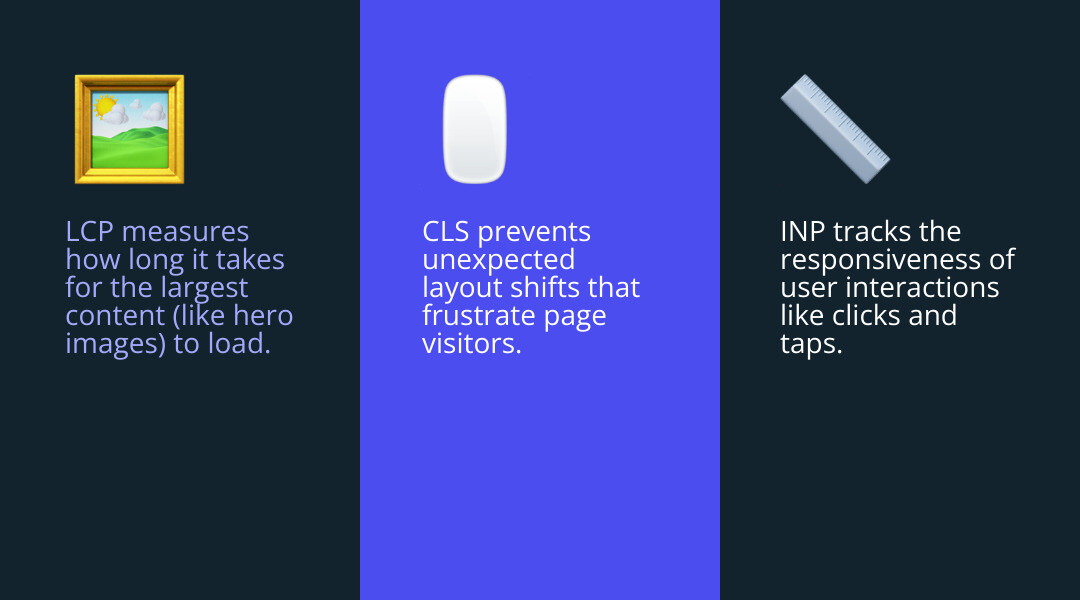
- Largest Contentful Paint (LCP): This measures loading speed. Specifically, it tracks how long it takes for the largest piece of content on the screen—usually a hero image or a product banner—to become visible. If this takes longer than 2.5 seconds, your visitors are staring at a blank or half-baked screen, which feels like an eternity in internet time.
- Interaction to Next Paint (INP): This is about interactivity. It measures how long it takes for the page to actually respond when a customer clicks a button or opens a menu. If a user clicks "Add to Cart" and nothing happens for half a second, they might click it again or assume the site is broken.
- Cumulative Layout Shift (CLS): This tracks visual stability. Have you ever tried to click a link, only for the page to jump at the last second, causing you to click an ad instead? That’s poor CLS. It happens when images or fonts load late and push other content around.
To get a deeper look at these, you can Learn about Web Performance through official documentation, but the main takeaway is that these three numbers define your user experience. If you ignore them, your search engine rankings will likely suffer, as Google prioritizes sites that provide a stable, fast experience.
Why Speed Metrics Matter for E-commerce
Speed is the foundation of your conversion rate. If your site is slow, everything else you do—email marketing, paid ads, social media—becomes less effective because you're sending people to a "leaky" bucket.
Research shows that 53% of mobile users will leave a site if it takes longer than three seconds to load. When they leave, your bounce rate goes up, and your return on ad spend goes down. Furthermore, Google uses mobile-first indexing, meaning it looks at the mobile version of your store to determine your rankings. Since Shopify Performance Optimization is so closely tied to how Google sees you, a slow mobile site can hide your store from potential customers entirely.
How to Measure Your Store Performance Accurately
To fix a problem, you have to measure it correctly. I see many merchants rely solely on the "Speed Score" in the Shopify admin dashboard. While that's a helpful starting point, it doesn't give you the full picture.

The gold standard for measurement is PageSpeed Insights. This tool provides two types of data: Lab Data and Field Data.
- Lab Data: This is a controlled test. Google runs a simulated visit to your site using a mid-tier mobile device on a 4G connection. It’s great for testing new changes, but it doesn't always reflect what every customer sees.
- Field Data (Real User Metrics): This is the most important data. It comes from the Chrome User Experience Report (CrUX), which collects actual performance data from real people visiting your store over the last 28 days. This is what Google actually uses for ranking.
If you want to Improve Shopify Site Speed, you need to look at both. Your lab score might be low because the test is very strict, but if your field data shows "Green" across the board, your real customers are having a great experience.
Interpreting Shopify Page Speed Insights Reports
When you run a report on Shopify page speed insights, the mobile score is almost always lower than the desktop score. Don't panic—this is normal. The mobile test uses "4G throttling" and "CPU slowdown" to simulate a customer on an older phone with a spotty connection.
The performance score is a weighted average. For example, Total Blocking Time (which relates to INP) usually carries a lot of weight. If you have a massive JavaScript file from a chat app loading early, it will tank your score even if your images are small. You can use a Weighted average calculator to see how different metrics impact your final 0-100 score, but focusing on the individual Core Web Vitals is a better use of your time than chasing a perfect 100. Shopify Speed Optimization is about the user, not just the number.
Using Native Shopify Page Speed Insights Tools
Shopify has built some excellent Web performance reports directly into your admin panel. If you go to Analytics > Reports, you can find a dedicated dashboard for web performance.
One feature I find incredibly useful here at First Pier is the "Event Annotations." When you see a sudden dip in your speed metrics, Shopify will often mark the chart with an icon. This tells you if the dip happened right after you installed a new app or changed your theme code. It’s like having a digital paper trail for your store's health. Staying on top of these Shopify Store Optimization Tips 2025 ensures that you don't let a single bad app ruin months of progress.
Common Factors That Slow Down Shopify Stores
In my experience, a Shopify Site Loading Slowly is rarely caused by Shopify itself. Shopify’s servers are world-class. The slowness usually comes from what the merchant adds to the platform.
The most common culprits are:
- App Bloat: Every time you install an app for a countdown timer, a pop-up, or a loyalty program, you are adding "scripts" to your site. These scripts often block the page from loading until they are finished. Even if you delete the app, it might leave behind "ghost code" in your theme files.
- Heavy Themes: Some themes come packed with features you don't need—like five different types of sliders or complex animations. This creates a "heavy" theme that takes a long time for the browser to parse.
- Unoptimized Images: Since 77% of retail traffic is on mobile, loading a 5MB high-resolution product photo is a recipe for a high bounce rate. The phone has to download all that data before it can show the image.
- Excessive Liquid Loops: This is a technical one. Sometimes, a theme's code will tell the server to "loop" through every single product in your store just to find three related items to show on a page. This creates a massive delay before the page even starts to send data to the browser.
Practical Strategies to Improve Store Performance
Improving your Shopify page speed insights doesn't always require a developer, though for the deep code work, it certainly helps. There are several "big wins" you can handle yourself.
First, let's talk about Shopify Image Optimization. You should always use the right format. While JPEG is common, WebP is a "next-gen" format that provides high quality at a much smaller file size. Shopify now automatically converts many images to WebP, but you can help by uploading Optimised Images that are already resized to the dimensions they will actually appear on the screen.
Another essential technique is Lazy Loading Shopify assets. This tells the browser: "Only load the images the user can see right now. Wait to load the ones further down the page until they scroll there." This significantly reduces the initial weight of the page. Shopify also provides a built-in Content Delivery Network (CDN), which stores your images on servers all over the world, so a customer in Maine gets their data from a nearby server rather than one in California.
Managing Apps for Better Shopify Page Speed Insights
If you want to Optimize Shopify Store Speed, you must be ruthless with your apps. I recommend an "app audit" every quarter. Ask yourself: "Is this app making me more money than the speed it's costing me?"
For the apps you keep, check if they support "Theme App Extensions." This is a newer way for apps to interact with Shopify that is much cleaner and faster. You can also work with a developer to use "Async loading" or "Script deferral." This ensures that your essential page content (like your product title and price) loads first, while the non-essential scripts (like a chat widget) wait until the page is fully interactive. This prevents "namespace collisions," a common coding headache that can be solved with Immediately Invoked Function Expressions (IIFE).
Mobile-Specific Performance and Checkout Optimization
Mobile users are impatient and often on less-than-perfect data plans. This is why a mobile-first design is no longer optional.
| Checkout Method | Average Load Time | Conversion Lift |
|---|---|---|
| Standard Mobile Checkout | 4.2 seconds | Baseline |
| Shop Pay (One-Tap) | 1.2 seconds | +1.91x |
| AMP-enabled Pages | 0.8 seconds | +20% |
One of the best ways to improve mobile performance is to use Shop Pay. It stores customer info so they can check out with one tap. Because it reduces the number of pages a user has to load, it drastically increases the checkout-to-order rate.
You might also consider an AMP website (Accelerated Mobile Pages) approach for your blog or collection pages. Apps like Sheriff AMP Pages can create stripped-down versions of your pages that load almost instantly on mobile. Finally, ensure your theme uses the srcset attribute for images. This allows the browser to choose a smaller image for a phone and a larger one for a desktop, saving precious data for your mobile visitors.
Frequently Asked Questions about Shopify Speed
Why is my mobile score so much lower than my desktop score?
Mobile tests are designed to be a "worst-case scenario." They simulate a mid-tier device (like an older Android) and a throttled 4G network. This highlights every single inefficiency in your site. A desktop computer has a powerful processor and a fast internet connection that can "brute force" its way through heavy scripts and large images, hiding the problems that your mobile customers are actually feeling.
Do Shopify apps permanently slow down my store?
They can. When you uninstall an app through the Shopify dashboard, it doesn't always remove the code it added to your theme. This "ghost code" remains in your files, making requests to servers that no longer exist and slowing down your load time. I always suggest a manual check of your theme.liquid file and snippets folder after removing an app to ensure no leftover scripts are hanging around.
How often should I check my speed metrics?
I recommend checking your Shopify page speed insights at least once a month, or immediately after any major change. Major changes include installing a new app, changing your theme, or adding a large number of new products with high-res photos. Performance isn't a "one and done" task; it's a continuous part of running a healthy business.
Conclusion
Understanding Shopify page speed insights is about more than just chasing a green number on a report. It is about respecting your customers' time and making it as easy as possible for them to give you their money.
Performance monitoring and Shopify Performance Optimization 9dbb2 are ongoing processes. As your store grows, it will naturally get heavier, and you’ll need to keep trimming the fat to stay fast.
Here at First Pier, we help brands navigate these technical metrics every day. Based in Portland, Maine, our team specializes in taking the guesswork out of Shopify development. We don't just tell you your site is slow—we find the specific apps, scripts, and images causing the bottleneck and fix them. If you're ready to stop losing sales to a sluggish site, our Shopify Plus Optimization services can help you build a faster, more profitable storefront.





.png)
.png)

