


YouTube ad specs are simple to get wrong and expensive to get wrong quietly. An asset that is a few seconds too long, cropped to the wrong ratio, or missing the resolution Google expects will either be rejected outright or serve in a fraction of the placements you paid to reach. This page collects the current requirements for every YouTube ad format in one place, along with the parts of Google Ads that decide how those assets are bought and billed.
The campaign side of YouTube changed substantially between 2024 and 2026. Video action campaigns no longer exist, Demand Gen absorbed them, and the old cost-per-click versus cost-per-view framing that appears in most YouTube guides no longer matches what the platform charges for. Specs and campaign structure are covered together here because a spec sheet is only useful once you know which campaign type your asset has to serve in.
Last verified 2 September 2026 against Google Ads Help and YouTube Help. Three things have moved this year. The upgrade of Video action campaigns to Demand Gen finished in April 2026. Google Display Ads campaigns started migrating into Demand Gen in June 2026. And a change to how target-based bid strategies behave on budget-limited campaigns took effect on 17 August 2026. All three are covered below.
YouTube ad specs at a glance
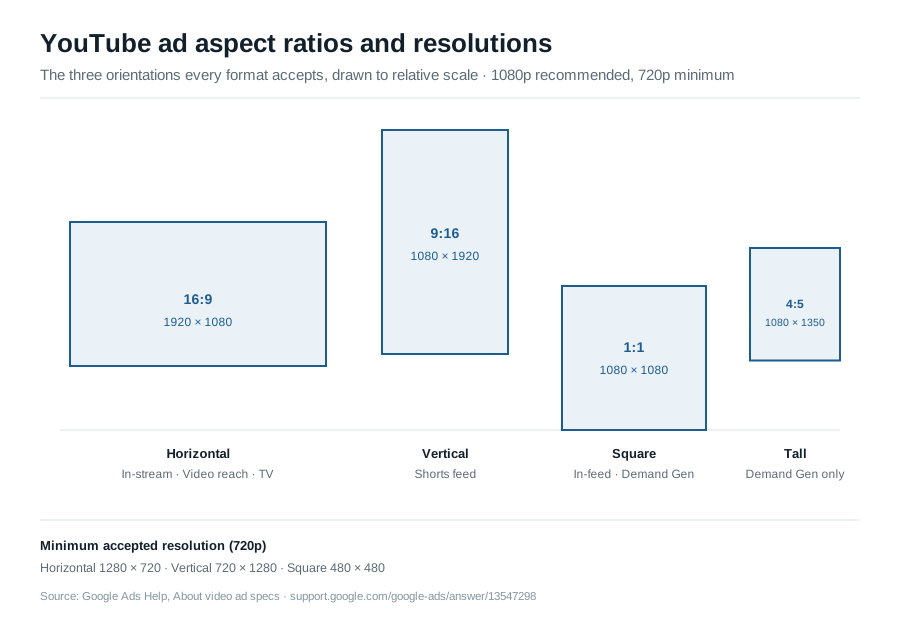
The table below is current as of August 2026. Every format accepts the same three orientations unless noted: 16:9 horizontal at 1920 x 1080, 9:16 vertical at 1080 x 1920, and 1:1 square at 1080 x 1080. Durations and billing are what differ.
| Format | Duration | Aspect ratio and resolution | Where it runs | How you pay |
|---|---|---|---|---|
| Skippable in-stream | No minimum or maximum; skip button appears after 5 seconds. Google recommends staying under 3 minutes. | 16:9, 9:16 or 1:1. 1080p recommended, 720p minimum. | Before, during or after videos on YouTube watch pages and Google video partners; full-screen interstitial in mobile apps. | CPV, Target CPM, Target CPA or Maximize conversions, depending on the campaign type. |
| Non-skippable in-stream | 7 to 15 seconds for standard assets. A 16 to 30 second version is available for connected TV only. | 16:9, 9:16 or 1:1 for standard assets. The 16 to 30 second CTV asset must be horizontal; square and vertical will not run. | Before, during or after videos on YouTube and Google video partners. | Target CPM only. You are buying impressions, not views. |
| In-feed video | No maximum length. | Any of the three orientations. Thumbnail 1280 x 720 recommended, 1280 x 640 minimum. | YouTube search results, Watch Next, the YouTube home feed and the subscriptions feed. | Charged when someone clicks the thumbnail to watch. In Video views campaigns, 10 seconds of autoplay also counts as a view. |
| Bumper | 6 seconds or shorter, non-skippable. | 16:9, 9:16 or 1:1. 1080p recommended. | Before, during or after videos on YouTube and Google video partners. | Target CPM. |
| Shorts | Minimum 5 seconds in Demand Gen. Assets under 10 seconds cannot also serve on YouTube in-stream. Google recommends staying under 60 seconds. | 9:16 at 1080 x 1920 is the ratio Google recommends for Shorts. Demand Gen also accepts 1:1 at 1080 x 1080, 4:5 at 1080 x 1350 and 16:9 at 1920 x 1080. | Between organic Shorts in the Shorts feed, across mobile and other devices. | In Video views campaigns a view counts at 10 seconds or completion, or on a click of the call to action or a Like, Comment or Share. In Demand Gen, billing follows the campaign bid strategy. |
| Masthead | Any length, but desktop autoplay is capped at 30 seconds and the start point is adjustable. | 16:9 recommended, 1920 x 1080 or higher. The asset must be an existing public or unlisted YouTube upload. | The YouTube home feed on desktop, mobile, tablet and TV screens. | Reservation only. CPM Mastheads deliver a fixed impression volume and are available through a Google representative, YouTube Programmatic Guaranteed instant deals or Google Ads Reservation. Cost-per-hour Mastheads give 100% share of voice for the reserved hours and are sold only through a Google representative. |
A terminology note before the checklist below: "pre-roll" is not a term Google Ads uses anywhere in its own documentation. It is leftover industry shorthand for any ad that plays before the video someone chose to watch, which in Google’s naming is a skippable in-stream or non-skippable in-stream ad served in the "before" position — both are in the table above. There is no separate pre-roll format, spec or campaign type to look up.
One format that still appears in older guides is gone: YouTube stopped running overlay ads, the desktop-only banners that sat across the bottom of the video player, on 6 April 2023. If a checklist you are working from still lists them, it predates several other changes on this page.
File requirements that apply to every format
These are the underlying asset rules, also current as of August 2026. They apply regardless of which campaign type the video ends up in.
| Requirement | Specification |
|---|---|
| Recommended resolution | 1080p: 1920 x 1080 horizontal, 1080 x 1920 vertical, 1080 x 1080 square |
| Minimum resolution | 720p: 1280 x 720 horizontal, 720 x 1280 vertical, 480 x 480 square |
| Recommended file format | .MPG (MPEG-2 or MPEG-4) |
| Other accepted formats | .WMV, .AVI, .MOV, .FLV, .MPEG-1, .MP4, MPEGPS, 3GPP, WebM, DNxHR, ProRes, CineForm, HEVC (h265) |
| Maximum file size | Under 256 GB |
| Audio-only files | Not accepted. MP3, WAV and PCM will be rejected. |
| Video thumbnails | 1280 x 720 recommended, 1280 x 640 minimum, 16:9, .JPG, .GIF or .PNG, under 2 MB |
| Companion banner | 300 x 60, JPEG, GIF or PNG, maximum 150 KB, desktop only |
Demand Gen campaigns add their own asset set on top of the video, because the same campaign serves in feeds that need static images. Video assets carry a 5 second minimum and accept 1:1 at 1080 x 1080, 16:9 at 1920 x 1080, 4:5 at 1080 x 1350 and 9:16 at 1080 x 1920. Image assets accept 1.91:1 at 1200 x 628 (600 x 314 minimum), 1:1 at 1200 x 1200 (300 x 300 minimum), 4:5 at 960 x 1200 (480 x 600 minimum) and 9:16 at 1080 x 1920 (600 x 1067 minimum), in .jpg or .png up to 5 MB. Logos are square, 1200 x 1200 recommended with a 144 x 144 minimum, up to 150 KB.
A practical consequence of that spec sheet: if you produce only a single 16:9 master, a Demand Gen campaign will still run it, but it will compete for Shorts and vertical feed placements against advertisers who supplied the 9:16 asset Google recommends for those surfaces. Budget for at least a horizontal and a vertical cut of every concept.
Audio ad specs
The file requirements table above says audio-only files are rejected, which answers a different question than the one people searching for YouTube audio ad specs are usually asking. Audio ads are a real, separate format — Google published a dedicated setup guide for them in July 2026 — and they still require a video upload, not a raw audio file.
| Requirement | Specification |
|---|---|
| Maximum duration | 30 seconds |
| Serving behavior | Creatives up to 15 seconds serve as non-skippable. Creatives from 16 to 30 seconds serve as skippable. |
| Creative format | A YouTube video upload pairing audio with a static image or light animation — not an MP3, WAV or PCM file. |
| Accepted resolution | 426 x 240 (240p) up to 3840 x 2160 (2160p). 16:9 is the preferred aspect ratio. |
| Where it runs | Audio surfaces and listening-first states on YouTube and YouTube Music. |
| Campaign setup | Video campaign, Brand awareness and reach objective, Audio subtype, Target CPM bidding. |
Google recommends 60 to 80 words of voiceover for a 30-second ad, written for listening rather than watching.
YouTube ad safe zones
Every format above shares one constraint that does not show up in a duration or a resolution: player controls, the skip button, captions and platform UI all sit on top of the video, and where they sit is different for a horizontal in-stream ad than for a vertical Shorts ad.
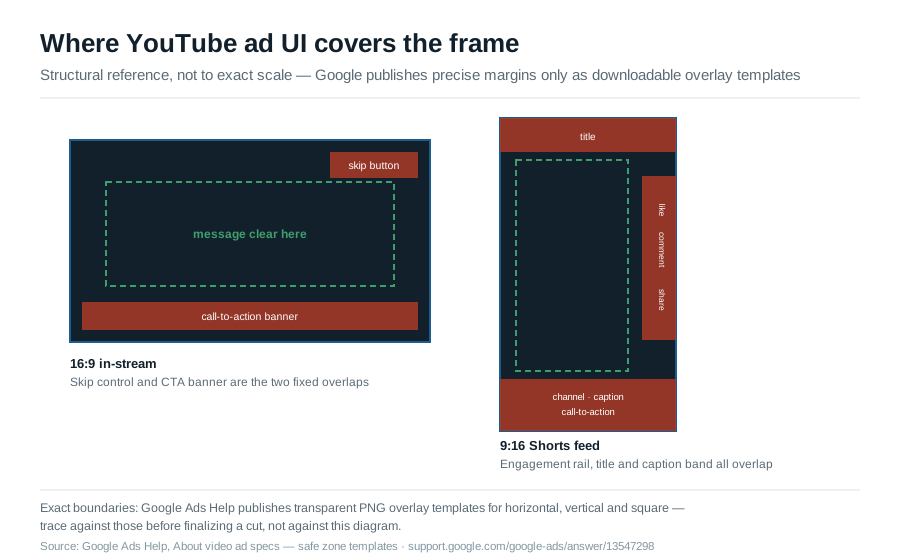
Two things worth being precise about. First, Google does not publish these margins as pixel values or percentages anywhere in its written documentation — the only official source is a set of downloadable transparent PNG overlay templates for horizontal, vertical and square video, meant to be dropped directly into your editing software. Treat any page that states an exact safe-zone pixel margin as an estimate, not a Google figure, unless it links to those templates.
Second, the overlap is not identical everywhere. A skippable in-stream ad only has to clear the skip button, in the top right, for its first five seconds, and the companion banner along the bottom on desktop. A Shorts placement carries the title near the top, the like, comment and share rail along the right edge, and the channel name, caption and call-to-action band across the bottom — all at once, for the full length of the ad. Keep the message, logo and any on-screen text inside the center third of the frame for Shorts, and check the actual template before locking a cut.
Campaign types as they exist now
This is where most YouTube advertising content on the web is out of date, including guides published in the last year. The structure below reflects the Google Ads interface as of August 2026.
Demand Gen replaced Video action campaigns
Video action campaigns, the conversion-focused video campaign type that ran skippable in-stream and in-feed ads with a call to action, no longer exist. Google removed the option to create new ones in April 2025, began automatically upgrading existing campaigns to Demand Gen in July 2025, moved most accounts in batches through September 2025, and upgraded the final campaigns in April 2026. That migration is complete; there is nothing left to plan around.
Demand Gen is the successor, and it is broader than the campaign it replaced. It serves across YouTube in-stream, YouTube in-feed, YouTube Shorts, Discover, Gmail, Maps and the Google Display Network from a single campaign. Channel controls let you run all Google channels and let the system allocate, or select specific ones — YouTube Shorts, YouTube in-feed, YouTube home feed, YouTube Watch Next, YouTube Search, Discover, Gmail and the Google Display Network. Running all channels gives the optimization more room; restricting channels is worth doing only when you have a concrete reason, such as a creative that only works in a vertical feed.
The practical shift is that YouTube is no longer a campaign type you buy on its own when your goal is conversions. It is one surface inside a campaign that also buys Discover and Gmail placements. Budget and reporting have to be read at that level.
Display campaigns are migrating into Demand Gen next
Demand Gen is now absorbing a second campaign type. In June 2026 Google began a phased rollout of a migration tool that moves existing Google Display Ads campaigns onto the Google Display Network inside Demand Gen. Google has said that two further phases follow: new Display campaigns will only be creatable within Demand Gen, with existing campaigns remaining editable until they are moved, and remaining eligible campaigns will then be migrated automatically. Google has not published dates for either of those phases.
For anyone running YouTube, the consequence is the same one the Video action campaign migration created. A campaign type that used to represent one channel now represents several, so the question of how much you are spending on YouTube specifically becomes a reporting exercise rather than a budget line.
Video campaigns that remain
The Video campaign type still exists for upper-funnel objectives, with these subtypes:
- Video views: multi-format campaigns that serve skippable in-stream, in-feed and Shorts ads together, bid on Target CPV.
- Video reach: three variants, all bid on Target CPM. Efficient reach mixes skippable in-stream and bumpers and can expand to in-feed and Shorts; non-skippable reach runs 15-second ads, 30-second ads shown primarily on connected TVs, or a mix of 6-second bumpers and 15-second ads; target frequency buys a set number of exposures per person per week or month.
- Ad sequence: serves ads in a defined order to the same viewer, on Target CPM or Maximum CPV.
- Audio reach: audio ads against YouTube music and podcast listening, on Target CPM.
Performance Max also draws on YouTube inventory as one of its channels, which means a single account can be buying the same placements through three different campaign types. If your YouTube impressions are climbing without a corresponding change in your video campaigns, check Performance Max and Demand Gen before assuming something changed in the auction.
What Google added to Demand Gen in 2026
Two rounds of Demand Gen changes landed in 2026, and they are worth knowing before you brief creative or set up reporting:
- Announced 20 May 2026: multimodal video creation in Asset Studio, which builds YouTube video assets from prompts; dynamic product videos, which distribute videos uploaded to Google Merchant Center across Demand Gen campaigns; Google Maps inventory; product feeds extended to more surfaces and verticals; checkout links in nine additional markets; and AI-assisted campaign creation that carries settings across from Performance Max.
- Announced 25 June 2026: wider automatic video resizing, including vertical to square, vertical to landscape and square to landscape; Gemini-generated recommendations on image and video assets; and web-to-app measurement covering app installs driven by Demand Gen.
The measurement additions matter more than the creative ones for most accounts. Campaign type attribution isolates Demand Gen conversions, and uplift experiments measure how Demand Gen and Performance Max interact, which replaces guesswork about whether the two are competing for the same conversions.
Bidding: what actually triggers a charge
The old framing of YouTube pricing as a choice between cost-per-click and cost-per-view is obsolete. What you pay for is determined by the campaign type and the format, and in most conversion campaigns you are not buying views at all.
- Cost per view, skippable in-stream: you are charged when a viewer watches 30 seconds, or the full ad if it is shorter than 30 seconds, or interacts with the ad, whichever comes first.
- Views in Video views campaigns: the threshold differs by placement. Skippable in-stream requires 30 seconds or completion, in-feed requires a click on the thumbnail or 10 seconds of autoplay, and Shorts requires 10 seconds, completion, a click on the call to action, or a Like, Comment or Share. Views are not counted at all for bumper and non-skippable in-stream ads, because the viewer had no choice.
- Target CPM: the only option for bumper and non-skippable in-stream, and the basis for every Video reach subtype. You pay per thousand impressions whether or not anyone watches to the end.
- Demand Gen: six strategies, split between efficiency and volume. Target CPA, Target ROAS and Target CPC set an efficiency target; Maximize conversions, Maximize conversion value and Maximize clicks spend the budget toward volume.
One naming change to be aware of when reading older reports: in October 2025 Google renamed the Views metric to TrueView views, and view rate to TrueView view rate. Nothing about billing or how paid views are counted changed with it.
The 17 August 2026 bid strategy change
On 17 August 2026, Google changed how budget-limited campaigns using target-based bid strategies behave, so that bids optimize more consistently toward the target you set. A campaign with a $10 target CPA that had been delivering at $5 moves toward $10.
It applies to target-based strategies — Target CPA and Target ROAS, plus Target CPC in Demand Gen — across Search, Shopping, Performance Max, Demand Gen, Display, Hotel and Travel campaigns. Campaigns that are not limited by budget are unaffected, as are Target impression share, Target CPM and manual CPC. App campaigns, Video reach and Video views campaigns are excluded, so upper-funnel YouTube buying is untouched. The auction itself does not change.
Google has said it will not adjust targets or budgets on your behalf. A Bid Target Adjustment Tool has been available since 6 July 2026 through account notifications and the Campaigns page, for reviewing campaigns marked "Limited by budget" and setting targets that match recent performance. Google warned that forecasting tools could be unreliable between 17 and 31 August 2026 while the change settled, and advised waiting one to two conversion cycles before judging the result — that window has now passed. If you have Demand Gen campaigns that were running comfortably under target on a constrained budget, check those targets now against actual recent delivery rather than the pre-17-August baseline.
Targeting options as Google Ads names them today
Targeting is split into two questions in the interface: who you reach, and where your ad appears. They are configured separately.
Audience segments
Audience targeting is built from six segment types, all available to video campaigns:
- Affinity segments reach people by long-term interests and habits.
- In-market segments reach people showing recent purchase intent in a category.
- Custom segments are built from keywords, URLs and apps you supply, which makes them the closest thing to intent targeting available in video.
- Detailed demographics reach people by long-term life facts such as education or homeownership status.
- Life events reach people around milestones such as moving or graduating.
- Your data segments reach people who have already interacted with your business, including site visitors, customer lists and viewers of your YouTube channel.
Demand Gen adds two things on top. Lookalike segments extend a first-party seed list, such as purchasers or engaged subscribers, to similar users. Optimized targeting expands beyond the segments you selected when the system finds converting users outside them, which is useful for scale and unhelpful for clean audience tests. Turn it off when you are testing a segment, leave it on when you are scaling a proven one.
Content targeting
Video campaigns keep the ability to choose where ads appear, under the Content page in the "Audiences, keywords and content" menu:
- Placements: specific YouTube channels, individual videos, apps and websites.
- Topics: broad subject categories across videos, channels and sites.
- Keywords: words and phrases related to a video, channel or type of site.
- Devices: computers, phones, tablets and TV screens, including Chromecast and connected TV.
Demand Gen does not offer content targeting. There are no keywords, topics or placement lists, only channel controls and audiences. If placement-level control matters for brand safety or for a specific sponsorship-style buy, that work belongs in a Video campaign, not in Demand Gen.
Device targeting deserves more attention than it usually gets. Connected TV is a materially different viewing context from a phone: no click, no immediate site visit, and a 16:9 horizontal asset requirement for the 30-second non-skippable format. If TV screens are a meaningful share of your impressions, judge those campaigns on reach and lift, not on click-through rate.
Budgeting and cost
There is no rate card for YouTube ads. Every impression is auctioned, and what you pay depends on the audience you are competing for, the format, the season, and the quality signals attached to your account. Published "average CPM" and "average CPV" figures circulate widely, but most are drawn from undisclosed samples, mixed campaign types and years of data pooled together, which makes them useless as a planning input. Your own account data, and the forecasts Google Ads produces when you build a campaign with your actual targeting selected, are the only figures worth budgeting against.
What you can control precisely is the spend mechanics, and those are documented:
- You set an average daily budget per campaign, not a fixed daily cap.
- On any given day, a campaign may spend up to twice the average daily budget to capture traffic fluctuations.
- Across a month, you will not be charged more than 30.4 times your average daily budget, which is why the multiplier exists without producing runaway spend.
- Campaign total budgets are available for video campaigns with a fixed flight, which is the safer structure for a launch or a seasonal push.
For planning, the more useful question than "what does YouTube cost" is how much frequency your budget buys against the audience you actually want. Google's Reach Planner will model reach, frequency and cost for a given budget and targeting set before you commit, and it is worth running before the creative brief rather than after.
Measuring YouTube ads
Video generates a long gap between exposure and action, which is why click-based reporting alone will consistently undervalue it. The metrics that matter depend on what you bought:
- Conversions and engaged-view conversions. An engaged-view conversion is recorded when someone watches at least 10 seconds of a skippable in-stream ad, or the whole ad if it is shorter, and converts within the engaged-view window. For in-feed and Shorts ads the threshold is 5 seconds. Default windows are 3 days for web conversions and 1 day for Performance Max. These are reported separately from click conversions, so read both.
- TrueView view rate and CPV for Video views campaigns, as a creative diagnostic. A low view rate is almost always a first-five-seconds problem, not a targeting problem.
- Unique reach and average frequency for Video reach campaigns, which is what you actually bought.
- Brand Lift for awareness campaigns of sufficient scale, which surveys exposed and unexposed groups rather than inferring intent from clicks.
- Campaign type attribution and uplift experiments for Demand Gen, both added in 2026. The first separates Demand Gen conversions from other campaign types; the second tests Demand Gen and Performance Max together rather than in isolation.
Whatever the campaign type, resist judging YouTube on last-click revenue in an analytics platform that never sees the impression. Compare periods with and without video spend at the account level, and watch what happens to branded search and direct traffic.
Spec checklist before you upload
- Confirm the format each asset is destined for, and check its duration against the table above. Non-skippable at 16 seconds is the single most common rejection.
- Export at 1080p in the ratio native to the placement. Cut a 9:16 version for Shorts rather than relying on a 16:9 master.
- Verify the 16 to 30 second non-skippable asset is horizontal. Square and vertical versions will not run.
- Front-load the message. Skippable in-stream gives you 5 seconds before the skip button appears, and a bumper gives you 6 seconds total.
- Keep logos, captions and product detail away from the edges of the frame. Overlays, calls to action and player controls sit in different places on each format and screen.
- Upload a custom thumbnail at 1280 x 720 for in-feed ads instead of accepting an auto-generated frame.
- For Demand Gen, supply the full image and logo set as well as the video, or the campaign will serve unevenly across its channels.
- Check that the Masthead source video is public or unlisted on the channel, not private.
Where this leaves you
Specs are the floor, not the strategy. Getting them right means your ad serves everywhere you paid for it to serve, at the quality the placement deserves. The decisions that determine whether the spend returns anything sit one level up: which campaign type matches your objective now that Demand Gen has absorbed the conversion-focused video buy and is absorbing Display as well, whether your audience is built from your own data or from Google's segments, and whether you are measuring the delayed response that video actually produces.
If you are running YouTube alongside Shopify and want the campaign structure, tracking and creative requirements handled as one system rather than three, talk to us about your ad program.
Sources
Every specification and date on this page was checked against the following on 12 August 2026, with the audio, safe zone and pre-roll additions checked on 2 September 2026.
- Google Ads Help: About video ad specs
- Google Ads Help: About video ad formats
- Google Ads Help: Non-skippable in-stream ads
- Google Ads Help: About YouTube ads and view metrics
- Google Ads Help: About Video views campaigns
- Google Ads Help: Video reach campaigns
- Google Ads Help: Video Action Campaigns are being upgraded to Demand Gen
- Google Ads Help: Google Display Ads campaigns have a new home in Demand Gen
- Google Ads Help: About Demand Gen campaigns
- Google Ads Help: Demand Gen campaign asset specs and best practices
- Google Ads Help: Demand Gen campaign performance guide
- Google Ads Help: Changes to target-based bid strategies
- Google Ads Help: FAQ on changes to target-based bid strategies
- Google Ads Help: About engaged-view conversions
- Google Ads Help: Why daily costs might exceed your average daily budget
- Google Ads Help: YouTube Masthead
- YouTube Help: YouTube advertising formats
- Google: New Demand Gen features to drive performance on YouTube, 20 May 2026
- Google: June 2026 Demand Gen Drop, 25 June 2026
- Google Ads Help: Create YouTube audio ads





.png)
.png)

