


How to Reduce Cart Abandonment on Shopify

Last reviewed: July 8, 2026.
Summary
- Show shipping costs early — Display shipping fees before checkout to prevent surprise costs.
- Use automatic discounts — Apply savings directly to the cart without requiring manual coupon codes.
- Enable express checkouts — Integrate Shop Pay, Apple Pay, and Google Pay to speed up mobile purchases.
- Simplify checkout forms — Turn on guest checkout and remove optional input fields.
- Run a three-message recovery sequence — Send automated email and SMS reminders at 1 hour, 24 hours, and 72 hours.
Cart abandonment on Shopify is usually a checkout-friction problem: shoppers leave when total cost, payment effort, or trust risk changes late in the purchase path. The highest-impact fixes are to show shipping earlier, make payment faster, and follow up with a timed recovery flow.
Seven out of ten shoppers who add something to their cart will leave your Shopify store without buying. The average cart abandonment rate across ecommerce sits at 70.19%, meaning the majority of your traffic walks away at the finish line.
This is a recoverable problem. The Baymard Institute estimates that $260 billion in lost orders in the US and EU alone is recoverable through better checkout design and recovery flows. For a store doing 125,000 monthly visitors at a $100 average order value, improving conversion by just 0.5% adds $62,500 per month — or $750,000 annually — without spending extra on acquisition.
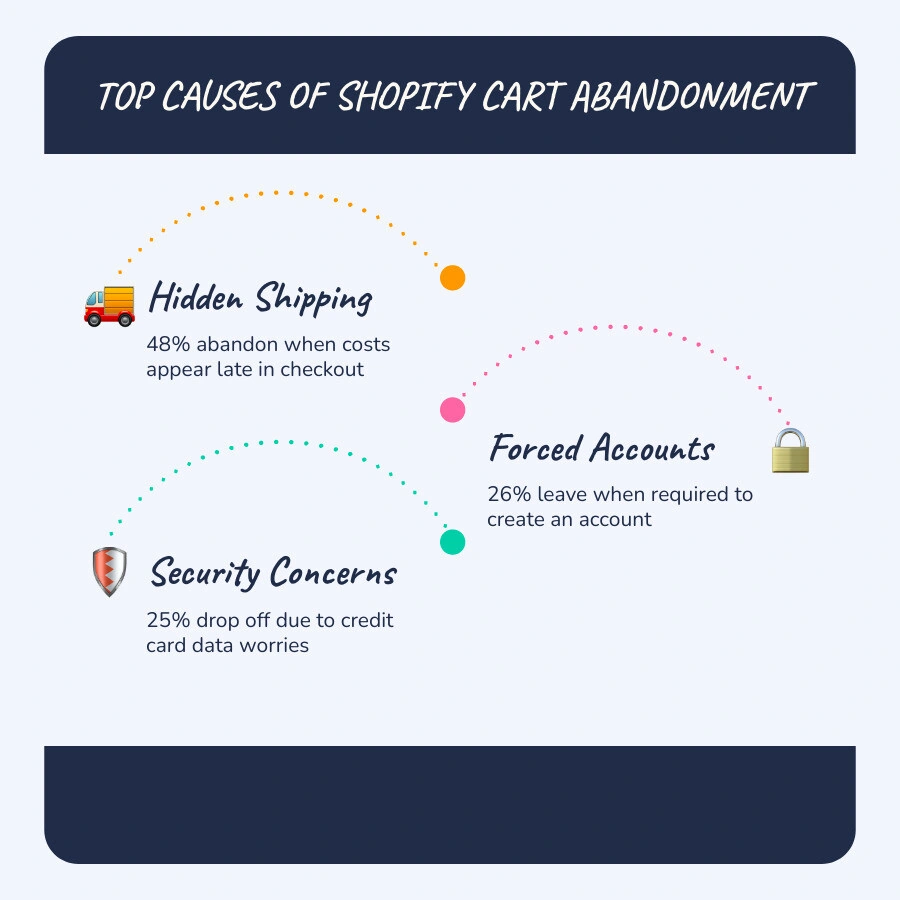
Most of the drop-off comes down to a short list of fixable causes. Unexpected extra costs — primarily shipping — drive 48% of abandonment. Forced account creation accounts for another 26%. Security concerns about credit card data push away 25% more. These are specific friction points with specific fixes.
The seven steps in this guide address those root causes directly, in order of impact.
How to reduce cart abandonment shopify terms explained:
Understanding Your Store's Cart Abandonment Rate
Before you can fix the leaks in your checkout, you must understand how to measure them. In ecommerce, there is a clear distinction between an abandoned cart and an abandoned checkout. An abandoned cart occurs when a visitor adds an item to their cart but leaves the store without starting the checkout process. An abandoned checkout occurs when the visitor takes the extra step to enter the checkout flow, inputs some personal or contact details, but exits before completing the transaction.
By default, the Shopify admin natively tracks abandoned checkouts rather than abandoned carts. To get a complete picture of your store's performance, you need to calculate your overall Cart Abandonment Rate. This metric measures the percentage of created carts that do not result in a completed purchase.
The formula to calculate your cart abandonment rate is:
Cart Abandonment Rate = ((Carts Created - Carts Completed) / Carts Created) x 100
While a 70% abandonment rate is the overall baseline, benchmarks vary significantly by industry and device:
- Apparel: 65% to 75%
- Beauty: 60% to 70%
- Home Goods: 75% to 85%
- High-Ticket B2B: 85%+
- Mobile Devices: 78% to 85%
- Desktop Devices: ~70%
Mobile shoppers abandon carts at a rate that is 5 to 10 percentage points higher than desktop users. This gap highlights why mobile responsiveness is a critical component of Shopify Conversion Rate Optimization. If your mobile checkout is slow, clunky, or requires excessive typing, your abandonment rate will climb.
To benchmark your performance, look at your Shopify analytics funnel. A conversion rate between 1.4% and 1.8% is average for Shopify stores, while top-performing brands exceed 3.2%. If your store's checkout conversion rate is below 50%, or if your cart abandonment rate is above 75%, you have a clear, fixable problem.
How to Reduce Cart Abandonment Shopify: The 7-Step Framework
Fixing cart abandonment requires a systematic approach that balances prevention (stopping abandonment before it happens) and recovery (winning back shoppers who have already left).
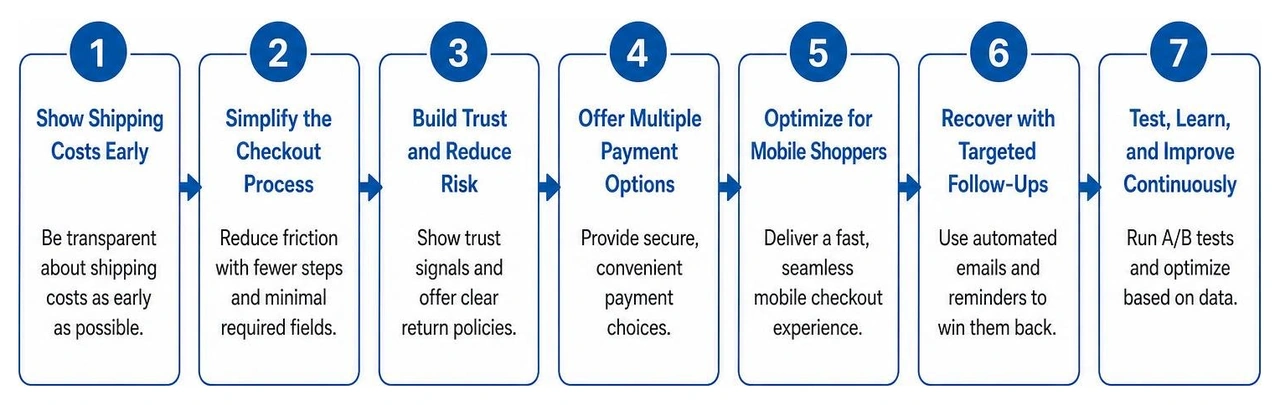
By structuring your Ecommerce Conversion Strategy, you can systematically plug the leaks in your Conversion Funnel Shopify. Here is the 7-step framework to do it.
Step 1: Show Shipping Costs Early
The single largest driver of cart abandonment is unexpected costs at checkout, accounting for 48% of all dropped checkouts. When a customer spends ten minutes choosing products, only to find a surprise shipping charge added at the final step, they feel misled.
To prevent this, you should surface shipping costs before the checkout page. You can accomplish this by:
- Using a sitewide free shipping bar above your main navigation that clearly displays your free shipping threshold (e.g., "Free shipping on orders over $50").
- Setting your free shipping threshold 20% to 30% above your Average Order Value (AOV). This encourages customers to add more items to their cart to qualify, which can drop abandonment rates by 15% to 25% while lifting your order values.
- Adding a clear shipping calculator or dynamic progress bar directly in your cart drawer. This shows customers exactly how much more they need to spend to qualify for free shipping before they ever click "Checkout."
For more details on improving these shipping displays, see this guide on How to Optimize Shopify Checkout to Reduce Cart Abandonment.
Step 2: Use Automatic Discounts
Manual promo codes introduce a large point of friction. When shoppers see a prominent "Discount Code" box at checkout, they often leave your store to search coupon sites. If they cannot find a working code, they rarely return to finish the purchase.
Automatic discounts solve this problem by applying savings directly to the cart once specific conditions are met. This relies on the psychological principle of loss aversion. When a customer sees an automatic $15 discount applied to their $75 cart, the checkout total updates immediately. The purchase now feels like a done deal, and leaving the cart feels like losing a real $15 benefit.
You can set up automatic discounts directly in your Shopify admin under Discounts > Create discount. Choose "Amount off products" or "Free shipping," and select "Automatic discount" as your method. Set clear cart value thresholds to incentivize larger purchases without eroding your margins.
Step 3: Enable One-Click Express Checkouts
Over 73% of Shopify traffic comes from mobile devices, where typing out credit card numbers and shipping addresses is highly frustrating. Accelerated checkout buttons bypass the entire standard checkout form, allowing returning customers to complete their purchase in under three seconds.
The most useful tool in this category is Shop Pay, which securely stores shipping and payment credentials for over 150 million users. Shopify data shows that Shop Pay converts up to 1.72 times better than standard checkouts, boosting mobile conversions by up to 91%.
To set this up:
- Navigate to your Shopify admin and go to Settings > Payments.
- Click Manage on your Shopify Payments setup.
- Under Wallets, check the boxes for Shop Pay, Apple Pay, and Google Pay.
- Ensure these express payment buttons are positioned at the very top of your checkout page or directly inside your cart drawer.
For a deeper look at accelerated checkout integrations, read about 7 Proven Ways to Slash Shopify Cart Abandonment in 2026.
Step 4: Simplify Checkout Forms and Enable Guest Checkout
Forcing customers to register for an account before purchasing causes 26% of checkout abandonments. Shoppers expect to check out in four minutes or less, and forced registration is a major barrier.
You can easily adjust this in your Shopify admin by going to Settings > Checkout and setting customer accounts to "Accounts are optional." This allows buyers to complete their transactions as guests, while still giving them the option to save their information on the post-purchase "Thank You" page.
Additionally, improve your form fields to the bare minimum. Every extra field reduces your conversions by roughly 7%. Go to Settings > Checkout > Form options and hide optional fields like "Company name" and "Address line 2." Enable address autocompletion to allow mobile users to populate their entire address with just a few keystrokes. These small tweaks are highly effective when you want to Increase Conversion on Shopify Store.
Step 5: Build Trust with Clear Guarantees and Security Badges
Approximately 25% of shoppers abandon checkouts because they do not trust the website with their credit card information. This is especially true for first-time visitors who are unfamiliar with your brand.
To ease these concerns, place clear trust signals near your checkout buttons and payment fields:
- Display accepted payment logos (Visa, Mastercard, PayPal, Shop Pay) clearly in your cart drawer and checkout footer.
- Add a concise return policy summary near the payment section (e.g., "Easy 30-Day Returns & Exchanges").
- Include a secure checkout badge or SSL certificate icon to reassure buyers that their data is encrypted.
- Display a single, high-impact customer quote or star-rating badge in the checkout sidebar to provide social proof at the exact moment of purchase.
Step 6: Deploy Exit-Intent Popups and Urgency Tactics
An exit-intent popup is your last line of defense. By tracking cursor movement, Shopify apps can detect when a desktop user is about to close the tab or navigate away from the cart page.
When triggered, an exit-intent popup should offer a clear, immediate incentive to stay. According to industry data, exit-intent popups convert at an average rate of 17.12%, recovering a significant portion of departing traffic.
To keep this tactic effective without hurting your brand value:
- Trigger popups only on the cart page, never on the homepage or during the first few seconds of a visit.
- Avoid generic discounts that train customers to abandon their carts on purpose. Instead, offer a specific benefit, like free shipping or a small free gift with purchase.
- Use a realistic countdown timer (e.g., "This offer expires in 15 minutes") to create a genuine sense of urgency.
To explore how these popups fit into broader merchant strategies, review the Shopify enterprise guide on How to Reduce Shopping Cart Abandonment (2025) - Shopify.
Step 7: Run a Three-Message Recovery Sequence
No matter how clean your checkout is, some customers will get distracted and leave. This is where automated recovery flows become essential. While Shopify's native system can send a single recovery email, a structured three-message sequence using email and SMS recovers 11% to 15% of abandoned checkouts, compared to just 3% for a single email. Here at First Pier, we build these multi-channel sequences to systematically capture revenue that would otherwise be lost.
To implement this, you should set up a dedicated flow using an email marketing platform. For detailed setup instructions, see the guides on Abandoned Cart Shopify, Klaviyo Flows, and How to Set Up Klaviyo Flows. Integrating your marketing tools properly is a critical step in aligning your Klaviyo and Shopify data for Shopify Email Marketing.
Your three-message sequence should follow this high-converting schedule:
- Message 1 (Sent at 30 to 60 minutes): Send a helpful, non-promotional reminder. Do not offer a discount yet. Frame the message around customer service (e.g., "Did something go wrong with your order?"). Include clear customer support contact details and high-quality product images of the items left behind.
- Message 2 (Sent at 24 hours): Send an email focused on social proof and reassurance. Highlight customer reviews, your return guarantee, or low-stock alerts to create natural urgency.
- Message 3 (Sent at 72 hours): This is your final effort. Offer a time-bound discount or free shipping incentive. Make it clear that the coupon expires in 24 hours to encourage immediate action.
For more advice on building these multi-channel sequences, you can check out the Tips and Tools for How to Reduce Shopify Abandoned Carts - Gorgias.
Comparing Automatic Discounts vs. Manual Discount Codes
When designing your checkout promotion strategy, choosing the right discount type is critical. While manual coupon codes are highly popular, they introduce significant conversion friction.
| Feature | Automatic Discounts | Manual Discount Codes |
|---|---|---|
| Friction Level | Extremely low (applies automatically) | High (requires copying and pasting) |
| Mobile Usability | Excellent (no typing required) | Poor (difficult to copy/paste on mobile screens) |
| Abandonment Risk | Low | High (customers leave checkout to search for codes) |
| Discount Abuse | Controlled by strict cart rules | High (codes get leaked to coupon aggregator sites) |
| Setup Complexity | Moderate (requires configuring Shopify rules) | Low (simple code generation) |
By prioritizing automatic discounts for major promotions (such as spend-and-save tiers or free shipping thresholds), you keep customers focused on completing their purchase instead of hunting for coupons. To understand how to structure these rules in your store, check out the How to Reduce Shopify Cart Abandonment (2026) | Shopify Playbook.
Behavioral Segmentation: Functional vs. Pleasure Buyers
To truly master cart recovery, you must recognize that not all cart abandoners are the same. Shoppers generally fall into two distinct behavioral categories:
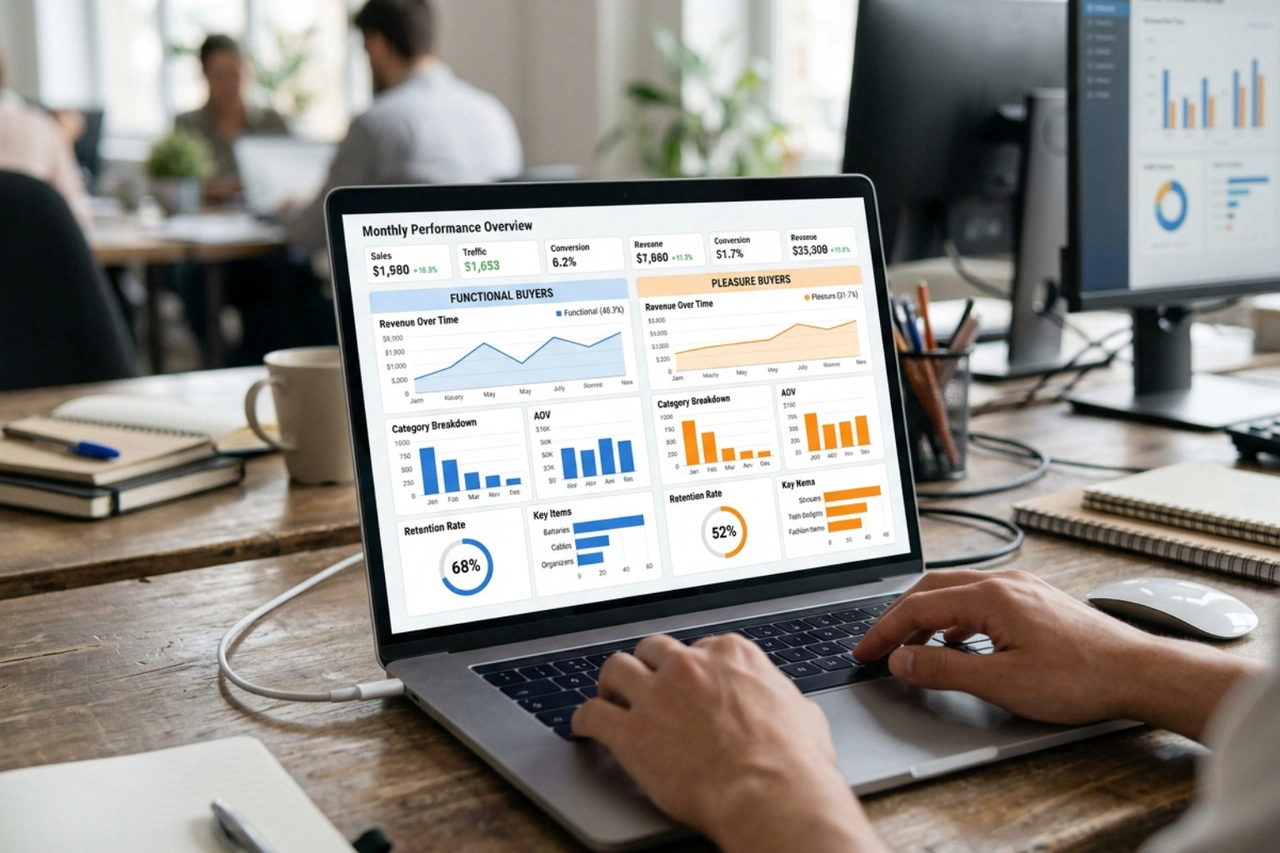
- Functional Buyers: These are need-driven shoppers. They know exactly what they want, evaluate the purchase logically, and are highly sensitive to friction. If they encounter slow load times, complex checkout forms, or unexpected fees, they will abandon the purchase.
- Pleasure Buyers: These are experience-driven shoppers. They browse your store, view multiple pages, and add items to their cart as a way of creating a digital wishlist (an action that essentially means "I like this," not "I am buying this now"). They do not abandon due to friction; they abandon because they lack the immediate motivation to buy.
Treating both segments with the same recovery strategy is highly inefficient. For functional buyers, focus entirely on removing friction (enabling Shop Pay, simplifying forms, and showing shipping costs upfront). For pleasure buyers, focus on creating genuine motivation. Instead of offering flat discounts that hurt your profit margins, use time-sensitive bundles, limited-time free gifts, or exclusive access to new arrivals to nudge them across the finish line.
For community discussions and real-world merchant examples of behavioral segmentation, read What's the most effective way to reduce cart abandonment on Shopify?.
Frequently Asked Questions about Shopify Cart Abandonment
How do I reduce cart abandonment on Shopify?
To reduce cart abandonment on Shopify, remove the highest-friction points before checkout: show shipping costs early, offer guest checkout, enable Shop Pay and other express wallets, and send recovery messages within 30 to 60 minutes. The biggest causes to address first are unexpected costs at 48%, forced account creation at 26%, and payment-security concerns at 25%.
Why do customers abandon carts on Shopify?
Customers abandon carts on Shopify when the purchase becomes more expensive, slower, or riskier than expected. Common triggers include a surprise shipping charge at checkout, a required account before purchase, too many form fields on mobile, or missing return and security information near the payment step.
How long after abandonment should I send the first recovery email?
You should send your first recovery email within 30 to 60 minutes of abandonment. This window is highly effective because your brand and the products are still fresh in the customer's mind. Keep this first message polite and helpful, focusing on customer support rather than offering a discount immediately.
Does Shop Pay really reduce cart abandonment?
Yes. Shop Pay significantly reduces checkout friction by storing billing and shipping information for over 150 million users. Returning customers can complete their purchase in a single tap, which improves checkout speed and can boost mobile checkout-to-order conversion rates by up to 91%.
Bottom Line
Reducing cart abandonment is not about finding a single trick; it is about removing specific friction points throughout your customer's shopping journey. Start with the causes tied to the largest abandonment numbers: unexpected costs at 48%, forced account creation at 26%, and payment-security concerns at 25%. Then monitor your Shopify analytics for at least two to four weeks after each change so you can compare checkout conversion rate, cart conversion rate, and recovered revenue.
If you would like help with Shopify conversion rate optimization, get in touch.





.png)
.png)

